

Table of Contents
Project Moca to Outlook Board to Fast Deprecation
MC554157 (May 12) announces the retirement of the board view in the Outlook calendar. Well, the OWA calendar because the board view never existed in the Outlook desktop calendar, unless you count the Monarch client as an Outlook desktop client.
The origins of the board view come from Project Moca. In 2020, Moca seemed like a nice way for people to organize different pieces of information drawn from different sources on a board, kind of like pinning bits of paper to a pinboard. After going through a preview phase while Microsoft figured out where Moca might fit inside Microsoft 365, eventually Moca turned up as a new board view for the OWA calendar in mid-2021.
Low Usage for Boards
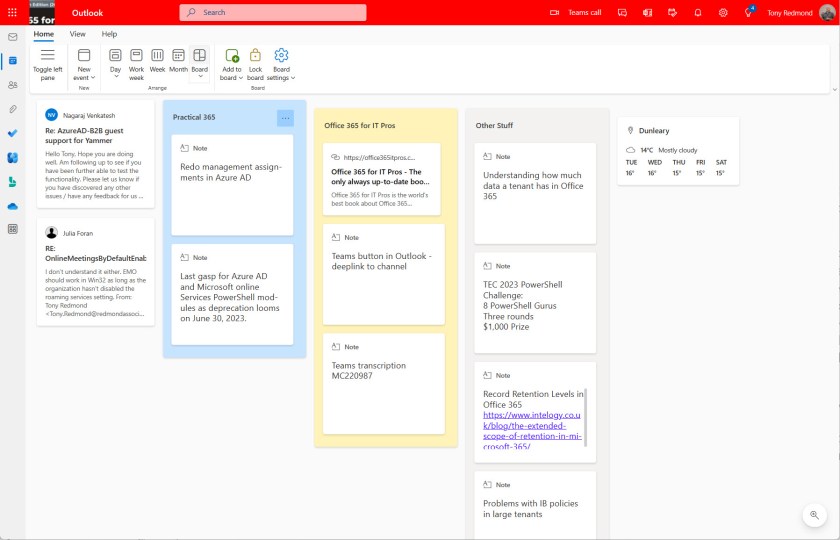
Getting on for two years later, Microsoft’s famous telemetry must show that the usage of boards remains staggeringly low. At least, that’s what I anticipate the data indicates because I have never been asked a single question about this aspect of OWA, and that’s despite writing several articles on the topic. I have several boards (Figure 1), but I haven’t used them in months. The fact is that the board view seems to have been in a sad state of disrepair for quite a while. No new features appeared and no-one in Microsoft seemed interested in curing the obvious quirks that sometimes emerged when moving items around a board. Software that stays static is always in trouble unless it’s a COBOL program running tax software from the 1970s.

Many Ways to Take Notes
Another truth is that there are just too many ways to take notes available in Microsoft 365. Some like the simplicity and mobile access of To Do; others like OneNote. And now Microsoft is preaching the wonders of the Loop app. Over the long term, I could see a consolidation in the OneNote/Loop space with the newer application winning because of its better synchronization capabilities and its roots in SharePoint Online. But we shall see.
The End of Boards
In any case, the guillotine descends on boards on June 26, 2023, or roughly six weeks from the announcement and just before the end of Microsoft’s FY23 fiscal year. By Microsoft standards, retiring an Outlook feature in six weeks is very fast and is further testimony to its low usage. Boards are no public folders, something that Microsoft has been trying to dump since 1987 or thereabouts.
Microsoft’s advice to users is confusing. On the one hand, they say that there’s nothing that users need to do. Boards will simply disappear on the designated date. The items linked to boards remain in place and can be accessed from their original location. For instance, when you create a note on a board, Outlook stores the underlying item in the Notes folder of your mailbox. Outlook Notes is another application that hasn’t received much tender loving care from Microsoft in the recent past, but at least the data is there and can be copied and pasted into a more up-to-date and functional digital notebook.

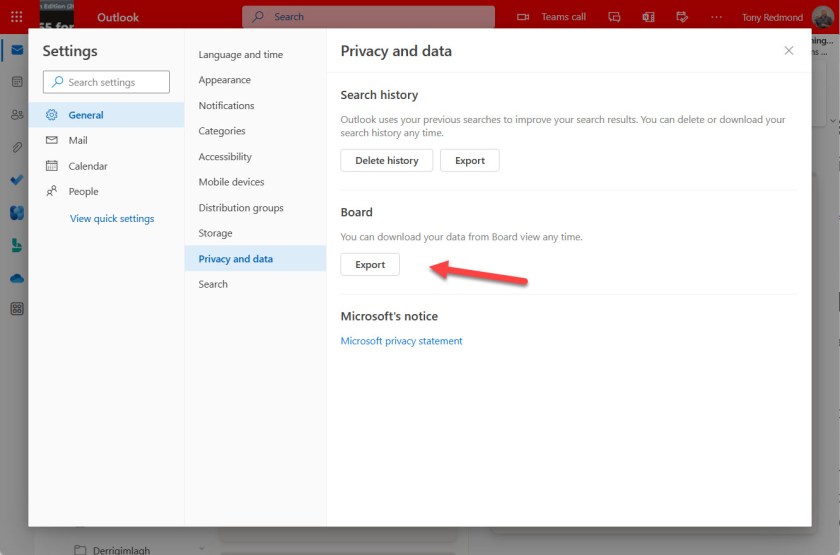
On the other, Microsoft recommends going to the Privacy and Data section of Outlook (OWA) options to export board data (Figure 3). I shouldn’t bother. In a decision surely taken by a developer without supervision, OWA outputs the board information in JSON format to a file called boards.json. I wonder what target the developer had in mind when they contemplated how to export the board data?
Make sure that you’re not surprised about changes that appear inside Office 365 applications by subscribing to the Office 365 for IT Pros eBook. Our monthly updates make sure that our subscribers stay informed.