


Table of Contents
Communicate by Email with Teams Channels
Teams supports the ability of users to send email to a channel by publishing special Teams channel email addresses. (The option to generate email addresses is controlled by the Email integration org-wide setting). The addresses used by Teams channels point to hidden mailboxes in a part of Microsoft 365 managed by Microsoft and invisible to the rest of the world, which accounts for the odd email addresses in the teams.ms domain. To retrieve an email address for a channel, use the Get email address option in the […] menu (Figure 1).

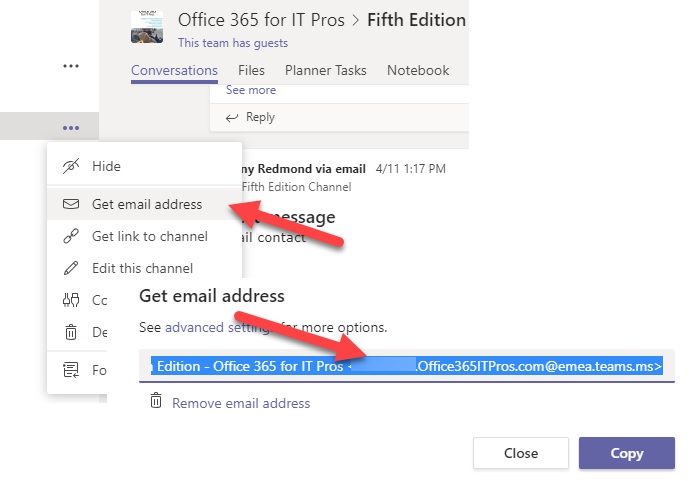
You can then paste the email address into a message to send it to the channel. Teams uses a connector to pick up the new message and bring it into the channel, and all is well. A fuller explanation of how Microsoft 365 and Teams process inbound messages and deliver them to the target channel is available here.
However, because the email addresses are a little weird, it’s unlikely that people will remember them. If you think that people will want to email a specific channel regularly, you might like to create an Exchange mail contact to make it easier for them.
Creating a Mail Contact for a Teams Channel
Mail contacts show up in the Exchange Global Address List (GAL), so once an contact exists, it’s easy for users to add them as a message recipient.
- Go to the Exchange Admin Center (EAC) and select Contacts under Recipients.
- Click Add [+] Mail Contact.
- Fill in the details for the new contact. Copy the email address for the channel into the external email address field. It’s a good idea to give the contact a display name that clearly indicates its purpose. In Figure 2, I’ve added a “(Teams)” suffix.


After saving the contact, the object is available in the GAL and can be used to address messages. Outlook clients will take a day or so to pick up the new mail contact in their copy of the Offline Address Book (OAB). However, before the contact appears in the OAB, Outlook users can always consult the GAL to find the new address (Figure 3).


Users Can Delete Teams Channel Email Addresses
The only problem is that users can remove the address for a Teams channel, which invalidates the mail contact. Teams is happy to generate a new email address for the channel if requested (it won’t reuse an address), so you’ll have to update the mail contact with the new address if this happens.
Using Teams Channel Email Addresses Elsewhere
Much the same technique works if you want to add a Teams channel email address as a member of a distribution list. It is, after all, a valid email address, and in most respects, can be used in the same way as any other email address.
For more information about Mail Contacts, read the Exchange Online chapter of the Office 365 for IT Pros eBook. Teams is covered in two chapters – one for the basics and architecture, and the other covers managing a Teams deployment. Together, the two chapters span over 150 pages of invaluable material…