After July 1, 2025, any sharing links generated with one-time passcodes (OTP) will stop working. Only links based on Entra ID B2B Collaboration will work. Users who lose access to content shared from SharePoint Online or OneDrive for Business will have to contact the original sharer to ask them to generate a new sharing link. Sounds like a recipe for confusion, which is what might happen.
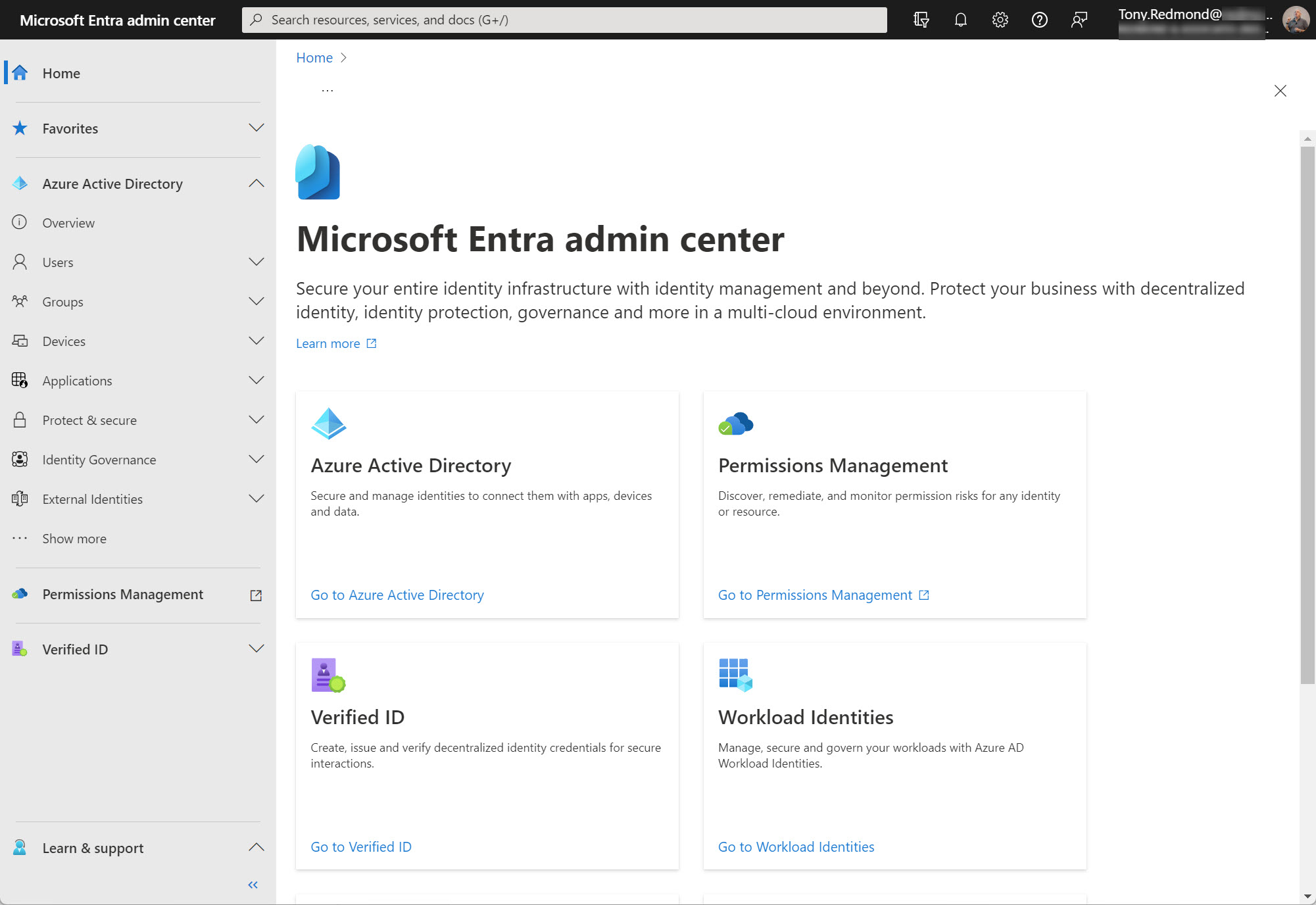
The prospect of agents running amok in Microsoft 365 tenants lessened a tad with the introduction of Entra Agent ID. Tenants will be able to manage agents through the Entra admin center. Custom agents created with Copilot Studio or Azure AI Foundry now have Entra identifiers and show up in the admin center. So far, not much else happens but the promise of more functionality is there.
The ConditionalAccessPolicy setting in an OWA mailbox policy can be configured to work with Entra ID conditional access so that OWA blocks access to attachments on unmanaged devices. Microsoft originally introduced the feature in 2018 and as it turns out, the combination of OWA mailbox policy and CA policy also blocks attachment access for the new Outlook for Windows client.
Microsoft will disable service principal-less authentication in March 2026. This step closes a hole that doesn’t exist today but might in the future. The strange thing is that many Microsoft 365 applications seem to use service principal-less authentication. Microsoft will take care of first-party apps before March 2026, but there’s work to do for apps from other vendors.
The Conditional Access Optimization Agent is one of 6 Security Copilot agents unveiled by Microsoft on March 24, 2025. The idea is that the agent can optimize CA policies by observing the connectivity behavior within a tenant. The agent can suggest how to fill gaps in CA coverage, detect new users and apps, and generally be helpful. Is it worth it? Experience will tell…
The February 2025 EX1015484 incident explains why mail user objects with duplicate SMTP addresses are created for guest accounts. That’s a problem because Exchange Online can’t route messages to objects with duplicate email addresses. Fortunately, you can find out if any duplicates exist in your tenant with some PowerShell. Problems happen!
A new preview option in the Entra admin center supports the ability to update multiple Entra ID accounts. You can update properties, add managers and sponsors, update group membership, revoke account access, and so on. The only surprising thing about the new option is that it’s taken Microsoft so long to add it to the admin center.
A reader asked how they could create dynamic administrative units for every department in their directory. A PowerShell script does the job, even if some constraints in how Entra ID processes membership rules means that the rules can’t be quite as precise as I would like them to be.
Entra ID includes a registration campaign feature to help organizations move users to stronger authentication methods like the Authenticator app. Running campaigns is a good thing, unless you decide to do it when the administrators are away from the office (like me) or users are unprepared. But it is time to get rid of SMS and voice responses to MFA challenges, so maybe you should schedule a campaign soon?
The EntraExporter toolis a PowerShell module that generates details of objects in an Entra ID tenant configuration (like groups, policies, and users) and creates JSON files. It’s a great way to capture point-in-time information about Entra ID (Azure AD) configuration. Although you can’t replay the captured data to recreate objects, having all the information available is a great start if you need to restore or replay anything.
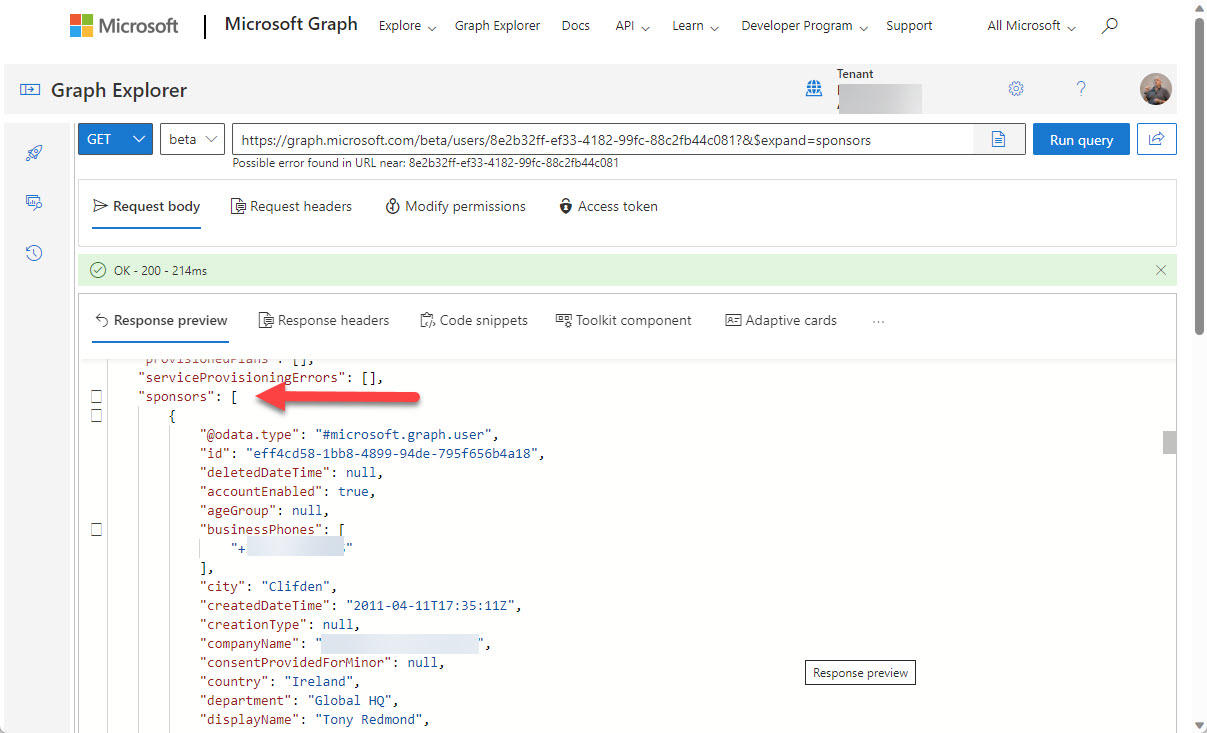
You can now define Entra ID guest account sponsors using the Entra ID admin center or PowerShell. A sponsor is an account or group that knows why a guest account exists. During operations like account reviews of the membership of a Microsoft 365 group, sponsors can help group owners decide if guest accounts should continue as members or should be removed. I’m sure others will come up with ideas for using guest account sponsors, but that’s what we have for now.
Entra ID risky users are accounts that Entra ID Identity Protection detects as exhibiting signs of suspicious activity that might mean the accounts are compromised. In this article, we consider the value of Entra ID risky accounts and how they can be used in conditional access policies. And a look at the Microsoft Graph PowerShell SDK cmdlets that are available to risky users too!
A new preview capability supports filtering against the Azure AD employee hire date property (Entra ID). Two different filter types are available to support the PowerShell ge and le operators. One filter checks against a set date, the other uses a calculated date. Both work well, and hopefully this development means that the Entra ID developers will enable the same capability for the Get-MgUser cmdlet.
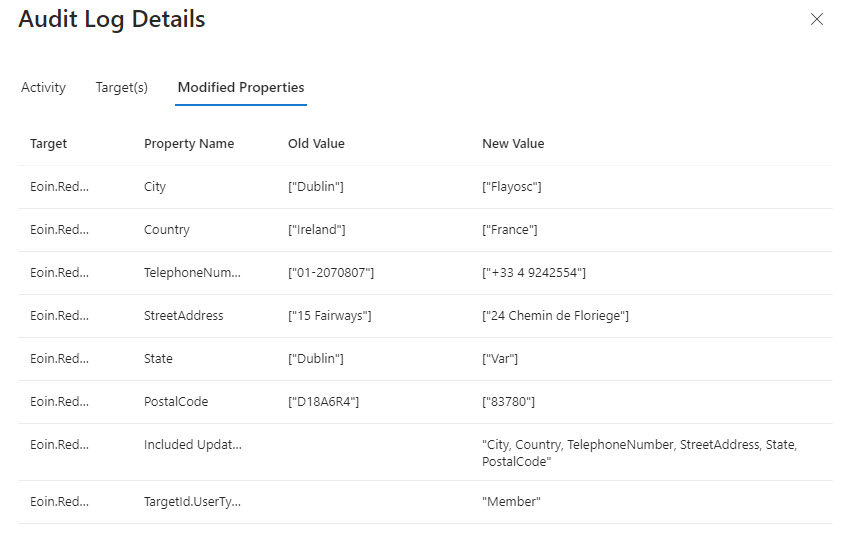
A Twitter discussion about how to audit user account changes revealed that Entra ID does not capture details of changes to the usage location for an account. The possibility existed that the data might be present in the information ingested from Entra ID into the unified audit log, but that turned out not to be the case. Even if some properties are missing, a PowerShell script demonstrates the principle of how to report user account changes (old and new properties). But it would be nice if Entra ID captured details about changes to the UsageLocation property.
A reader asked why some deleted Microsoft 365 user accounts appear to have assigned licenses. That seemed strange because licenses are freed up for reuse when accounts are deleted, so we took a look behind the scenes to find out why some deleted user accounts keep license information in their properties and some do not.
Microsoft has added a machine learning feature to Entra ID Access Reviews. The new feature checks affiliation between users and the group being reviewed. It’s an interesting idea, but only if the manager-employee relationships in your directory are accurate because that’s what Entra ID Access Reviews use to check affiliation. Microsoft Entra ID Governance licenses are needed for the new features… Another $7/user/month!
Restricted administrative units (preview) are a new mechanism to support scoped management of Entra ID user accounts, devices, and security groups. You’ll need Premium P1 licenses for the accounts assigned management roles for these AUs, but that seems like a small price to pay for the functionality.
Microsoft announced that they are rebranding Azure AD to become Microsoft Entra ID. This is just a name change and no functionality or licenses are affected. It’s simply yet another Microsoft rebranding exercise like Microsoft 365, Purview, and Defender. The name change will start in the latter half of 2023 and be completed by 2024.
PIM, or Privileged Identity Management, is a solution for managing the assignment of privileged Entra ID roles to users and groups. PIM role assignments can be active or eligible. If you report “normal” role assignments, you only see the currently active set. Some more processing is needed to fetch the PIM assignments. Here’s our version of a script to do the job for holders of the Exchange administrator and Global administrator roles.
Up to now, the Microsoft Graph PowerShell SDK has not included a cmdlet capable of reporting the renewal dates for Microsoft 365 subscriptions. A new beta Graph subscriptions endpoint is a method to retrieve the renewal information. Even if you can’t use an off-the-shelf cmdlet, you can still get the data.
Being able to set user-preferred authentication methods for Entra ID multi-factor authentication hasn’t been possible up to now. New Graph APIs make it possible to get and set authentication methods for Entra ID accounts. It’s just another small step along the line to migrate away from the MSOL and Azure AD modules.
Sometimes, long running PowerShell scripts encounter the problem of Azure AD access token lifetime expiration. In other words, the default lifetime of tokens issued by Azure AD is too short to allow the script to complete before the token expires. Two solutions exist. Use a token lifetime policy to prolong access token lifetimes or check in code for potential expiration and renew when necessary.
I now have a Microsoft Graph Early Adopter badge. I didn’t ask for it. The badge just arrived via email. Which brings me to how to deliver product feedback. Sure, you can make comments via GitHub, but that ignores a perfectly good feedback portal developed to allow people to give direct feedback (including requests for new features) to Microsoft. You won’t get a badge for providing feedback via the portal, but it’s the right thing to do.
Protected actions are a new preview feature for Azure AD conditional access policies. You can associate protected actions with an authentication context and specify that anyone who wants to use these actions should meet the conditions set in a conditional access policy. Although only a limited set of actions are available in the preview, you can see the value of what Microsoft is doing and how it might apply to actions across the Entra and Azure portals.
Teams Shared Channels are a great way to collaborate across multiple Microsoft 365 tenants. From an administrative side, it’s nice to know about who’s connecting – who’s coming into your tenant to use a Teams shared channel and who’s leaving your tenant to share ideas in a Teams shared channel belonging to another tenant. This article explains how to retrieve that information from Azure AD shared user profiles.
Token protection is a new session control (preview) for Entra ID conditional access policies. The idea is to bind a sign-in token to a user’s device to stop attackers attempting to reuse the token to compromise the user’s account. Only a limited set of Microsoft 365 apps support token protection at present, but it’s an idea that should help if token theft becomes as pervasive as some predict.
The Microsoft Graph PowerShell SDK includes two cmdlets to revoke access for Entra ID accounts. As it turns out, Microsoft would prefer if developers use the Revoke-MgUserSignInSession cmdlet instead of Invoke-MgInvalidateUserRefreshToken, but who would have known if we hadn’t asked the question?
Two years ago, I wrote about how to generate a report about managers and the direct report from the information stored in Entra ID. As it turns out, the Get-User and Get-Recipient cmdlets have a little flaw that can make the data they return inaccurate. To make sure that the data is correct, a new version of the script uses cmdlets from the Microsoft Graph PowerShell SDK to report Entra ID managers and reports. We also format the output in a nicer way, so it’s all good.
In an unannounced move, Microsoft imposed a new limit on Graph requests using the List Users API that include the SignInActivity property. The old limit allowed a request to fetch 999 items; the new reduces it to 120 items. I’m sure that the change is made with the best possible motive, but introducing something like this without warning broke a lot of programs and scripts, and that’s just unacceptable.
The AzureAD PowerShell retirement date is approaching quickly. After March 30, 2023, Microsoft says that the module will work for six months. Then? Who knows!. Cmdlets that set licenses for Azure AD accounts are now retired and will stop working on or before March 30, 2024. If you haven’t already upgraded scripts, it’s time to do so.
The changes in Microsoft 365 keep on coming thick and fast. Changes range from the introduction of fundamental new technology like Microsoft 365 Copilot to an update to a small product detail. In this case, the Azure AD admin center is moving to the Microsoft Entra admin center. Microsoft has its own reasons for making this change, which will ripple out across the community to affect content developers and trainers. Is that a problem? Only if you don’t respond.
Microsoft has integrated Authenticator Lite, a subset of the full Microsoft Authenticator app, into Outlook for iOS and Android. The code allows users to respond to MFA challenges using number matching or one-time codes without leaving Outlook and is intended to help organizations deploy and manage MFA with less friction. Although you can’t use Authenticator Lite if the Authenticator app is present on the same device, integrating MFA capabilities direct into apps sounds like a great idea.
SharePoint Online is embracing Azure AD more closely by forcing new tenants to use the integration between the two Microsoft 365 components. In addition, site sharing will use the Azure AD invitation mechanism instead of SharePoint’s own code. The changes make a lot of sense and shouldn’t cause much disruption for tenants. It’s a good reminder to check the relevant policies that control external access via Azure B2B Collaboration.
The first app in a new community project called IdPowerToys helps Microsoft 365 tenants to document conditional access policy settings in PowerPoint. The information used to document the CA policies is extracted (manually or automatically) from Azure AD, analyzed, and output as a PowerPoint presentation. It’s a nice way to see what CA policies exist in a Microsoft 365 tenant and helpful if you want to rationalize the set of policies in use.
The Azure AD sign-in frequency controls how often accounts must reauthenticate. Setting an unreasonably short value makes it more difficult for people to work because Azure AD constantly nags for credentials, including MFA challenges. I experienced the effect of such a policy last week and it wasn’t nice. Security policies need to be practical and pragmatic as well as effective.
The new Entra ID app property lock feature (in preview) prevents attackers updating the credentials for an Entra ID enterprise app so that they can get an access token and exploit the app’s permissions. This technique has been used in several attacks, notably the infamous SolarWinds exploit in 2021. The app property lock is not mandatory and it’s important to keep on checking the audit log to make sure that attackers don’t creep into your tenant.
Mail contacts have long been used by Exchange organizations to provide an identity for external people. Contacts show up in the GAL to make it easy for users to send messages to external people and they can be included in distribution lists. The downside is that mail contacts are only available to Exchange Online. Perhaps the time is right to consider switching focus to Entra ID guest accounts? We explore the option here.
Microsoft makes a 30-day Teams Premium trial license available to allow customers to test the premium features. Once the trial finishes, it’s a good idea to clean up and remove the Teams Premium trial licenses from the Azure AD accounts that participated in the trial, especially as the trial license has the same display name as the paid-for Teams Premium license. You can accomplish the task through the Microsoft 365 admin center, but we explain how to do the job with PowerShell too. The same technique works to remove any specific license from a set of user accounts.
It’s easy to invite people to become guest users in a Microsoft 365 tenant, but some of the invitees never accept the invitation. Perhaps they don’t need to redeem the invitation to do work or maybe it’s because they don’t want to. In either case, Entra ID guest accounts with unredeemed invitations can accumulate and become stale. In this post, we discuss how to use PowerShell to find and remove those stale accounts in a safe manner.
Microsoft plans to support IPv6 connectivity for Azure AD starting on March 31, 2023. The change creates specific requirements for conditional access policies that use named locations to allow or block connections. Administrators will have to add new IPv6 address ranges to named locations to allow users to continue to connect. Apart from that, it’s a matter of making sure that any reporting, analysis, or SIEM applications can deal with the new IPv6 data.