Microsoft is working on cloud signatures for Outlook, but how can you update signatures for the current versions of Outlook click to run. Here’s our best attempt with PowerShell. The code works, but it could do with some error handing and various improvements before it could go anywhere near production. Think of it as a working example of why cloud signatures will be so much better,.
Have you ever been in a to-and-fro email conversation that never gets anywhere fast? It might be better to transfer to Teams, and that’s what the Outlook Reply with IM feature does. Instead of battling through multiple replies, you discuss matters in a Teams chat and hopefully end up with a good resolution. At least, that’s the plan.
Writing code to illustrate a point sometimes falls into the trap that things don’t work so well when you scale things up. Take Graph calls for instance. Code that works well with 100 teams isn’t so good with 4,000. The solution is to keep on telling the Graph to fetch data until it’s all in the safe hands of PowerShell, and then process it.
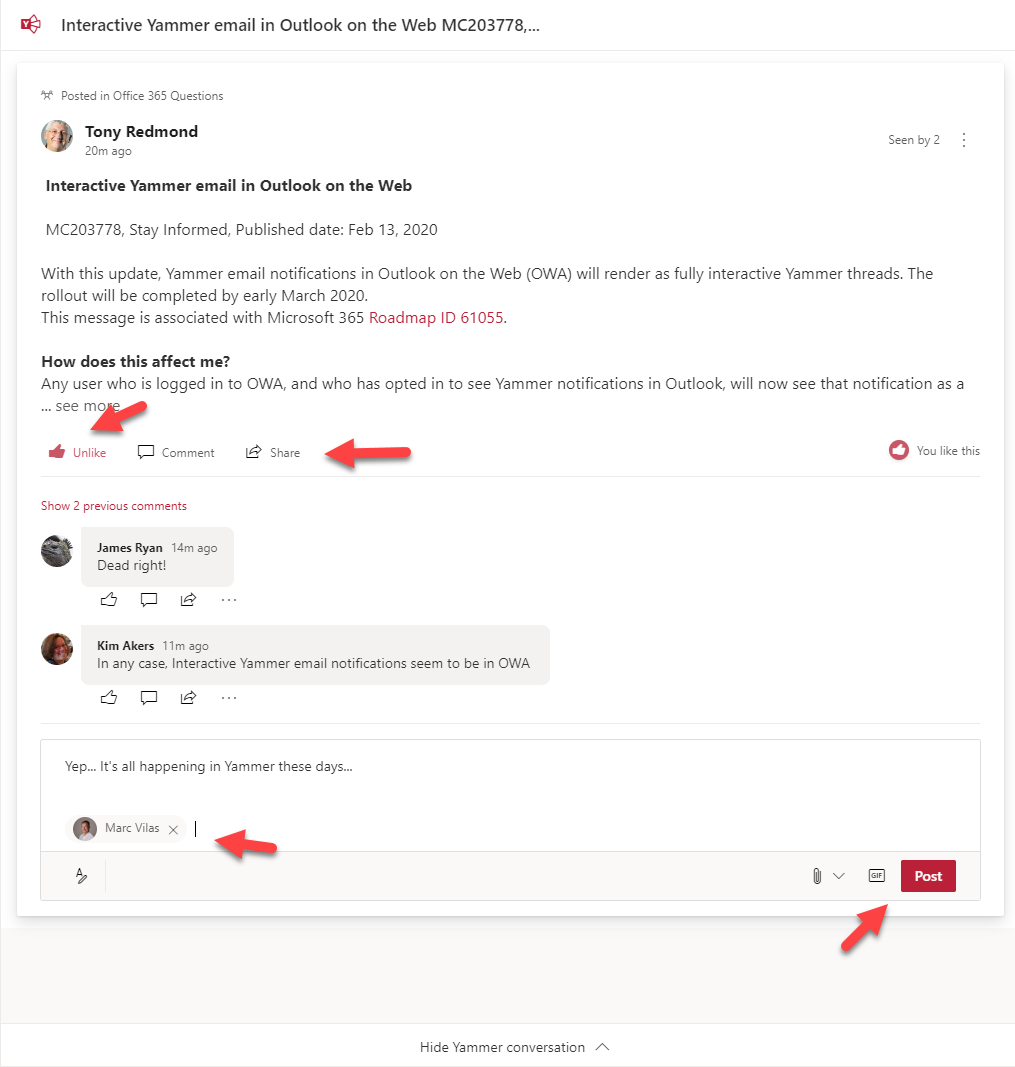
If you receive a notification about Yammer conversations in OWA, you might notice that you can now do all sorts of new things to interact with Yammer while remaining in OWA. It’s part of Microsoft’s effort to make Yammer more relevant and accessible to people who prefer to communicate through email. And the nice thing is that the approach works well.
Microsoft Teams has supported the ability to post to up to 50 channels for a while. Now you can edit or remove channels or update the text of posts. Or even remove a multi-channel post completely. It can be a little confusing when a post is removed from a channel as any replies are left behind, but that’s just a matter of user training and education, isn’t it?
Exchange Online reads inbound email to know when messages contain events that should end up in user calendars. OWA is the only client that exposes the settings to control what events are processed, but all clients can display the events Exchange creates. Some new cmdlets are available to support controlling the settings centrally.
Exchange transport rules are a powerful way to apply different conditions to messages as they pass through the transport service. In this case, we add a disclaimer to calendar meeting requests with a pretty simple rule that works on the basis that it detects a special x-header in meeting requests and applies the disclaimer when the x-header exists.
After a long delay, Microsoft has started to deploy the new Teams Files channel tab experience to Office 365 tenants. The new experience is more functional than the old, even if it doesn’t offer the complete set of features available in the SharePoint Online browser interface. You should see the new tab interface very soon if it’s not already in your tenant.
A question asked what the best way is to add a mailbox to multiple distribution lists. The admin UIs do the job for a few lists, but PowerShell is the way to go when you have lots of lists to process. Two approaches are discussed here: one uses an array as the input, the other uses a CSV file.
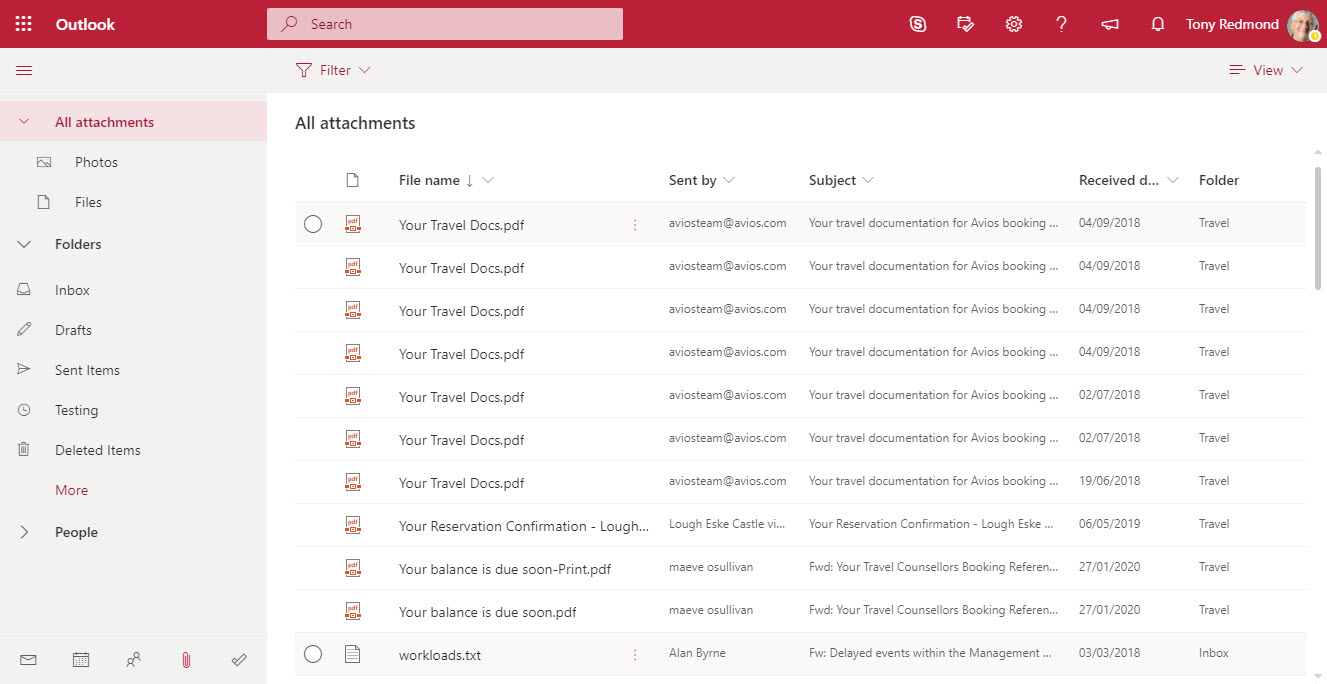
OWA now includes Files in its “module switcher”). The new module allows fast access to attachments stored in any folder in an Exchange Online mailbox. It’s a neat feature that will please many people simply because it makes finding often-elusive attachments just that bit easier.
The email addresses for Teams channels are interesting objects. Messages sent to channels start conversations in the target channel and are also captured in SharePoint. Any team member can enable or disable the ability of a channel to receive email by creating or removing email addresses and no admin control exists to stop this happening. Events captured in the Office 365 audit log reveal when email addresses are created or removed, meaning that you can at least know what’s going on.
The Office 365 compliance framework can now to place holds on Teams compliance records created for conversations in private channels. You simply have to place holds on the mailboxes of members of the private channels and hope that no one removes the members from the tenant. If they do, the hold lapses, which seems like a pity.
Teams App Security policies now include an Allow user pinning setting, which controls the ability ot users to pin apps to the left-hand navigation rail. The setting is enabled by default and probably can stay that way in most circumstances. Guest users don’t get to pin anything because their accounts are not policy-controlled.
Subscribers to the Office 365 for IT Pros eBook can download the February update now. This release updates 18 of the 24 content chapters, so it’s a pretty big update overall. No other eBook (or printed book) attempts to update as often as we do, which means that our content is the most up-to-date available to read about Office 365 and associated technologies. That’s a nice position to be in.
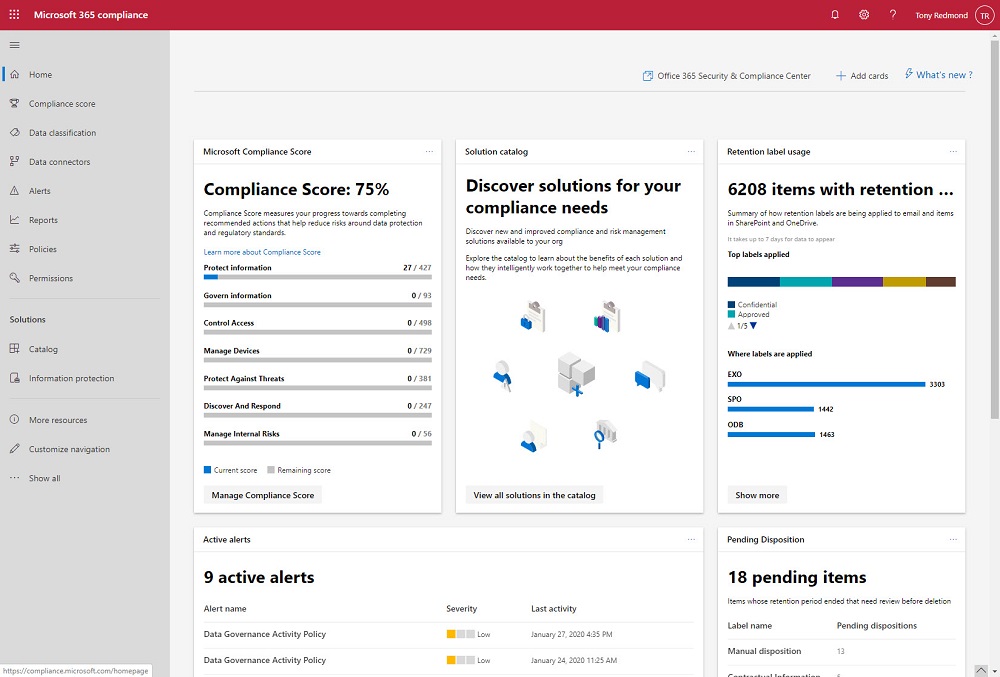
The Microsoft 365 Compliance and Security centers are roling out to Office 365 tenants where they’ll replace the old Security and Compliance Center over time. The new centers look fresher than the SCC, but looks can deceive and it’s much more important that the functionality exposed in the new portals work reliably all the time.
Microsoft reported another good quarter in their FY20 Q2 results. Among the highlights was more growth for Office 365 in revenues and users. Microsoft’s cloud juggernaut keeps on moving and there’s no sign when things might slow.
Office 365 Groups (and their underlying teams and sites) can be removed by user action or automatically through the Groups expiration policy. By examining records in the Office 365 audit log, we can track exactly when groups are soft-deleted followed by permanent removal 30 days later. All done with a few lines of PowerShell and some parsing of the audit data held in the records.
A question asked how to be notified when people delete Teams. The answer lies in the Office 365 audit log, and once we’ve found out when Teams are deleted are who deleted them, we can notifications to administrators via email or by posting to a Teams channel. The administrators can then decide if they should restore the deleted team or let it expire and be permanently deleted after 30 days.
Not many Office 365 users choose OWA as their mobile client, but those who do will soon be forced to use the new OWA because Microsoft is removing the toggle to allow people to switch between the old and new versions in February, just like they did for workstation versions last July. The new OWA is a fine client, but its usefulness on mobile browsers is not as good as the functionality offered in Mobile Outlook, which continues to be our choice as the best mobile Office 365 email client.
Chrome 80 appears on February 4 complete with “SameSite” updates to close off the potential for cross-site request forgery attacks. Office 365 has many web interfaces, so Microsoft has had to do some work to prepare for Chrome 80. Microsoft says that Office 365 is prepared but customers will have to apply patches for on-premises products, once the patches are available. Or stop using Chrome. Which mightn’t be a bad thing.
A recent Teams Live Event hosted by Microsoft’s Information Protection team discussed the automatic assignment of sensitivity labels to SharePoint Online and OneDrive for Business content. A preview is now available and Microsoft hopes to make this functionality available at the end of March 2020. You’ll need Office 365 E5 or Microsoft 365 E5 licenses.
Every year brings the opportunity to attend or present at Office 365 conferences. A pretty good lineup has developed for 2020 and I’m looking forward to making the rounds to learn more about Office 365 in places like New Orleans to Las Vegas to Oslo and Amsterdam.
Office 365 users might receive a phishing attempt to say that they’ve just been paid by a UK healthcare group. The message shows some obvious signs to tell the recipient that it only contains trouble, but these signs are easier for humans to pick up than they are for machine learning. The combination of good message hygiene and user education should be enough to deflect phishing attacks.
The Groups admin role was added to Office 365 in November 2019 to allow tenants to assign responsibility for day-to-day group management to specific users through interfaces like the Microsoft 365 Admin Center. The role is still relatively unknown and probably not used in many tenants. In this post, we discuss how to use PowerShell to assign the role to those allowed to create new groups.
In mid-February, Microsoft will roll out a change to allow Office 365 tenants in regions where the Teams and Stream services are not co-located to record Teams meetings for the first time. This might be good news for you, but it might also pose a data sovereignty issue because once you start using Stream in another region, that’s where the recordings will stay.
Now that SharePoint Online supports Office 365 Sensitivity Labels, it’s time to consider how to protect files stored in document libraries. When you compare the two approaches, there’s really only one winner. And there’s no surprise in saying that the winner is Office 365 Sensitivity Labels.
Exchange Online now supports a custom recipient limit for mailboxes of between 1 and 1000. The limit controls the maximum number of recipients a mailbox can add to a message. Think of the fun you could have by setting the recipient limit on manager mailboxes to something small, like 6….
Microsoft has given the Teams desktop and browser clients an “enhanced scheduling experience.” In other words, the form used to create meetings is better than before. It’s true that the new form looks a lot like Outlook and makes it easier to set up meetings, but don’t think of Teams as the equal of Outlook in calendar management, because it isn’t.
The SharePoint Conference 2020 takes place in Las Vegas on 19-21 May 2020. SharePoint is very important to Office 365 and it’s important that tenant administrators understand SharePoint. Tony is going to Vegas to learn and to deliver sessions about Teams and Office 365 Sensitivity Labels. And avoid gambling, vice, and other bad things.
After a couple of years, it’s time to update the Office 365 Groups and Teams Activity Report script. Written in PowerShell, the script analyzes the groups in an Office 365 tenant to figure out if each group or team is in active use. Because it’s a PowerShell script, you can amend the code to your heart’s content.
Teams users can now see read receipts for messages in private and group chats. The read receipt is a visual indication that someone has read a message rather than a positive signal back to the user, but it works well. Controls over read receipts are available at a user and tenant level (through messaging policies).
Microsoft retracted the announcement of the deprecation of the classic Azure Information Protection client and label management in the Azure portal. Office 365 sensitivity labels have taken over from AIP clients in most tenants, so the impact of this change is limited. However, if you still need to use an AIP client, you should move to the unified version.
In November, Microsoft set a 1TB limit for Exchange Online auto-expanding archive mailboxes. Now they’ve retreated and the latest service description says nothing about a limit. The two changes in the service featured little or no customer communications and a total lack of any supporting material, like administrative controls to help manage archive mailboxes approaching the limit. While a limit has gone for now, it will be back.
Finding it hard to keep up to date with Office 365? This post describes how to use PowerShell to post recent Microsoft 365 roadmap updates to a Teams channel.The message cards hold details of what an update contains, its status, the posting date, and the technology categories the item covers. Apart from posting to Teams, the script also creates a CSV file holding details of all the roadmap items that you can use for reporting and analysis.
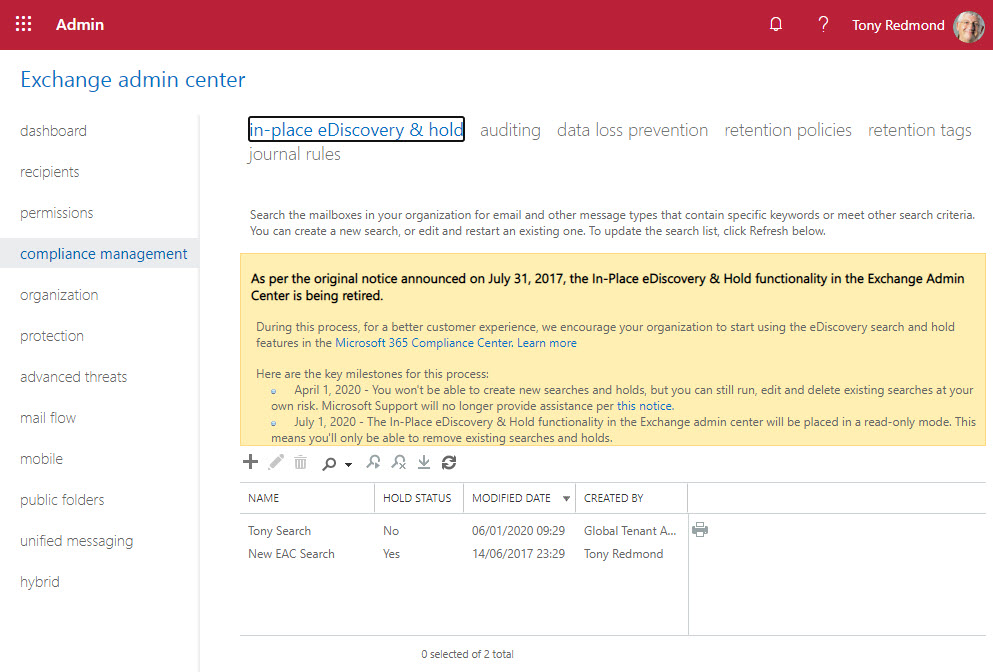
Microsoft announced the retirement of legacy eDiscovery tools from Office 365. The Exchange Online in-place holds and eDiscovery tool, Office 365 Advanced eDiscovery 1, and the Search-Mailbox cmdlet are being retired. All will be gone by mid-2020. It’s a pity to see the Search-Mailbox cmdlet being removed, but time and progress make this kind of thing inevitable.
Teams and SharePoint Online share a connection through the Files Channel tab. Unfortunately, if you rename the URL of a SharePoint site, the connection broke. The good news is that Microsoft has now fixed the problem. Some pesky bugs got in the way, one of which stopped the connection being restored. But the developers persisted and the final bug was fixed last week.
Office 365 for IT Pros is the only book that is continuously updated to track progress of Microsoft’s Cloud Office service. The January 2020 update is now available for subscribers to download from Gumroad.com or Amazon. Fifteen out of 24 chapters are updated in this release. As always, we’d like subscribers to download and use the new content.
Teams supports priority notifications to nag users when something important happens and they need to respond. Enterprise Office 365 users can send as many urgent messages as they want, but Microsoft plans to charge frontline users to send more than five messages monthly.
Teams personal chats display an activity tab that allows you to get an insight into what person you’re chatting with is doing. Some might worry that the other person will see something that they shouldn’t, but there’s nothing to worry about.
The Office 365 for IT Pros Writing team is taking a short break for the holiday season. We’ll be back in 2020 with new articles and insight into Office 365 as well as an update for the book on January 6. Everyone needs to recharge their batteries and we’ll be using the holidays to prepare for all the work we know that’s coming in 2020.