Many PowerShell modules are available for Office 365 applications. Keeping them up to date can be a pain, so here’s a PowerShell script to automate the task. Using the latest modules means that you can access new and updated cmdlets, which might make all the difference to your scripts.
The Groups section of the Microsoft 365 admin center has been overhauled recently and several useful changes were made. Restore deleted groups is the headline act, but the other updates also deliver value. Collectively, they make Groups easier to manage.
The standard Teams search function can unearth a lot of information in chats and channels. Using filters, precision searches, and contextual searches makes it easier to find what you need, even if you might have to learn some new tricks. But life is full of new experiences, and so is search.
The 2021 edition of the Office 365 for IT Pros ebook will soon be available. Read about an author’s perspective on working on the book and why it’s different to other books.
You can now enable noise suppression for Stream videos during the original upload or afterwards. Speech is isolated from background sounds to make it clearer and more distinct. You can apply noise suppression to lots of different videos, but you can’t to Teams meeting recordings because noise suppression is already done for those videos.
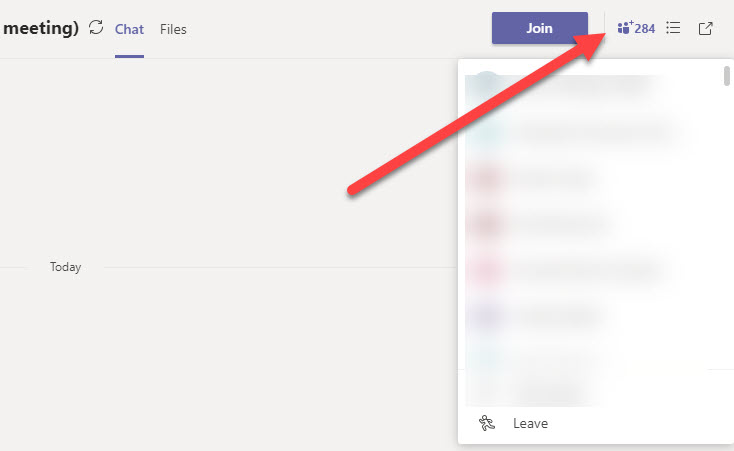
The new information pane available in Teams desktop and browser clients gives information about recent contributors and is the relocated home for system messages. You can certainly debate what makes someone a recent contributor as some of those listed don’t seem to be too active. Maybe it’s one of those AI algorithms that will be tweaked over time…
Teams meeting organizers can download a participant report to note who attends a meeting and when they were present. If you forget to download a report while the meeting is active, you’ll have to make up the attendance roster, and that would be a bad thing.
Microsoft Stream doesn’t support Office 365 retention policies, so you can’t make sure that videos are kept for eDiscovery or compliance purposes. But a little lateral thinking and some PowerShell code quickly gives us a solution based on events from the Office 365 audit log, including emailing the report to someone designated to review videos before final deletion.
Because it sits on top of so many Microsoft 365 components, Teams is easily the hardest Office 365 workload to backup. You can try to backup Teams by copying its compliance records stored in Exchange Online, but that’s only a partial (and bad) solution that utterly fails to take the full spectrum of Teams data into account.
Many migration projects use Exchange Web Services (EWS) to move data to Exchange Online. EWS is using throttled to preserve resources. Here’s how to lift the restrictions for up to 90 days, all without going near a support call.
You can apply an Office 365 Sensitivity Label to control different aspects of Groups, Teams, and Sites. One of the settings controls whether guest users are allowed in group membership. We explain how to use PowerShell to search groups assigned a label to block guest access for existing guests, just in case you want to remove them.
Teams is removing system messages from the General channel in teams. System messages tell users about events like new members, but they’re really not that interesting, unless you’re fond of tracking the comings and goings of members, much like a noisy neighbor behind a curtain. Uncluttering the General channel is no reason to let it degrade, so keep it for important stuff and force conversations into other channels.
A few days after buying the Surface Earbuds, I am returning them to Microsoft. Poor sound and an uncomfortable fit in my ear mean that I’m reverting to my old Bose QC20 headphones, even though they have their own problems. The promised integration with Microsoft 365 applications isn’t worth the paper it’s written on, which is another reason for the Earbuds to go back.
The combination of Exchange Online and PowerShell allows Office 365 admins to send messages for all manner of reasons. These scripts depend on SMTP AUTH connections and change is coming in this area with the deprecation of basic authentication. It’s a good idea to take an inventory of scripts that send email, including those that use the .NET classes to do the job.
People who subscribe to the Office 365 for IT Pros eBook in June 2020 will receive a free update to the 2021 edition when it is released in July. Go ahead and buy a book as normal from Gumroad.com and we’ll send you a code in July for a free upgrade.
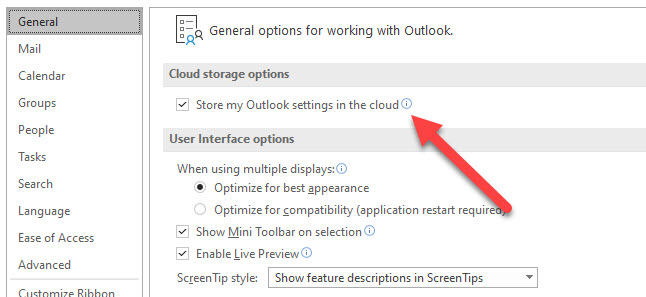
Outlook for Windows is being upgraded to store its setting, including signatures, in Exchange Online mailboxes for Office 365 accounts. Essentially, the bulk of the settings controlled through Outlook options are stored in mailboxes and available to Outlook on all Windows PCs that an Office 365 signs into.
Many people are working from home at present, and you might want to block their ability to book meetings in physical rooms. Policies can be configured to stop the Exchange Online resource booking assistant accepting every meeting requests sent to rooms, with exceptions granted to people allowed to make bookings.
You can use Microsoft 365 Groups and distribution lists to schedule meetings in the Teams calendar app, but sometimes you can’t schedule meetings with Teams. That sounds odd, but it’s because of the way that Teams selects groups from the Exchange Online GAL to show to users in the “picker” control to select meeting attendees. You can make changes to have Teams show up in the GAL, but that might not be enough if you want everyone in the team to receive meeting invitations.
The June 2020 update for Office 365 for IT Pros, the world’s best and only constantly updated book about Office 365 is now available. Subscribers can download updated files from their Gumroad account. If you’ve bought the Kindle version from Amazon, you can ask them for the updated files.
Microsoft Stream will tell you how much of the tenant storage allocation has been consumed by uploaded videos, but not who’s uploading the videos. You can find out by looking for video upload events in the Office 365 audit log. Once found, it’s a matter of processing the events to extract useful information!
Microsoft is raising the limit for Teams meetings and group chats to 350 participants. The group chat limit was increased to 250 in early May. The new increase is temporary and Microsoft will review it in September to decide whether to keep it at 350. The update is already rolling out and should be available worldwide in mid June.
Changes coming in May and June will allow organizations to make online meetings the norm when created by OWA or Outlook mobile clients. You can control the feature at the organization level and allow individual mailboxes to override the organization setting.
A new setting available in Teams meeting policies allows Office 365 tenants to have per-user control over who can present at meetings. You might want to do this to stop guests presenting. or to limit some people from inviting others to present. I’m not quite sure what the use case is, but no doubt some people will find great value in the new setting.
I’ve written many articles to explain how to use the Office 365 audit log to report different aspects of the platform. But taking action is much better than just reporting. In this post, we explain how to take a report generated from the Office 365 audit log and use it to drive some actions. In this case, removing the SendAs permission from people who aren’t using it.
Microsoft’s service description for OneDrive for Business promises “beyond 1 TB, to unlimited” storage. In reality, most enterprise Office 365 accounts have 5 TB storage and won’t need to go further. But you can… first to 25 TB and then even more in the form of SharePoint sites. You just have to talk nicely to Microsoft support.
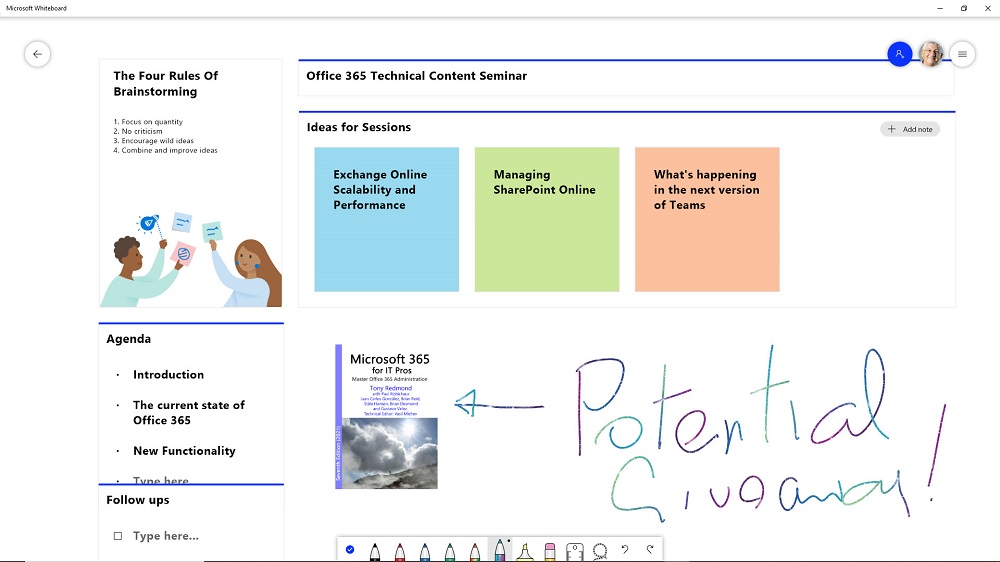
Whiteboard is a digital canvas application that can be loaded into Teams meetings to allow participants to share and develop ideas. The app available in Teams isn’t the most functional way to interact with Whiteboard, what whatever version you use can draw and sketch ideas to share with team members and other people within an Office 365 tenant.
Support for sensitivity labels is generally available for SharePoint Online. Users can apply labels to classify and protect documents, but a mismatch can happen between labels applied to documents and the sites where the documents are stored. When this happens, SharePoint Online emails site owners to tell them that a mismatch exists.
For compliance purposes, the Microsoft 365 substrate captures copies of Teams messages in Exchange Online mailboxes. The compliance records are indexed and discoverable, which means that they can be found by content searches. However, Teams compliance records are imperfect copies of the real data, which is a fact that seems to have escaped many people.
Outlook for Windows is soon to support roaming signatures, but only the click-to-run version when connected to an Exchange Online mailbox. Still, it’s progress, and it will make the task of using the same signature on different PCs much easier. Good-looking signatures must still be generated for corporate branding purposes, so the ISVs selling email signature products don’t need to fret.
The new screen capture option is available in Microsoft Stream worldwide. You can capture a window, browser tab, or a complete screen and have the content uploaded and processed by Stream. The feature handles short (15 minute) videos and it’s a nice way to capture lessons, how-to demonstrations, or even bug reproductions.
An item in the Teams release notes tells us that analytics are now available for channels. You can find out how many topics and replies are posted within a channel. You’ll probably know what channels are in heavy use anyway, but seeing how little traffic some channels get is a good way of knowing that maybe your teams don’t need those channels.
SharePoint Online generates a lot of events in the Office 365 audit log. You can interrogate the log with PowerShell to create per-user reports of their activities. The Search-UnifiedAuditLog cmdlet finds all the necessary data; after that it’s just a matter of filtering and refining the data and then creating the reports.
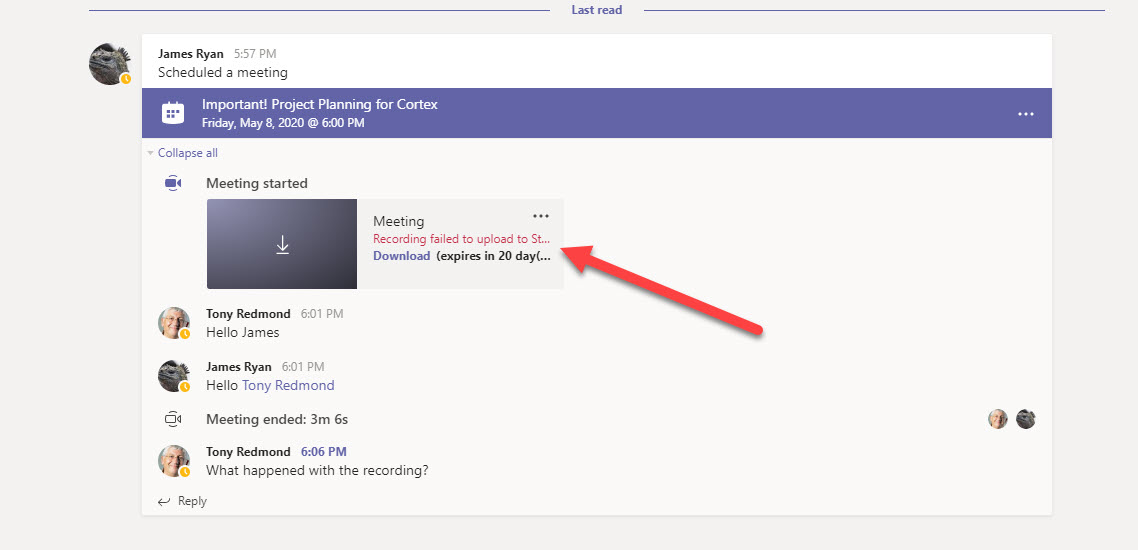
It’s very convenient to be able to record a Teams meeting and have the recording processed and stored in Stream. But what happens when the recording fails to be processed? Usually it’s because the account that starts the recording (the owner) doesn’t have a Stream license. Fortunately, the situation is easily rescued.
Microsoft has updated the Teams meeting policy to introduce a new control over video filters in Teams meetings. The VideoFiltersMode setting controls if people can use background blur and background effects, including the ability to upload custom images. A client update is needed to respect the new setting. It will come at the end of May.
Microsoft has published updates for the Exchange Online management and SharePoint Online PowerShell modules. Generally it’s a good idea to install the latest version of PowerShell modules for the different Office 365 products, but beware of some gotchas that await the unwary…
Do you need to find out who updated a SharePoint Online or OneDrive for Business document? Use PowerShell to search the Office 365 audit log for document events and the complete history is available. Well, at least the last 90 days’ history – or 365 days if you have the necessary licenses.
It’s easy to retrieve storage data for SharePoint Online sites with PowerShell, but it’s faster with the Graph. Some disadvantages do exist, but it’s nice to have a choice. TheGraph is faster, especially with large tenants, but the SharePoint Online PowerShell cmdlets can deliver more data.
Teams is a highly functional application that receives regular functionality upgrades. This post offers seven tips for making effective use of Teams from pinning important objects to making great video calls. All very practical and nothing too difficult to master.
Microsoft has announced that Stream will no longer create a people timeline in new videos it processes after June 1 and that the feature will be retired. The people timeline feature works well for videos taped in controlled conditions, like studios. It is less successful (and useful) for recordings of Teams meetings, which is where a lot of work for Stream comes from currently.
PowerShell modules are often updated regularly to add new features and functionality. When the time came to update the Azure Active Directory preview module to 2.0.2.89, things didn’t work so smoothly because the files for the previous version of the module had ended up in OneDrive for Business. The moral of the story is that there’s a reason why the Scope parameter exists for the Install-Module cmdlet.