Without warning (for security reasons), Microsoft stopped the Exchange Online Set-User cmdlet being able to update the work and mobile numbers for Azure AD accounts. We don’t know what kind of security concerns caused Microsoft to take this action, but it might be associated with administrative roles. In any case, this disappointing example of how to communicate with customers might end up with people having to update some PowerShell scripts – and no one likes unexpected work.
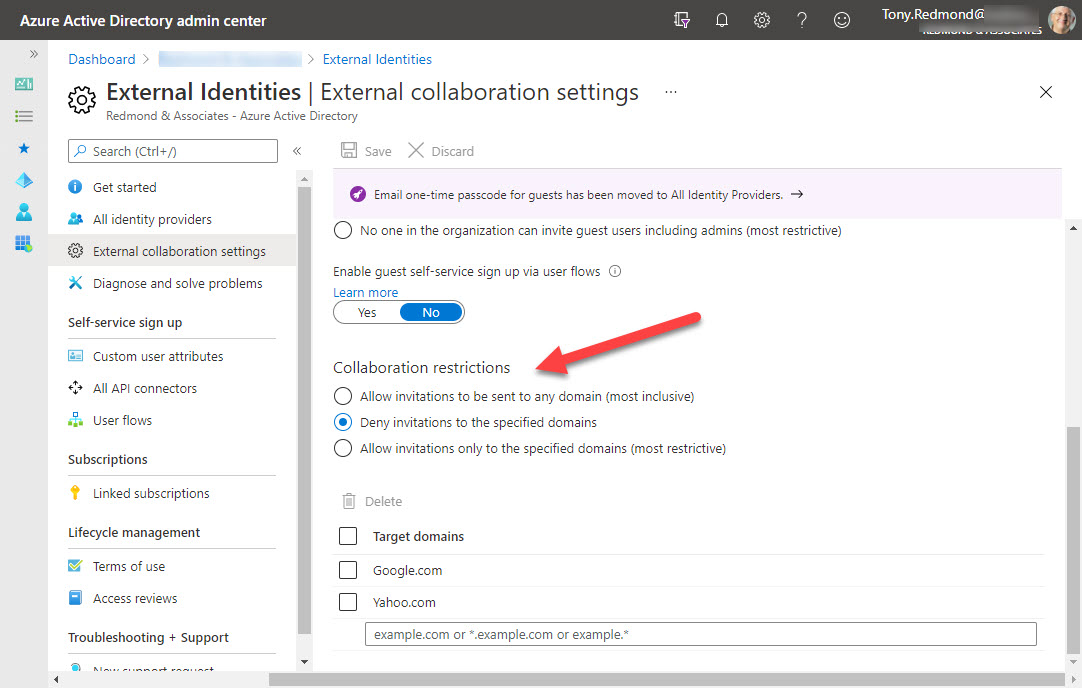
Azure B2B collaboration is used by Microsoft 365 Groups-based apps like Teams, Planner, and Yammer to control the creation of new guest accounts. You can update settings in the Azure AD portal to stop new accounts from specific domains or restrict guests to a list of known domains. But before you go ahead and update the settings, it’s a good idea to know where existing guest accounts come from. It’s easy to create a report with PowerShell. The next step might be to remove guests from offending domains.
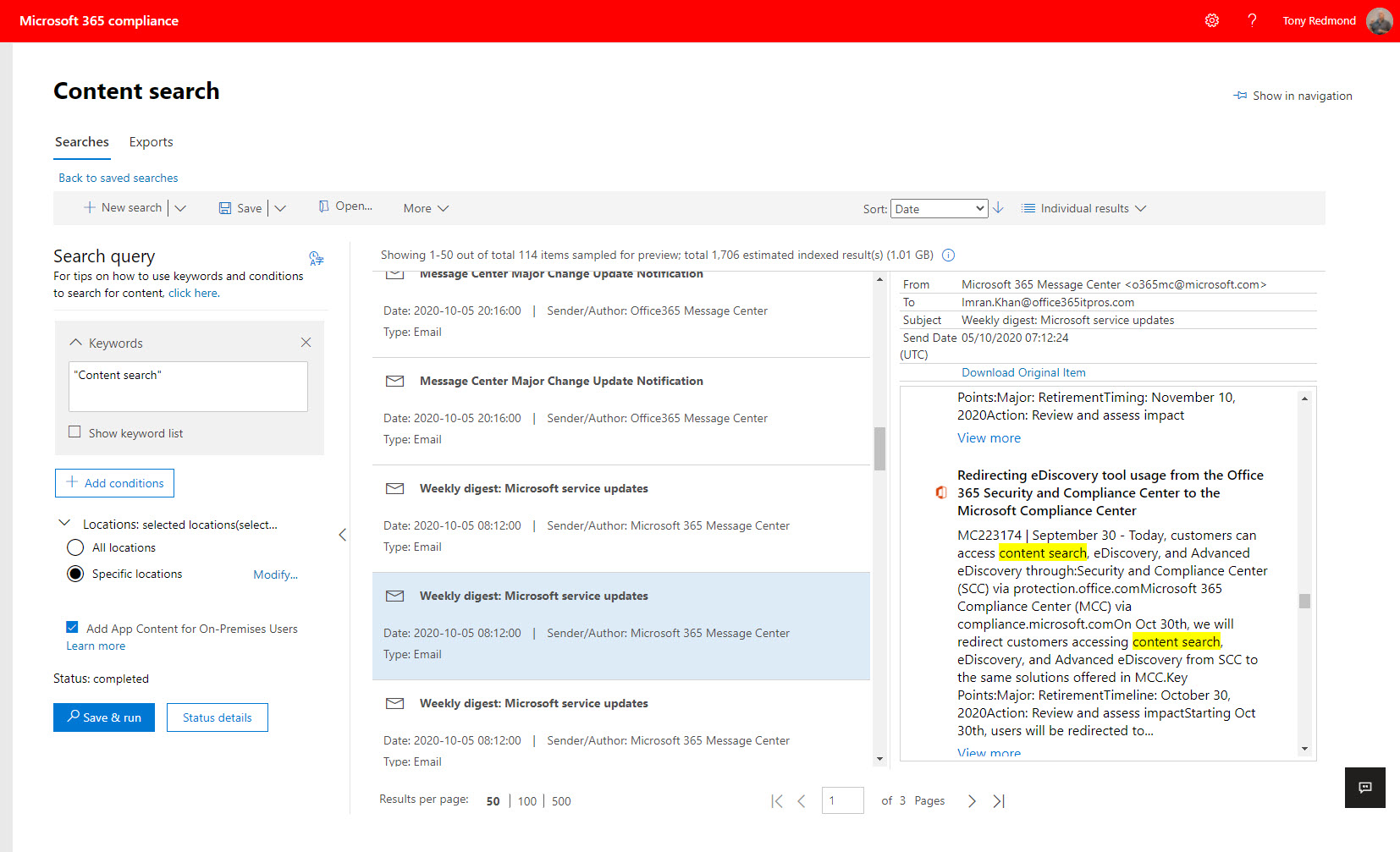
Microsoft 365 eDiscovery features will respect documented limits from May 10. The changes are likely made to conserve resources consumed by searches against the massive amounts of data now found in Office 365 tenants. The changes probably won’t affect eDiscovery investigators except in reminding everyone that the items shown in search preview are only a representative sample of what can be found by a full search.
Teams meeting organizers can control which participants can bypass the meeting lobby to join automatically, Microsoft has increased the set of available lobby options to handle a range of conditions from all-comers calls to those to discuss sensitive and confidential information. Here’s a quick review of the available options and what each does.
Exchange Online assigns large mailbox quotas to users. These quotas are needed to cope with the volume and size of modern email. What used to take 2 KB in 1996 now consumes 60 times more. And while email is more graphical and prettier to look at, you’d wonder if the value of the actual content has changed much, if at all.
Organizers of Teams meetings can create polls to use during their event. The polls now boast some AI capabilities to help organizers choose the right questions. Organizers can also create and launch polls using the Teams mobile client. This seems to be taking mobility a little further than you might want to use it, but I guess some people run meetings from large iPad devices.
Microsoft has announced that Whiteboard will move its storage from Azure to OneDrive for Business. It’s a good move because it addresses several important issues. around search, eDiscovery, compliance, and data governance The switchover is due in October 2021, but Office 365 tenants will get an opt-in choice to move earlier.
The May 2021 update for the Office 365 for IT Pros (2021 edition) eBook contains changes to 20 of the 24 chapters. The changes cover many topics from Microsoft’s FY21 Q3 results to new sensitivity labels settings for Outlook. Now spanning over 1,300 pages, Office 365 for IT Pros is packed full of practical and most importantly, up-to-date knowledge and guidance about Office 365, Exchange Online, SharePoint Online, OneDrive for Business, Teams, Planner, Azure AD, PowerShell, the Microsoft Graph, and many other topics.
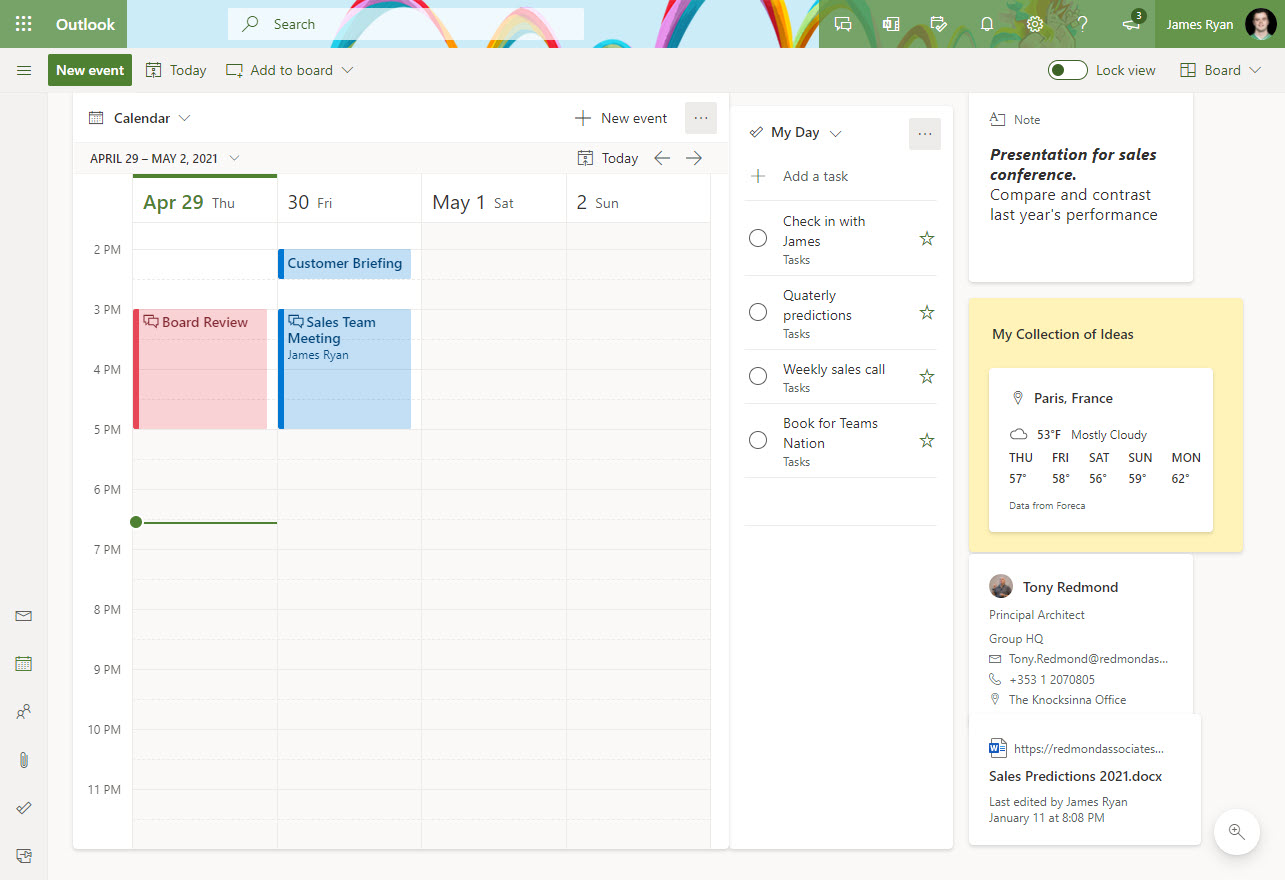
Microsoft is rolling out a new calendar board view for OWA. The new board looks very similar to a Project Moca board, which isn’t surprising because it’s a customized Moca board tailored to focus on the calendar. There’s no news yet when Project Moca might exit its current preview status, but maybe the new view will help by convincing people about the worth of configurable boards.
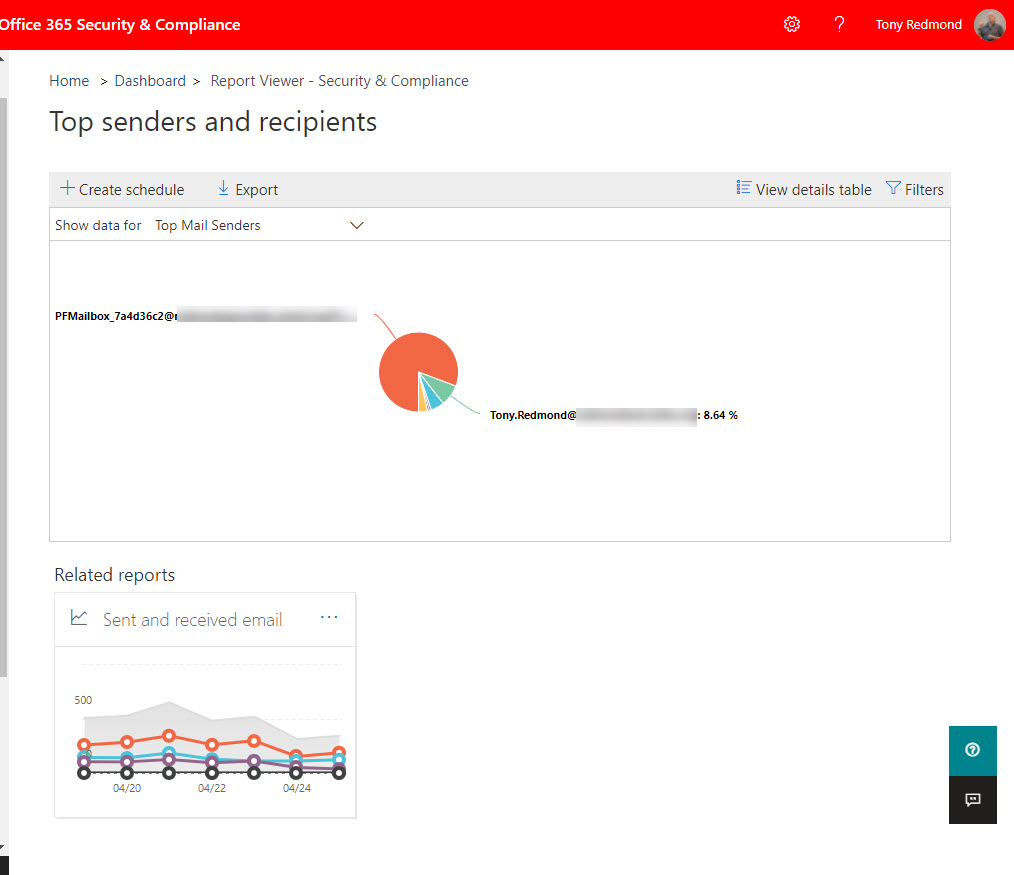
For whatever reason, Microsoft decided to cancel plans to remove the Top Senders and Recipients report from the SCC, citing customer feedback as the reason. The thing is that the SCC report and its underlying cmdlet use an old data source. The Microsoft Graph Reports API is the modern approach and an adequate replacement usage reports is available in the Microsoft 365 admin center. I really can’t understand why anyone would want to keep the old report as it’s not very good at all.
In their FY21 Q3 results, Microsoft announced that Teams now boasts 145 million daily active users. That’s a growth of 30 million over the last six months. Office 365 now has nearly 300 million paid seats. A paid seat is different to an active user, but Microsoft loves to mix up its data so that people believe what Microsoft wants them to think. In any case, the numbers are impressive.
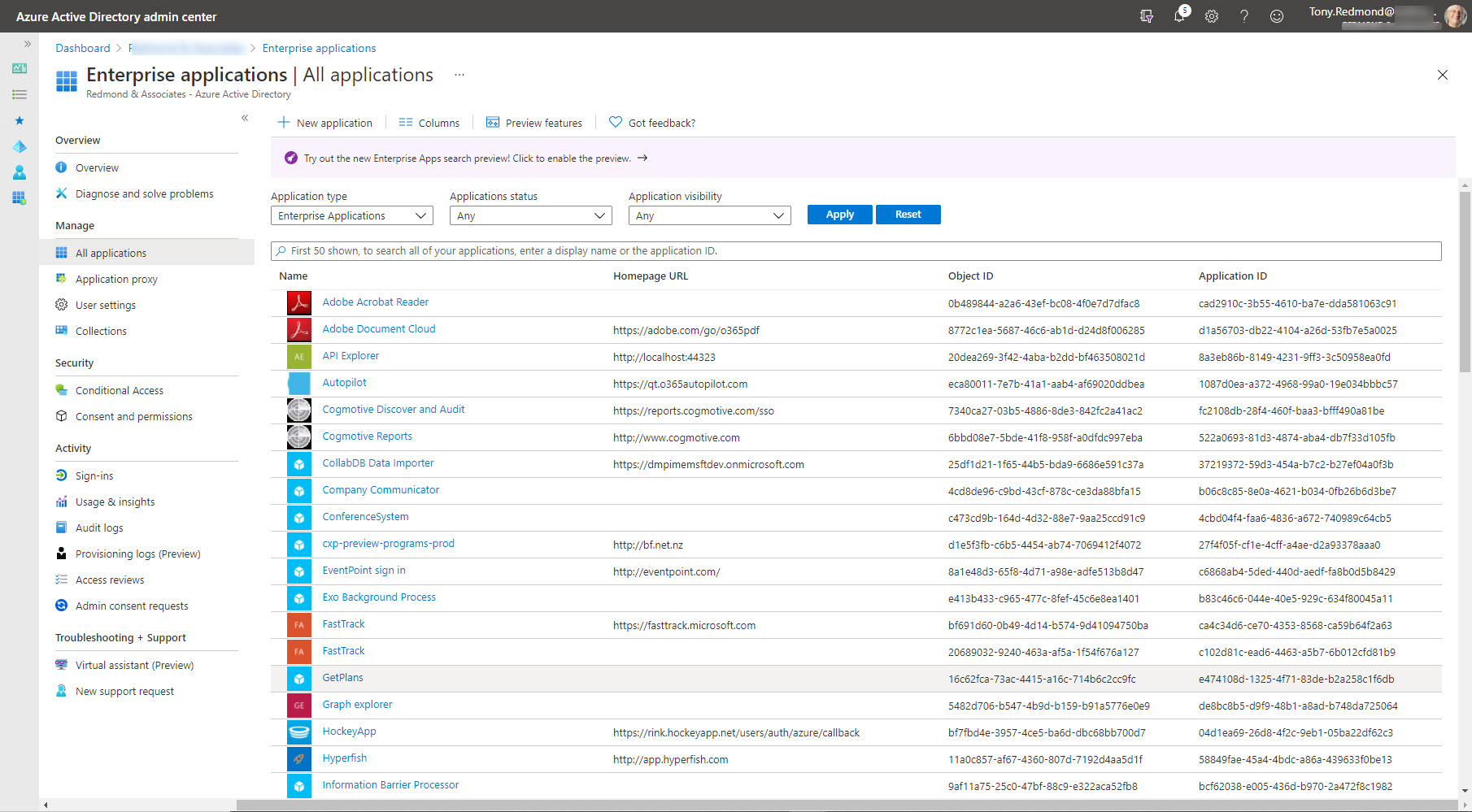
Over time, a Microsoft 365 tenant might accumulate many Entra ID enterprise apps. Do you know what these apps do or who uses them? It’s good to do a regular audit and cleanout of unwanted apps left behind for tests, trials, or expired applications. We use a script published on Practical365.com to grab the data from Azure AD and then import it into Microsoft Lists. The results we got might surprise you.
Exchange Online supports the ability to send email using any SMTP proxy address assigned to a mailbox. Following the announcement of the feature, users had many questions including what clients can be used. Here are some common questions and answers about the feature, including some PowerShell to report the set of proxy addresses assigned to user mailboxes.
The Teams developers are very proud that the new emoji picker expands the set of available emojis from 85 to over 800. No doubt some will welcome the increase. It will leave others cold as they wonder why Microsoft uses development resources to fill what seems to be an unimportant gap. In any case, the new emoji picker comes to Teams near you sometime soon. Enjoy!
SharePoint site owners can teamify (team-enable) their site, which is nice, Now you can create channel tabs based on site resources during the team enablement process. It’s a nice new feature but you must remember that a new team only has a General channel, so site resources will end up in a place where they might necessarily not end up in the long run.
Microsoft introduced a new organization setting for Office 365 tenants to have Outlook shorten meetings automatically. The idea is to create a break between meetings to give people time to decompress and prepare for their next call. It all sounds good and it makes sense to build buffers into your calendar during busy days. The problem is that other people might come late to a meeting, start it early (without you), or prolong it into your carefully scheduled buffer. Technology can help humans do the right thing, but in this case it’s strictly advisory.
Yammer networks configured in Microsoft 365 mode now support Azure B2B collaboration guest users. Which is nice, if it worked. But it doesn’t for me. Guest access worked for me during the testing phase but now that the feature has reached general availability, it won’t – using the same accounts. It’s odd. Yammer’s implementation of Azure B2B Collaboration has some other quirks too, all of which mean that it’s not very usable.
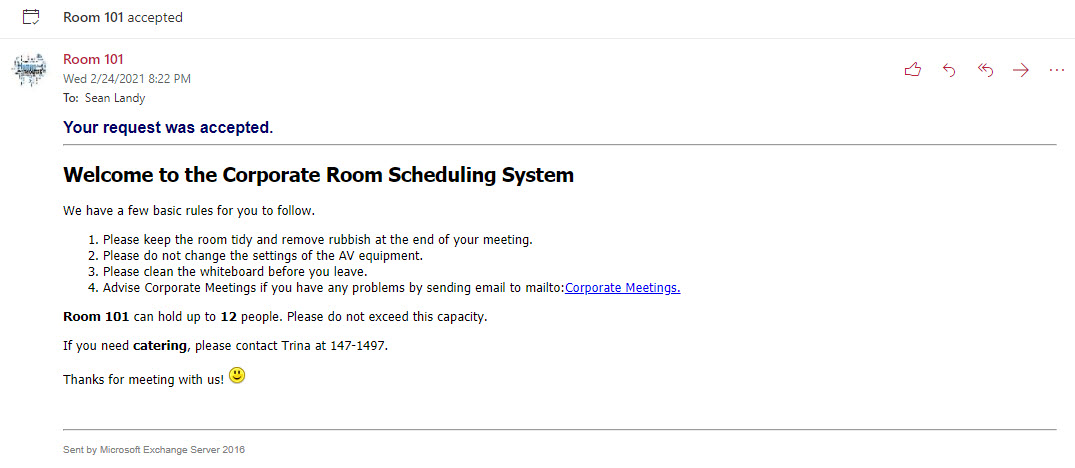
Exchange Online’s calendar assistant is good at responding to meeting requests for rooms. It can be even better with just a little customized text to remind those who book the rooms about meeting etiquette. Even though we might never get back to physical meetings in conference rooms, some face to face gathering will happen in the future, so now’s the time to prepare for bookings to be handled in a nicer fashion.
Teams supports several methods to import email. Outlook for Windows can drag and drop messages into Teams conversations. It’s a quick and easy way to move the focus of a conversation, but there are some downsides to be aware of.
The Teams usage data reported in the Microsoft 365 admin center can now be obfuscated. Teams is the last workload to support this facility. It’s all very well to anonymize, deidentify, or obfuscate user data to protect individual privacy and it’s appropriate to do so in the Microsoft 365 admin center where people with several roles can access the data, but having a single on/off switch for data obfuscation for the Microsoft Graph Reports API is a real pain.
Office 365 administrators can update Azure AD guest accounts with photos. Guests can do the job themselves using three PowerShell commands. Other approaches work too, but this is the easiest and quickest method to do the job, especially if you have guest accounts in multiple tenants.
Given the amount of change inside Office 365, it can be hard to test everything before new software appears in production. Which is why you should have a test or development Office 365 tenant. You can check out new features in safety, or run code downloaded from the internet like PowerShell scripts or new versions of PowerShell modules. All in all, it’s a great idea.
Organizations can choose to control updates of user photos by policy in their Microsoft 365 tenants or allow users to go ahead and use any image they like. In this article, we explore the value of having a user photo for every Office 365 account (and Teams and Groups too) and the choices organizations must make when they decide whether to control user-driven updates.
Users of the Teams mobile clients can now choose background images for their meetings, including custom backgrounds from their device’s camera roll. The implementation works well as long as the image you want is in your camera roll. Not being able to browse other repositories is a small gripe about a feature that many users will welcome.
Supporters of the Bing search engine will be delighted that Microsoft 365 can link Azure AD accounts to to personal accounts to accrue Microsoft Rewards. A tenant org-wide setting is available to control the feature. Whether this is enough to convince organizations and individual users to switch allegiance to Bing from another search engine is debatable.
Microsoft’s One Outlook program aims to rationalize the current client set. The Edge WebView2 component allows Outlook desktop to reuse OWA features, which is why Microsoft now distributes WebView2 with the Microsoft 365 apps for enterprise (desktop apps). We’re now seeing signs of reuse with an obvious example being the appearance of OWA’s room finder in Outlook for Windows.
Teams meetings include a neat Private Preview feature to allow users to see what their video feed will look like if they enable their camera. All good, except that a strange blog post feels that user privacy might be compromised. In my opinion, that view is a load of rubbish. Private Preview is a very worthwhile feature and a little training can make sure that no one is ever surprised by their video geed appearing unexpectedly in a Teams meeting.
A new phishing attack is circulating from an Office 365 tenant. The attack attempts to lure recipients into clicking a link to download a document. The phishing email is not quite as crude as other attempts and might lure users into doing the wrong thing, especially as the message is delivered to inboxes.
Teams Live Events now support anonymous external presenters, defined as people who don’t have Azure AD or MSA accounts. It’s a useful change because many large public meetings (the natural ground for Live Events) involve external presenters brought in because of their expertise in the meeting topic. The update is rolling out in April 2021.
Teams breakout rooms are a popular method to split meetings into smaller discussion groups. Microsoft has improved how breakout rooms work, notably by adding a countdown timer. The settings for breakout rooms and the assignment of users across rooms now persist across sessions. These small but important improvements reduce the friction of running meetings with breakouts.
Microsoft has refreshed the Send to Teams option in Outlook for Windows, OWA, and Outlook for Mac. You might not notice the change, but it’s a little faster and works better. Software engineering changes like this happen all the time in the cloud to speed up performance and improve reliability. We keep an eye on stuff like this to make sure that we understand what’s happening across Microsoft 365. It’s just what we do…
PowerShell pros know the secrets of typed variables and why this matters when cmdlets return data, but some of us have been doing things wrong for years. Which is why I spent a couple of hours contemplating the differences between typed and untyped variables when handling items returned by cmdlets. They say that old dogs can’t learn new tricks. I beg to differ…
The Microsoft 365 admin center UI to manage group memberships might look pretty, but it’s not as functional as it could or should be, especially for large groups. The lack of search, sorting, and filtering capabilities is OK when a group has fewer than 50 members, but once past that number these features matter. It’s time for some TLC for group management.
Microsoft plans to push ads for Teams for personal life into the activity feed of Teams mobile clients used by enterprise accounts. It’s a daft idea. Unsolicited communication is never welcome. This is a bad example of a company abusing its position to advance its own interests without asking whether their paying customers want this kind of communication.
The April 2021 update for the Office 365 for IT Pros eBook is available for download by the book’s subscribers. Every chapter received updates in April, making this month’s update the broadest revision we have ever delivered. It all underlines the amount of change which occurs within Office 365 and why a book that’s republished monthly is so valuable.
Microsoft 365 organizations which use Teams but don’t have a Teams DLP policy will see a Compliance Center widget recommending the creation of a DLP policy. Sounds good, and the policy covers the most common sensitive data types that people worry about. The downside is that Teams demands Office 365 E5 licenses for DLP policies. You might not know that, but you will if you accept the recommendation.
Azure AD holds information about managers and their direct reports. It’s easy for that data to go out of date, so we create a report to tell us who are the managers and how many direct reports they have. Azure AD has some cmdlets to retrieve information about managers and direct reports, but as it turns out, the older Get-User cmdlet is the best way to proceed.
The latest update for sensitivity labels allows them to control the external sharing capability of SharePoint Online sites. It’s a powerful example of policy-based management in action and demonstrates just how useful sensitivity labels will be as Microsoft steadily builds out the set of controls available through labels.
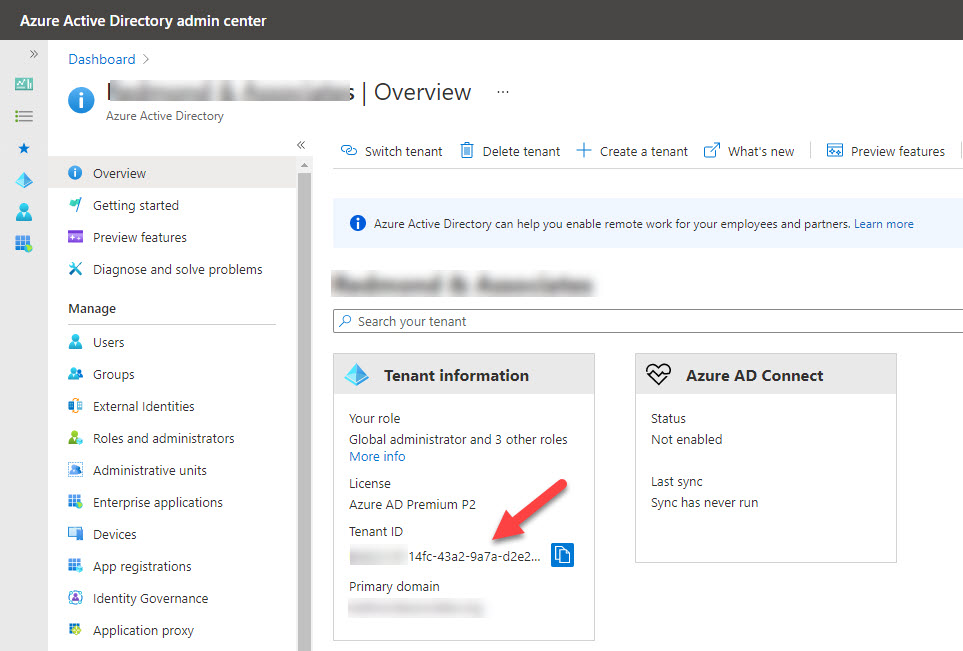
Every Microsoft 365 tenant has a tenant identifier. Sometimes you need to know what the identifier is, so here are several options to find it from PowerShell to the Azure AD portal to an external service. Tenant identifiers are public and need to be, otherwise apps wouldn’t be able to find the data they want.
Microsoft 365 tenant users can look forward to an increased range of self-service license purchases with the addition of Power BI Premium and Power Automate with RPA. Nine products are now eligible for self-service purchases, unless a tenant administrator decides that this kind of thing is nonsense and uses PowerShell to disable self-service purchases for all or some products.