Microsoft 365 tenant users can look forward to an increased range of self-service license purchases with the addition of Power BI Premium and Power Automate with RPA. Nine products are now eligible for self-service purchases, unless a tenant administrator decides that this kind of thing is nonsense and uses PowerShell to disable self-service purchases for all or some products.
You can configure Exchange Online distribution lists so that they reject messages sent to them as BCC recipients. I’m not sure how much use this feature will get, but it’s nice to have it anyway. PowerShell is the only management tool to configure distribution lists for the new block until Microsoft gets around to updating the Exchange Admin Center.
Sensitivity labels are a great way to protect confidential documents stored in SharePoint Online. Sometimes the documents must be decrypted. This article explains how to build a PowerShell script which uses Graph API calls to navigate to a folder in a SharePoint Online document library and decrypt the protected documents found in the folder.
A new Microsoft 365 admin center feature allows tenants to create an auto-claim policy to assign licenses when users sign into Teams for the first time. It seems like a good idea, but it’s limited by the fact that only Teams supports the auto-claim policy. No scoping exists either, which will disappoint those who like to manage licenses on a granular level. There’s some work to do before these policies will be right for everyone.
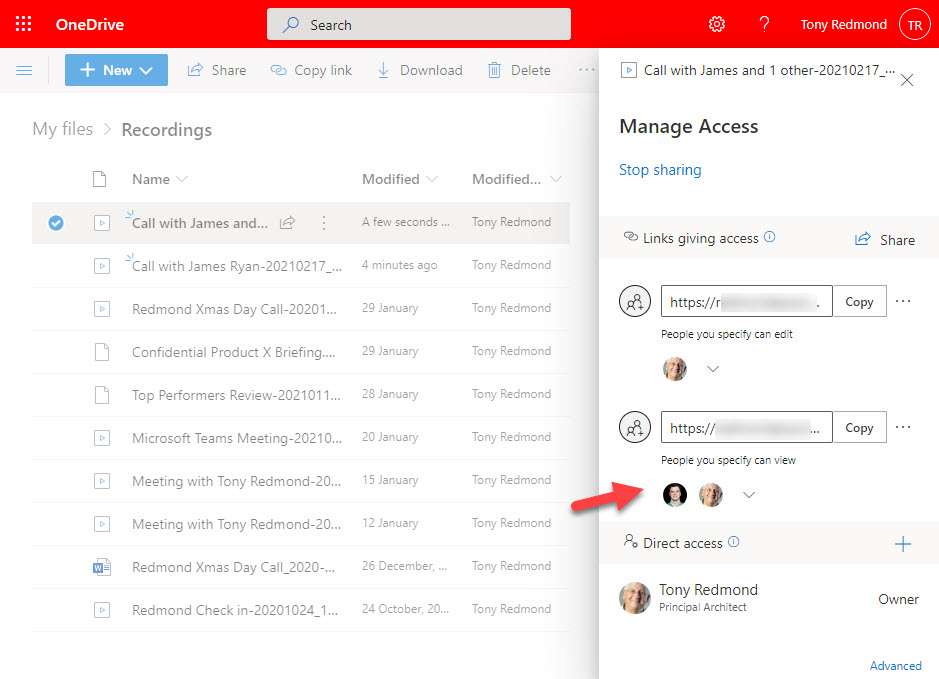
SharePoint Online and OneDrive for Business have a new sharing link control which highlights the permissions assigned to sharing recipients. It’s a minor tweak which is actually a pretty good idea as the last iteration of the sharing control buried permissions behind the scenes. And as we all know, permissions are important to IT resources.
A new preview feature allows the resources available to an Azure AD guest account to be reassigned to another email address. It’s a nice feature, but Teams has some problems with it at present. On the upside, everything works great with SharePoint Online and Planner, and we’re sure that Microsoft will fix the problem with Teams soon.
Microsoft will soon introduce roster containers to Planner. These are plans without Microsoft 365 Groups that apparently are tied to some mysterious new functionality. Because we have no idea what this functionality will be, we decided to disable it using Planner’s odd approach to PowerShell. Suffice to say that it’s not straightforward. Now if only someone had a plan…
Microsoft has released the public preview of the ability to set the Exchange out of office (OOF) auto-reply from the Teams desktop and browser clients. OOFs set in Teams are synchronized back to Exchange using EWS so that the new auto-reply configuration is picked up by clients like Outlook and OWA. It’s a small but useful update.
The OneDrive sync client is an important Microsoft 365 component which underpins features like autosave and coauthoring of Office documents. During the March 15 Azure AD outage, the client had a meltdown and removed all the local copies of files stored in a SharePoint Online folder, seemingly because it couldn’t authenticate. The problem was easily fixed, but it’s a bad example of handling what could be a transient authentication issue.
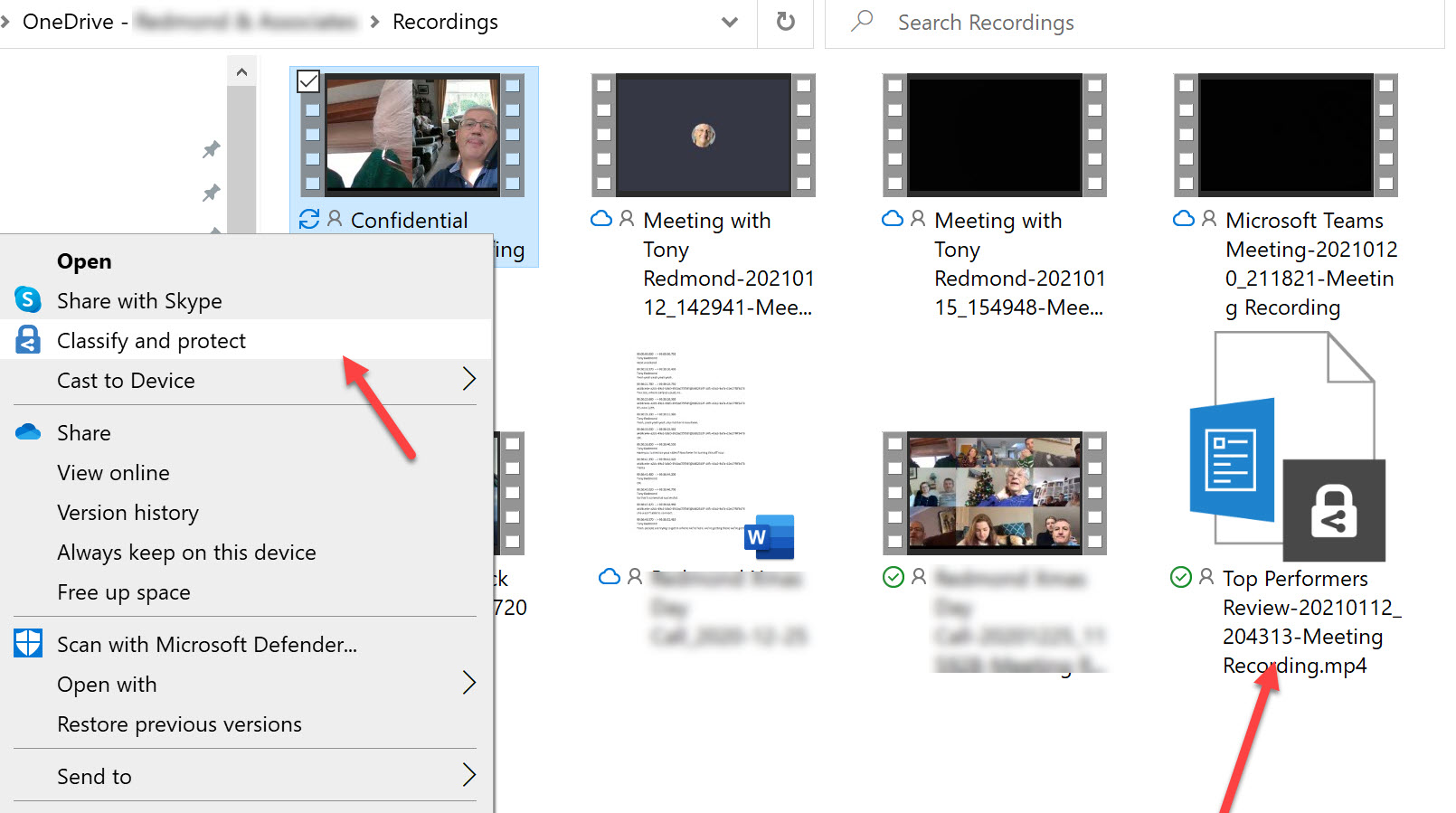
OneDrive for Business now stores Teams meeting recordings. You can protect files with sensitivity labels, but does this have any side effects for Teams? As it turns out, it does because the protective wrapper which encrypts the recording breaks the link to Teams. This might not be important if you need to protect a confidential recording and restrict access to a known set of users, but it’s something to consider before applying any labels.
Microsoft and Accenture have published a case study including some interesting statistics about Accenture’s Microsoft 365 usage. Some interesting headline numbers are cited, but the more interesting detail about how Accenture manages such a large tenant isn’t discussed at all – and that would be very interesting to know.
The Teams mobile clients (iOS and Android) benefit from a reduced data usage mode during video calls. The new mode can cut the amount of cellular data consumed significantly. We ran a simple test of a ten-minute meeting involving a shared PowerPoint slideshow and saw data usage reduce by 71%. That’s not a bad outcome!
Exchange Online tenants can activate external email tagging, which causes Outlook clients (not desktop yet) to highlight messages received from external domains. The feature can replace custom implementations to mark external email, usually done with transport rules. It’s easy to implement and control, but the mail tip offering to block an external sender seems a little over the top.
Microsoft has released V2.0 of the Teams PowerShell module. It brings some welcome improvements, notably the inclusion of all the management cmdlets, but has a downside too. The new cmdlets for managing teams templates are not easy to use and some authentication issues affect the Connect-MicrosoftTeams cmdlet after a change in authentication libraries. Microsoft has some work to do to improve this version of the module.
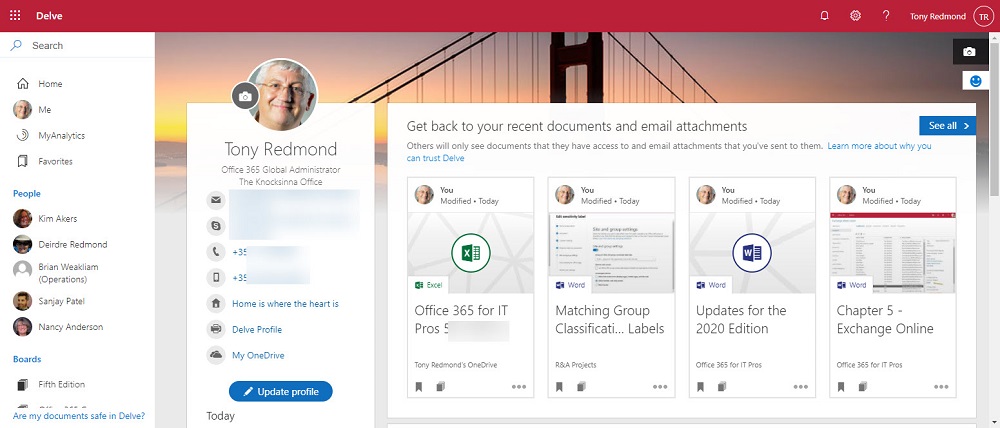
Microsoft is retiring the Delve mobile apps. That’s not a surprise because Microsoft hasn’t put much effort into Delve for the last few years. The question is when the Delve browser app will get the bullet. Call me cynical, but Microsoft has bigger concerns in areas like Search, SharePoint Syntex, and Viva Topics that mean Delve is unlikely to receive any tender loving care in the future.
Microsoft will include the Edge WebView2 runtime with Microsoft 365 apps for enterprise version 2101 or later. This doesn’t mean they install Edge; it’s simply a software component to make it possible for Outlook desktop to run features developed for OWA. You can block the deployment if you like, but there’s really no good reason to do so.
Microsoft plans to make the Dynamic View feature available for Teams meetings in mid-March. The signs are that the enhanced presentation of meeting content will make attending meetings a tad more engaging. Not much can be done with visual tweaks to rescue boring meetings where presenters drone on about stuff they should cover in a few minutes, but maybe the changes made by Dynamic View will brighten attendee spirits, We can but hope.
Attendees of Teams meetings now have the ability to share their opinion of the proceedings through live reactions, a set of emoticons ranging from thumbs-up to laugh. Reactions appear on attendee cards or float up from the bottom of the screen when material is beiing shared. Tenants can disable reactions uising Teams meeting policies, but meeting organizers can change meeting settings to allow reactions in specific events. Although it seems like a feature that doesn’t add much for a business user, reactions have their place – if used intelligently!
Now deployed to Office 365 tenants, large Teams meetings can support up to 20,000 view-only attendees, if an organization chooses to update its Teams meeting policies. Interestingly, this is a feature which Microsoft originally planned to license under its Teams advanced communication add-on, but the growth of large meetings in organizations might have forced their hand to bring the feature to mainline Teams.
Teams desktop clients are being updated with a new history menu to reveal the last 20 locations visited by a user in their Teams session. It’s a much faster way to get back to something than the older back arrow method. Another example of how Microsoft is refining the Teams client UI to remove little bits of friction and make everything work more smoothly. Or so they say.
The March 2021 update for the Office 365 for IT Pros eBook is now available. Office 365 for IT Pros is the only book updated monthly. which covers Microsoft’s cloud office system. This update covers 23 of the 24 chapters and is packed full of new information and insights covering anything from Teams to Stream to Exchange Online and SharePoint Online.
If you encounter an error when sharing a SharePoint file, you might see an error code like OSE204. What do these mainframe-like codes mean and why does SharePoint show them? Or more importantly, how did the sharing capability of a site change through administrator incompetence? And why is Microsoft removing the option to send a sharing link via Outlook (OWA)?
Microsoft is changing the way new teams are created in the Teams admin center to make sure that their settings are consistent with teams created in other interfaces. It’s a good idea because it means that all teams are then created equal. Organizations who wish to use different settings can update teams once they’re created using either PowerShell or the Graph API.
Microsoft is giving the Teams desktop and browser clients a makeover with their Fluent design system. If you look closely, you’ll see some changes in app icons, but the other changes are too subtle for many, including me. Up on the upside, while those of us who write about Teams will have to refresh some illustrations, the documentation for the Fluent design system is an interesting read. Well, it is late at night when you’ve nothing better else to do…
There are many examples of PowerShell scripts which create reports about the membership of Microsoft 365 Groups. Most are slow. This version is faster because of its per-user rather than per-group approach to processing. The output is a nice HTML report and two CSV files containing a list of memberships in Microsoft 365 Groups and summary data for each user in the tenant.
Microsoft has announced that recordings of Teams meetings stored in OneDrive for Business will be blocked for download by anyone except the owner. The change will roll out in mid-April and should be complete by mid-June. Microsoft’s post draws attention to the fact that you shouldn’t use channel meetings to discuss confidential topics. It’s all to do with the Microsoft 365 Groups membership model.
Many people want to print off membership details of Microsoft 365 groups, which makes it curious why Microsoft doesn’t support the option in Teams, OWA, or other applications. Fortunately, it is very easy to extract and report membership with PowerShell. Here’s how to generate a HTML report with a CSV file on the side.
The Office 365 audit log is packed full of information about what happens inside workloads. New events show up all the time. The question is how to understand what actions these events relate to. We outline a simple procedure to discover the presence of new audit events and dive into the investigation of an event called Consent to application, which is pretty important in the context of recent high-profile attacks.
From April 2021, Exchange Online will apply hard limits for the number of messages a mailbox can receive per hour. The limit remains the same (3,600), but now Exchange will block the mailbox receiving any more email for an hour. The new version of the Exchange Admin Center (EAC) promises to highlight problem mailboxes so that admins can ask owners why their mailboxes receive so much email.
Audit records are a great way to gain an understanding of what happens inside Office 365. We use PowerShell to report actions taken with sensitivity labels such as protecting files and containers. The latest development is the addition of support in the Microsoft 365 apps for enterprise (Office desktop) to log audit events when users interact with sensitivity labels. Unsurprisingly, more events are often logged by the desktop apps than their online equivalents.
The Teams desktop and browser clients are gaining an offline send capability. Messages sent offline are queued locally and go when the network reappears. Connectivity must be resumed within 24 hours. If not, users need to review the messages to make sure that it still makes sense to resend them.
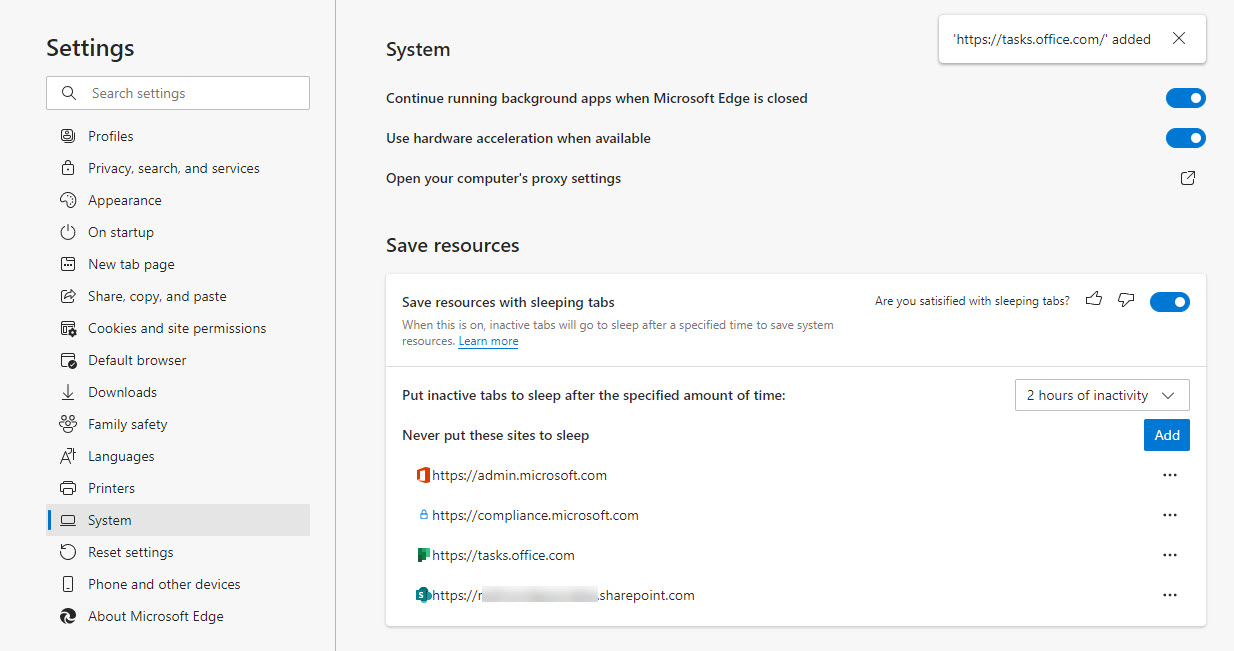
Microsoft’s Edge browser recently introduced sleeping tabs to conserve resources. Although this is a good idea, putting SharePoint Online tabs to sleep stops them reconnecting. I suspect it is because a refresh token times out and isn’t renewed. The solution is to add SharePoint Online sites to the list of sites that don’t sleep. Always-on document management is the best approach.
The Microsoft 365 substrate now captures Teams app card data in compliance records to make the data available for eDiscovery, content searches, holds, and retention. The compliance records are stored in user and group mailboxes. Audit records for card interactions are also logged in the Office 365 audit log. Using compliance records means that some app data context is lost, but at least you can find the information.
Viva Topics is one of the four modules in the Microsoft Viva employee engagement platform. You can run a 25-user trial for 30 days to create some topics and see how things work. A trial should help an organization decide if they want to pay the $5/user/month Microsoft asks for Viva Topics licenses – and everyone needs a license to see topic cards, which is the point of Topics.
A change made to the storage location in SharePoint Online for email sent to Teams channels caused problems for people who created Flows based on a known location. Instead of having one big folder for email messages sent to a folder, it seems like Microsoft plans to use a new folder for each month. There’s nothing wrong with this approach, but it would have been nice if Microsoft warned people using the folder for automated processing that a change was coming. They didn’t.
Microsoft has updated the format of the Teams attendance report to include more data about who attends meetings. The new report is persistent and available after a meeting ends. The new format will no doubt be popular with teachers who need to track who attends their online classes, but it’s likely to be also popular in the enterprise for those who organize meetings with mandatory attendance.
Microsoft wants to remove basic authentication from Exchange Online connection protocols. But pressures have forced Microsoft into a new strategy and away from the mid-2021 date for deprecation of basic authentication for five protocols. Instead, Microsoft will disable basic authentication for protocols where it’s not used, include four addition protocols in its target set, and pause action for tenants where basic authentication is in active use. When they restart, Microsoft will give tenants 12 months’ notice that basic authentication will be blocked for a protocol. You can argue that Microsoft should have pressed ahead with their original plan, but would widespread disruption of service be worth the benefit gained from blocking vulnerable protocols? Balancing risk versus reward is often not easy.
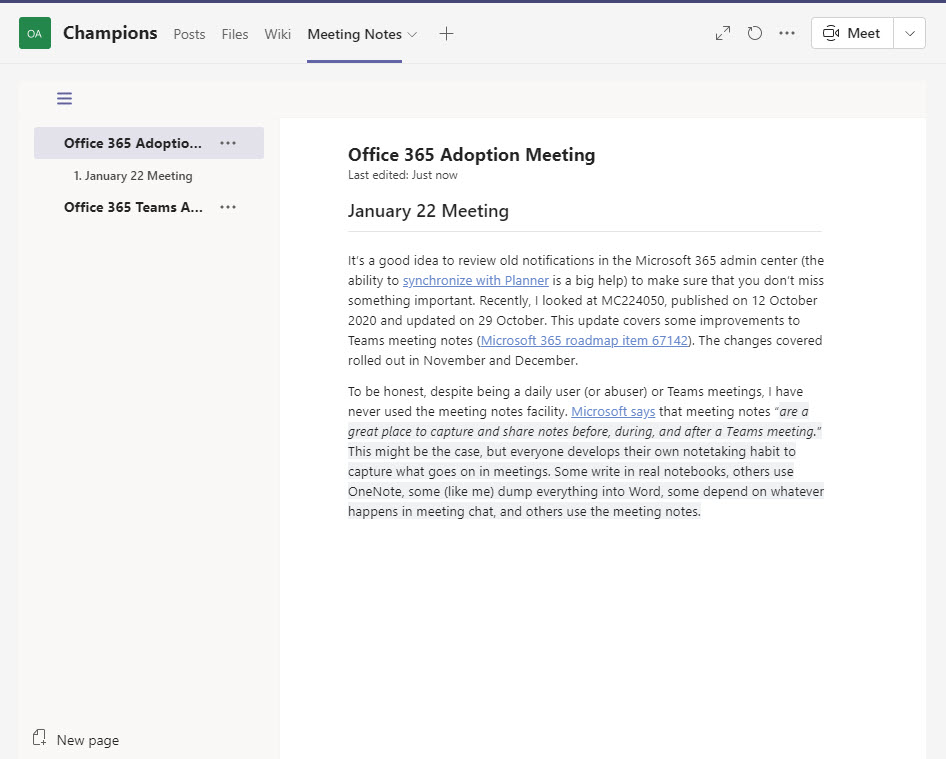
Teams meeting notes are a form of the Teams wiki with much the strengths and weaknesses of the wiki. Good enough for small meetings but limited for larger gatherings when you’ll probably want to capture details using a tool like Word or OneNote.
Yammer now boasts inclusive reactions, the ability to select a person-appropriate skin tone for thanks and like reactions. The feature is only available in the new Yammer UI. Being able to select a skin tone for reactions is not a new idea and now that Yammer has it, Teams can’t be far behind.
The inbound webhook connector used by Teams and Microsoft 365 Groups to accept information from external sources is getting a new format. Existing connectors must be updated by April 11, 2021. If not, data will stop flowing into the target channel or group, and that would be a bad thing.