A new feature makes it easier for Office 365 users to share documents in SharePoint Online and OneDrive for Business libraries with LinkedIn first-degree contacts. The LinkedIn folks are now included in the suggested people list. It’s much easier to pick someone from a list than to look for their email address (which might be out of date). Before you can share with LinkedIn, your Office 365 tenant and user account must be configured to support the connection.
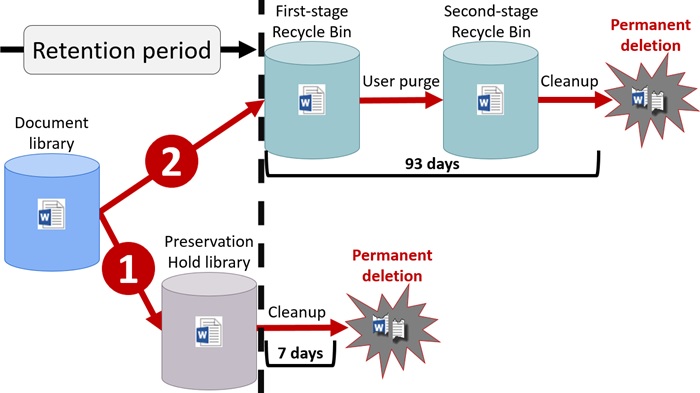
If you’re interested in deploying backups for SharePoint Online, you might be doing so to prevent data loss through accidental user deletion. However, Office 365 retention labels and policies can help prevent accidental deletion too. And the best thing is that retention policies and labels are part of Office 365 E3, so you don’t have to pay more to get protection.
Microsoft announced that the Office 365 E3 and E5 plans will receive new Information Protection licenses. They’re preparing for the introduction of sensitivity labels and the increased use of encryption to protect access to content in Office 365 apps like SharePoint Online, Exchange Online, OneDrive for Business, and Teams. You don’t have to do anything to prepare for the new licenses, but it’s nice to know what they are and how the licenses are used.
SharePoint Online supports the ability to create and publish a news digest from news items published on a site (or sites associated with a hub site). It’s a great way to spread information within an Office 365 tenant.
It’s easy to be fearful when companies move work to the cloud. But the simple fact is that there’s more work than ever before to do to master all of Office 365. Just go looking!
A recent update means that you can now apply column formatting for SharePoint Online lists and document libraries without the need to write JSON code.
The Save for Later feature gives SharePoint Online users a way to mark documents and news items so that they can easily follow up and read the full content of those items.
Making it easy to protect Office 365 content with encryption is great, but it has some downsides too. One of the obvious problems that we have is that encrypted documents in SharePoint and OneDrive for Business libraries can’t be found unless their metadata holds the search phrase.
The Microsoft-Adobe initiative to support Azure Information Protection for PDF files has reached general availability. Things look good and the issues encountered in the preview are removed. You can store protected PDFs inside Office 365, but be prepared to download the files to be able to view them.
Knowing how retention policies process Office 365 data can be hard to understand, especially if multiple policies are involved. Office 365 doesn’t give a global view of how retention policies affect workloads, but here’s how to use PowerShell to find out what policies process the sites in a tenant.
Some recent questions in the Microsoft Technical Community show confusion about the email addresses used by Office 365 Groups and Teams. Here’s our attempt to clarify.
Embedding external content in modern SharePoint Online (SPO) pages is a really easy task using Microsoft’s out of the box Embed webpart. In the WebPart settings panel we can add the external content URL (such as a YouTube video) or by using the standard <iFrame> HTML tag: In the event we want to add a …
Read More “How to Embed External Content in Modern SharePoint Online Pages”
Rights management and encryption are likely to be a much more common Office 365 feature in the future. Sensitivity labels makes protection easy for users to apply through Office apps. The downside is that protection makes content harder to access for some Office 365 and ISV functionality.
Not everyone likes writing JSON files, so when the time comes to customize a site design or site script for SharePoint Online, it’s a relief to find that a visual tool is available for the job.
Backup vendors say you should definitely use their products to protect your valuable Microsoft 365 data. Backup products can do a good job, but the nature of Microsoft 365 creates many challenges at a technical level. A lack of APIs is the most fundamental issue, but the connected nature of Microsoft 365 apps is another.
How many guest users does your Office 365 tenant have? And how many of those accounts are actually used? Given that many Office 365 applications now generate guest user accounts to facilitate external access to content, managing these accounts is a growing concern.
In the same way Microsoft is introducing a new modern search experience in modern SharePoint Online (SPO) sites, the same strategy is being applied to search in Office 365. In this article we take a look at the modern search features you can find in Office 365. This article was published on Petri.com on September 27, 2018. …
Read More “New Search Experiences Coming to Office 365”
A Petri.com article explains how to publish news items generated in SharePoint Online sites to Teams channels. It’s the way to spread those important announcements as widely as possible.
A very common question when discussing modern SharePoint is why Microsoft has not modernized the creation of subsites to give Office 365 tenants the ability not only to create a modern site, but also to create modern subsites. Fortunately, Microsoft has finally released a modern subsite template to allow any organization still using subsites to …
Read More “Modernizing SharePoint Subsites”
Office 365 tenant administrators can use different ways to access user data. Shouldn’t you have a policy to govern that access?
An update coming soon to the SharePoint Online Admin Center means that administrators will be able to manage Office 365 Groups. Given the importance of Office 365 Groups to SharePoint, it’s a good change.
Microsoft says that they will soon send email to users when Office 365 detects a higher than normal number of file deletions in SharePoint Online sites and OneDrive for Business accounts. There’s no real detail provided as to what counts as a high volume or why Microsoft is sending the notifications.
As announced in this post in the Microsoft Tech Community, the ability to add a new Office 365 Group to an existing SharePoint Online (SPO) site is finally available to Office 365. You will be able to connect existing classic SPO sites to new Office 365 Groups by means of two possible mechanisms: PowerShell (first …
Read More “Adding a New Microsoft 365 Group to an Existing (Classic) SharePoint Online Site”
Search in SharePoint Online (SPO) is an area that we will see change in the future. Indeed, you might have already seen some of the new search experiences in your modern SPO sites
The security company Avanan says that 10% of Office 365 users are affected by “PhishPoint.” That estimate seems pretty high to me.
SharePoint Online and OneDrive for Business sites will soon boast 100 minimum versions, which they need to power features like AutoSave and OneDrive Restore. But if you work for an organization that doesn’t want to use so many versions for files, you can update your SharePoint tenant configuration to disable minimum versioning. That is, provided you do so by September 30, 2018.