Microsoft makes a strong case that all Azure Active Directory accounts should be protected with multi-factor authentication (MFA). That’s a great aspiration, but the immediate priority is to check accounts holding administrative roles. This post explains how to use PowerShell to find and report those accounts.
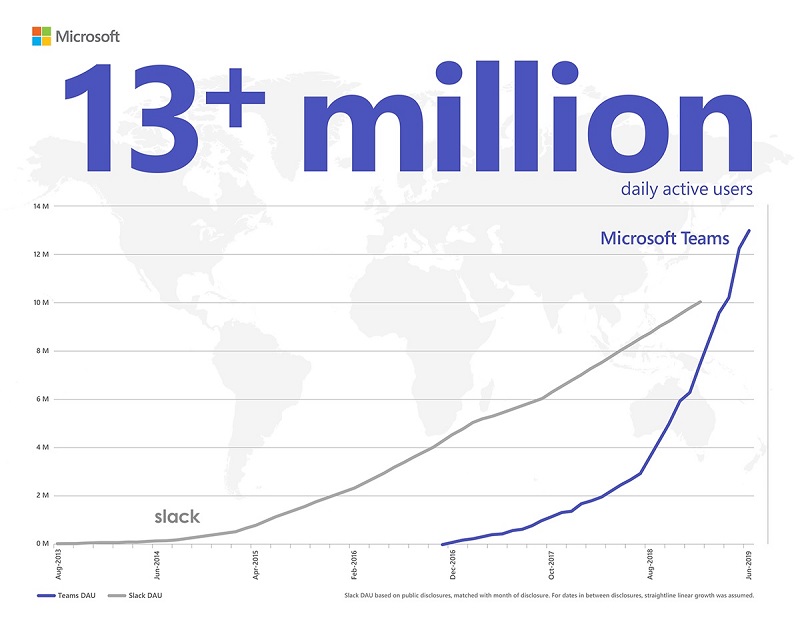
A July 11 Microsoft post brings the news that Teams has 13 million daily active users. That number surpasses the equivalent for Slack, so there’s much joy in the Teams camp. However, the number is lower than we expected based on the total number of organizations Microsoft reports to use Teams. It might just be the difference between active users and licensed users.
Teams now supports @-less mentions, meaning that the clients are intelligent enough to monitor user input for names of team members. If a name is found, Teams suggests making it a mention. The only thing you’ve got to remember is to capitalize the first letter of a name as otherwise Teams regards a name as just another word.
Sometimes it is difficult to understand exactly who has access to a document in a SharePoint Online site. The Manage Access option helps you understand who has access through group membership and sharing links. And if you need to adjust a sharing link, you can do it quickly and easily.
To drive interaction with viewers of Stream videos, you can add one or more Microsoft forms and have the forms appear at different times during the video playback. It’s a nice example of how Microsoft combines different bits of Office 365 to add more value to applications.
Microsoft has introduced a new Roles page in the Office 365 Admin Center. The new page lists all the roles available in an Office 365 tenant and allows admins to quickly see who holds each role, and add or remove accounts from roles as needed. It’s a small but important change that is welcome because it makes it easier for tenants to manage permissions.
Microsoft has announced that the switchover to the new OWA interface will start on July 22 when Office 365 tenants in targeted release will lose the chance to toggle back and forth between the two interfaces. By the end of September, everyone will use the new OWA. Let’s hope that Microsoft has fixed all the functionality gaps by then.
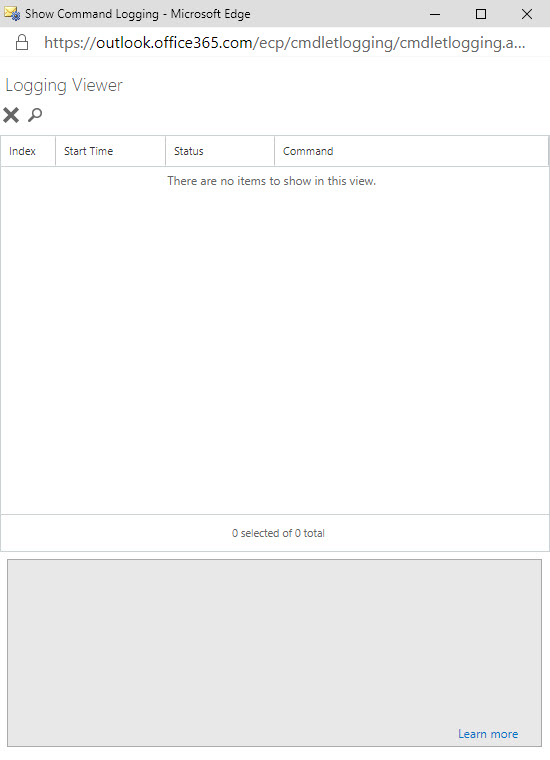
The ability to see the PowerShell commands executed by Exchange administrative centers has existed since Exchange 2007. Now something has changed in Exchange Online and the command log is blank. It’s sad because many administrators learned to use PowerShell by examining how Microsoft used it to manage Exchange. Let’s hope that Microsoft fixes this bug soon.
Teams does a good job of storing compliance records in Exchange Online mailboxes so that the data is available for Office 365 eDiscovery. But the number of records can impact the mailbox quotas of frontline workers, especially if they send graphics in personal and group chats. Here’s some PowerShell to help discover how much mailbox quota is being absorbed by compliance records.
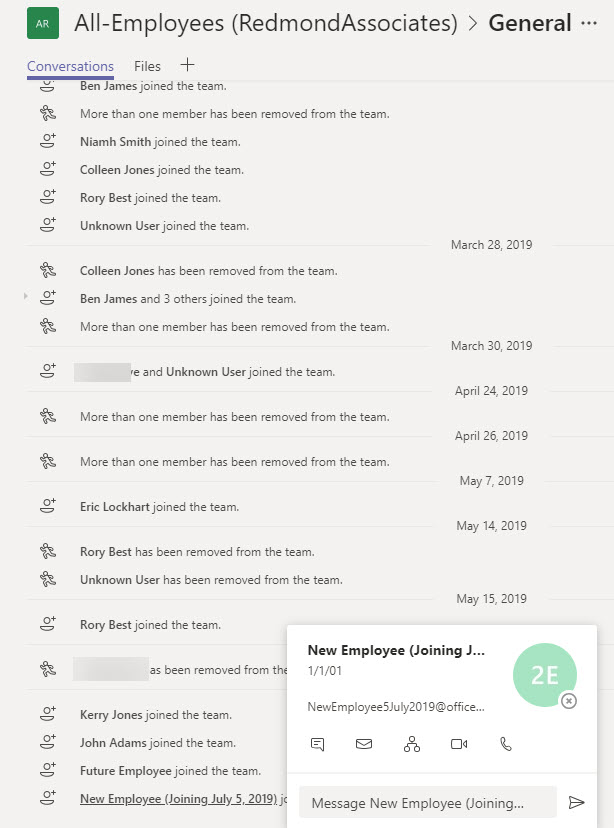
Do people read the notifications posted by Teams to the General channel of a team when someone joins or leaves the membership? Maybe they don’t take much notice, but these messages can tell you that someone has joined or left the company. If you think that Teams should have a setting to suppress “add member” messages for a team, consider supporting the User Voice suggestion on the topic.
Office 365 for IT Pros (2020 Edition) is now available in PDF/EPUB and Kindle formats. This is the sixth edition of the only eBook that is continually updated to match developments in Office 365. Existing subscribers will get a very attractive offer to renew their subscription for the new edition. Those of you who have never bought Office 365 for IT Pros should do so immediately because it’s packed full of practical information.
Microsoft launched the MailItemsAccessed audit event (to capture when email is opened) in January, reversed the roll-out in April, and now might restart sometime in Q3. It’s an odd situation that isn’t really explained by a statement from Microsoft. Are they going to charge extra for this audit event? Will they be analyzing the events? Or does Office 365 capture too many mail items accessed events daily?
A reader asks if it’s possible to create a dynamic Office 365 group for global administrators. Well, it is and it isn’t. Azure Active Directory doesn’t give us the ability to execute the right kind of query to find global administrators, but with some out-of-the-box thinking, we can find a way to accomplish the task.
A reader reports that the Teams Files channel tab is only able to display 300 items from a large SharePoint folder. Three hundred seemed like an arbitrary limit, but as it turns out, the new Files channel tab fixes the problem and all will be well once Office 365 completes the deployment to get the new Files Channel tab to all tenants.
Have you ever wondered how Microsoft secures SharePoint Online and OneDrive for Business data? Well, a recent article explains it all, and it is fascinating reading. Chunks and keys and blobs and encryption. A must-read article for anyone interested in SharePoint security.
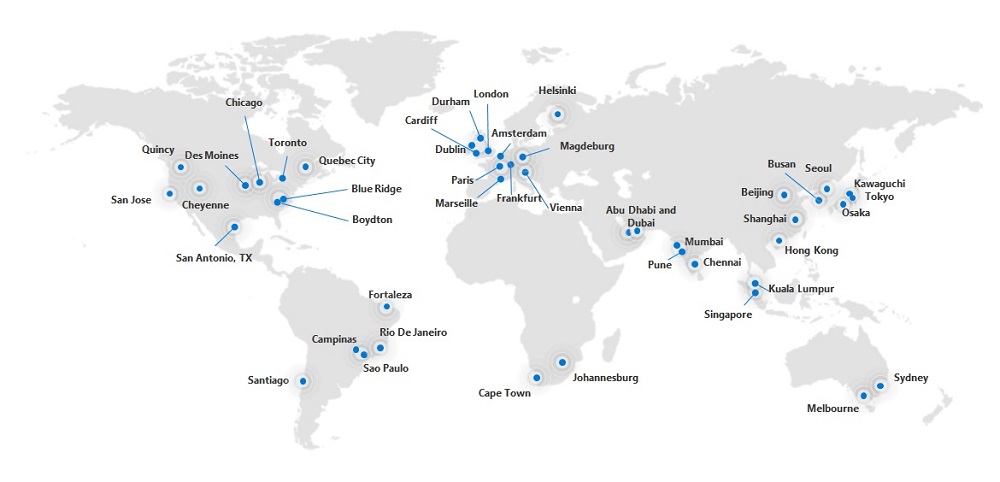
Office 365 is now generally available from datacenters in Dubai and Abu Dhabi to serve Arabian Gulf and Middle East customers. Microsoft hasn’t said what services are being delivered from the new datacenters, but it’s likely that they will begin with Exchange Online and SharePoint Online.
Org-wide teams are great because they feature automatic membership management. But sometimes you don’t want new Office 365 accounts showing up in org-wide teams. The solution is to create the account with some dummy details to mask the identity of the real person and update the account after they join the company.
Microsoft is changing how the removal of an Office 365 retention policy affects the data held in the SharePoint Online Preservation Hold Library. Instead of an immediate purge, data will be kept for a period to allow administrators to recover it. Sounds like a good idea and it should help people rescue a situation when someone removes a retention policy in error. That is, if they notice that the policy is no longer in effect for a site.
Removing Office 365 accounts is easily done through the Admin Center. You can also restore deleted accounts within 30 days, but what if you want to remove accounts in such a way that they can’t be restored? The answer is that it can be done using a two-stage process. And if the mailboxes belonging to those accounts are on hold, they are kept as inactive mailboxes.
Much to our surprise, this blog is covering the availability of three new Office 365 browser themes. We’re only doing this so that we can avoid including it in the Office 365 for IT Pros eBook. We know this will upset some people, especially fans of the unicorn theme, but we really have to draw the line somewhere when deciding what should be in the book.
Microsoft Stream, the video service for Office 365, is about two years old and the work that the developers have done in automatic transcription is showing some benefits. We took some videos filmed last week and put them through Stream to discover just what automatic transcription can do – and how useful transcript search is.
A quick visit to Washington DC included speaking at AvePoint’s ShiftHappens conference and taping some videos about Office 365 for Petri.com. The conference was small enough to encourage real interaction between attendees and overall was a very enjoyable event.
By the end of June, Office 365 tenants around the world will enjoy the chance to use the new announcement post type in Teams. I’m not altogether sure that the new post type will make our lives more productive, but it might brighten some of the boring announcements organizations are prone to make,
Microsoft says that the migration of Yammer storage for new files in SharePoint will restart in June and finish worldwide by the end of July. That’s great, but the migration of existing files is a manual process that can only be described as tiresome and error-prone. But it adds to the allure of Yammer and increases its prestige in the ranks of Office 365 apps. Or maybe not.
The 15th update for the Office 365 for IT Pros eBook is now available for download by subscribers. This is the last update before we switch focus to the 2020 edition, due for release on July 1, 2019. We didn’t make many changes in this update because we’re busy writing for the 2020 edition, but the changes we did make are important and we’d like people to download and use the updated files.
Microsoft has announced that it will deploy the ability to add shared mailboxes to Outlook Mobile by the end of July. But if you want to see the feature early, you can join the Testflight program and install the beta version of Outlook mobile. Using Outlook for iOS with Testflight also forces the upgrade of your Office 365 tenant to the Microsoft Sync Technology.
Microsoft has announced that Outlook Mobile (iOS and Android) will include support for Exchange Online shared mailboxes “in the next several weeks,” which probably means early July 2019. The update comes as good news for many people who have been forced to use an IMAP4-based workaround to access shared mailboxes. Microsoft is also making some other changes to improve the Files view and calendar sync in Outlook mobile.
Microsoft has implemented a new synchronization mechanism in Outlook ProPlus to deal more efficiently with shared folders. The new approach increases the limit from 500 to 5,000 folders and is a more elegant and precise solution. Users who manage other peoples’ mailboxes will appreciate the change after they install build 11629.20196 or later.
The new version of OWA boasts new abilities for owners to manage Office 365 Groups. The new UI is pretty slick and a welcome upgrade to the previous capabilities. You’ll still need to revert to PowerShell to manage some aspects of Office 365 Groups, but not as many times as you used to.
Microsoft has refreshed the Files channel tab to expose more functionality for Teams users when working with SharePoint Online document libraries.Office 365 commercial tenants should see the new UI in June 2019. The new Files channel tab is almost at feature parity with the functionality available through the SharePoint browser UI, but it still lacks the ability to expose and edit document properties.
The Office 365 for IT Pros eBook writing team will soon launch the 2020 edition of the only book that is continuously updated to keep track of developments inside Office 365. Existing subscribers will be able to upgrade to the new edition for $14.95, and anyone who buys a full-price copy in May or June 2019 will receive a free upgrade to the 2020 edition thanks to sponsorship from Quadrotech.
A busy week included speaking engagements in Germany and Oslo. The Experts Live Norway event saw Tony talk about Office 365 data governance, a topic he thinks he knows well. You can grab a copy of the presentation he used in Oslo from this post.
A reader wants the benefits of dynamic Office 365 groups without having to pay for Azure AD premium licenses. It’s relatively straightforward to maintain the membership of a group with PowerShell. That is, if your directory is accurately populated and the right results are returned when you look for who the set of group members should be.
Despite the age of the protocols, you can cheerfully connect a wide range of IMAP4 and POP3 clients to Exchange Online. If you do, you might need to consider how to handle calendar appointments, and if you want to use iCAL, you’ll need to make some adjustments with PowerShell.
Exchange Online supports inactive mailboxes as a way to keep mailbox data online after Office 365 accounts are removed. Inactive mailboxes are available as long as a hold exists on them. You can update mailbox properties to exclude all or some org-wide holds. If you exclude holds from a mailbox, you run the risk that Exchange will permanently remove the mailbox. If that’s what you want, all is well, but if it’s not, then you might not be so happy.
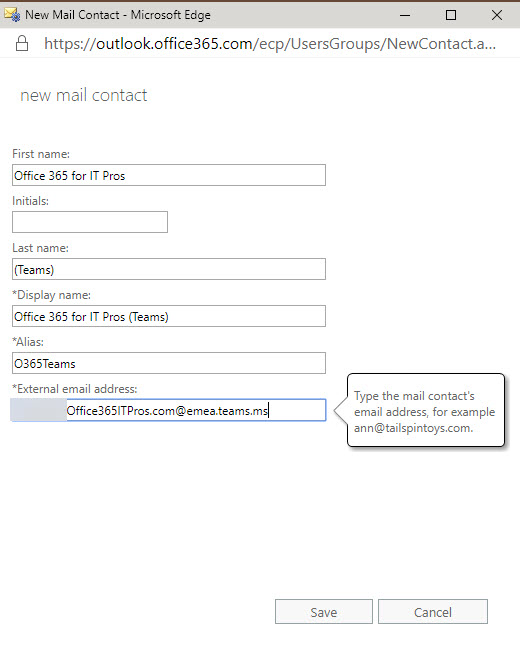
Teams allows users to send email to channels via special email addresses. Those addresses aren’t very user-friendly, but you can add them as mail contacts so that channel addresses show up in the Exchange GAL. It’s easy to do and makes it much easier for people to email Teams channels. That is, until someone removes the channel email address…
How best to add every team in your tenant to the Office 365 Groups Expiration Policy? Well, one way is to check all groups for Teams. Another is to use Get-Team to return the set of teams and process those. But then you should think about how to mark the teams that are in the policy in such a way that you don’t process them again. It’s easy to do this with one of the Exchange Online custom attributes.
Teams App Setup policies allow tenant administrators to modify the set of apps shown in the Teams navigation bar,. You can add your own apps and move apps around and then assign policies to select groups of users individually or using PowerShell. This is part of a set of features designed to make apps more manageable within enterprises. The next step will be Teams app permission policies (not yet available).
Office 365 supervision policies can now make use of artificial intelligence and machine learning to detect offensive language in email and Teams communications. The data model covers a wide range of problematic language, but only in English. You can go ahead and cheerfully continue to swear in French, German, and other languages with no danger of being detected by policy.
A recent report puts the availability of Azure behind Google and Amazon Web Services (AWS). Office 365 tenants depend on Azure in a variety of ways. The recent problems occurred in a variety of places and there’s no common thread connecting the different issues. It seems like Azure has had a run of bad luck, so let’s hope that the bad days have passed and reliability improves.