A reader reports that the Teams Files channel tab is only able to display 300 items from a large SharePoint folder. Three hundred seemed like an arbitrary limit, but as it turns out, the new Files channel tab fixes the problem and all will be well once Office 365 completes the deployment to get the new Files Channel tab to all tenants.
Have you ever wondered how Microsoft secures SharePoint Online and OneDrive for Business data? Well, a recent article explains it all, and it is fascinating reading. Chunks and keys and blobs and encryption. A must-read article for anyone interested in SharePoint security.
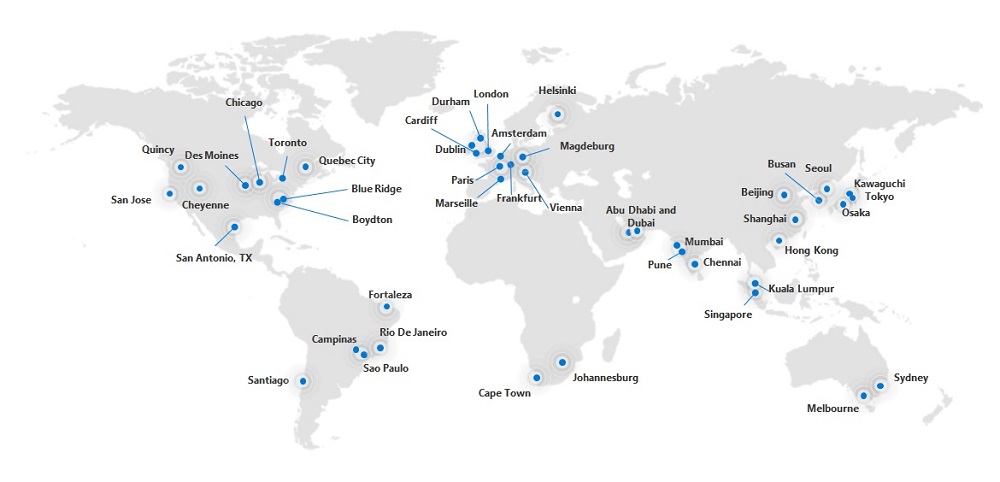
Office 365 is now generally available from datacenters in Dubai and Abu Dhabi to serve Arabian Gulf and Middle East customers. Microsoft hasn’t said what services are being delivered from the new datacenters, but it’s likely that they will begin with Exchange Online and SharePoint Online.
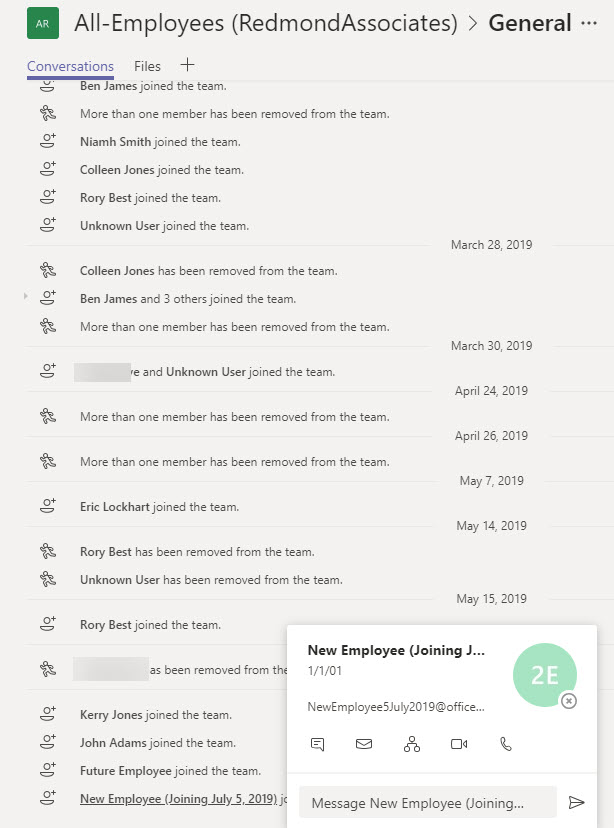
Org-wide teams are great because they feature automatic membership management. But sometimes you don’t want new Office 365 accounts showing up in org-wide teams. The solution is to create the account with some dummy details to mask the identity of the real person and update the account after they join the company.
Microsoft is changing how the removal of an Office 365 retention policy affects the data held in the SharePoint Online Preservation Hold Library. Instead of an immediate purge, data will be kept for a period to allow administrators to recover it. Sounds like a good idea and it should help people rescue a situation when someone removes a retention policy in error. That is, if they notice that the policy is no longer in effect for a site.
Removing Office 365 accounts is easily done through the Admin Center. You can also restore deleted accounts within 30 days, but what if you want to remove accounts in such a way that they can’t be restored? The answer is that it can be done using a two-stage process. And if the mailboxes belonging to those accounts are on hold, they are kept as inactive mailboxes.
Much to our surprise, this blog is covering the availability of three new Office 365 browser themes. We’re only doing this so that we can avoid including it in the Office 365 for IT Pros eBook. We know this will upset some people, especially fans of the unicorn theme, but we really have to draw the line somewhere when deciding what should be in the book.
Microsoft Stream, the video service for Office 365, is about two years old and the work that the developers have done in automatic transcription is showing some benefits. We took some videos filmed last week and put them through Stream to discover just what automatic transcription can do – and how useful transcript search is.
A quick visit to Washington DC included speaking at AvePoint’s ShiftHappens conference and taping some videos about Office 365 for Petri.com. The conference was small enough to encourage real interaction between attendees and overall was a very enjoyable event.
By the end of June, Office 365 tenants around the world will enjoy the chance to use the new announcement post type in Teams. I’m not altogether sure that the new post type will make our lives more productive, but it might brighten some of the boring announcements organizations are prone to make,
Microsoft says that the migration of Yammer storage for new files in SharePoint will restart in June and finish worldwide by the end of July. That’s great, but the migration of existing files is a manual process that can only be described as tiresome and error-prone. But it adds to the allure of Yammer and increases its prestige in the ranks of Office 365 apps. Or maybe not.
The 15th update for the Office 365 for IT Pros eBook is now available for download by subscribers. This is the last update before we switch focus to the 2020 edition, due for release on July 1, 2019. We didn’t make many changes in this update because we’re busy writing for the 2020 edition, but the changes we did make are important and we’d like people to download and use the updated files.
Microsoft has announced that it will deploy the ability to add shared mailboxes to Outlook Mobile by the end of July. But if you want to see the feature early, you can join the Testflight program and install the beta version of Outlook mobile. Using Outlook for iOS with Testflight also forces the upgrade of your Office 365 tenant to the Microsoft Sync Technology.
Microsoft has announced that Outlook Mobile (iOS and Android) will include support for Exchange Online shared mailboxes “in the next several weeks,” which probably means early July 2019. The update comes as good news for many people who have been forced to use an IMAP4-based workaround to access shared mailboxes. Microsoft is also making some other changes to improve the Files view and calendar sync in Outlook mobile.
Microsoft has implemented a new synchronization mechanism in Outlook ProPlus to deal more efficiently with shared folders. The new approach increases the limit from 500 to 5,000 folders and is a more elegant and precise solution. Users who manage other peoples’ mailboxes will appreciate the change after they install build 11629.20196 or later.
The new version of OWA boasts new abilities for owners to manage Office 365 Groups. The new UI is pretty slick and a welcome upgrade to the previous capabilities. You’ll still need to revert to PowerShell to manage some aspects of Office 365 Groups, but not as many times as you used to.
Microsoft has refreshed the Files channel tab to expose more functionality for Teams users when working with SharePoint Online document libraries.Office 365 commercial tenants should see the new UI in June 2019. The new Files channel tab is almost at feature parity with the functionality available through the SharePoint browser UI, but it still lacks the ability to expose and edit document properties.
The Office 365 for IT Pros eBook writing team will soon launch the 2020 edition of the only book that is continuously updated to keep track of developments inside Office 365. Existing subscribers will be able to upgrade to the new edition for $14.95, and anyone who buys a full-price copy in May or June 2019 will receive a free upgrade to the 2020 edition thanks to sponsorship from Quadrotech.
A busy week included speaking engagements in Germany and Oslo. The Experts Live Norway event saw Tony talk about Office 365 data governance, a topic he thinks he knows well. You can grab a copy of the presentation he used in Oslo from this post.
A reader wants the benefits of dynamic Office 365 groups without having to pay for Azure AD premium licenses. It’s relatively straightforward to maintain the membership of a group with PowerShell. That is, if your directory is accurately populated and the right results are returned when you look for who the set of group members should be.
Despite the age of the protocols, you can cheerfully connect a wide range of IMAP4 and POP3 clients to Exchange Online. If you do, you might need to consider how to handle calendar appointments, and if you want to use iCAL, you’ll need to make some adjustments with PowerShell.
Exchange Online supports inactive mailboxes as a way to keep mailbox data online after Office 365 accounts are removed. Inactive mailboxes are available as long as a hold exists on them. You can update mailbox properties to exclude all or some org-wide holds. If you exclude holds from a mailbox, you run the risk that Exchange will permanently remove the mailbox. If that’s what you want, all is well, but if it’s not, then you might not be so happy.
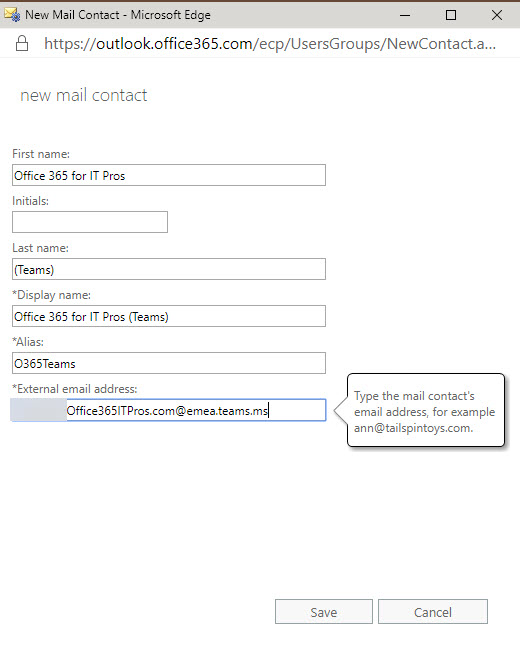
Teams allows users to send email to channels via special email addresses. Those addresses aren’t very user-friendly, but you can add them as mail contacts so that channel addresses show up in the Exchange GAL. It’s easy to do and makes it much easier for people to email Teams channels. That is, until someone removes the channel email address…
How best to add every team in your tenant to the Office 365 Groups Expiration Policy? Well, one way is to check all groups for Teams. Another is to use Get-Team to return the set of teams and process those. But then you should think about how to mark the teams that are in the policy in such a way that you don’t process them again. It’s easy to do this with one of the Exchange Online custom attributes.
Teams App Setup policies allow tenant administrators to modify the set of apps shown in the Teams navigation bar,. You can add your own apps and move apps around and then assign policies to select groups of users individually or using PowerShell. This is part of a set of features designed to make apps more manageable within enterprises. The next step will be Teams app permission policies (not yet available).
Office 365 supervision policies can now make use of artificial intelligence and machine learning to detect offensive language in email and Teams communications. The data model covers a wide range of problematic language, but only in English. You can go ahead and cheerfully continue to swear in French, German, and other languages with no danger of being detected by policy.
A recent report puts the availability of Azure behind Google and Amazon Web Services (AWS). Office 365 tenants depend on Azure in a variety of ways. The recent problems occurred in a variety of places and there’s no common thread connecting the different issues. It seems like Azure has had a run of bad luck, so let’s hope that the bad days have passed and reliability improves.
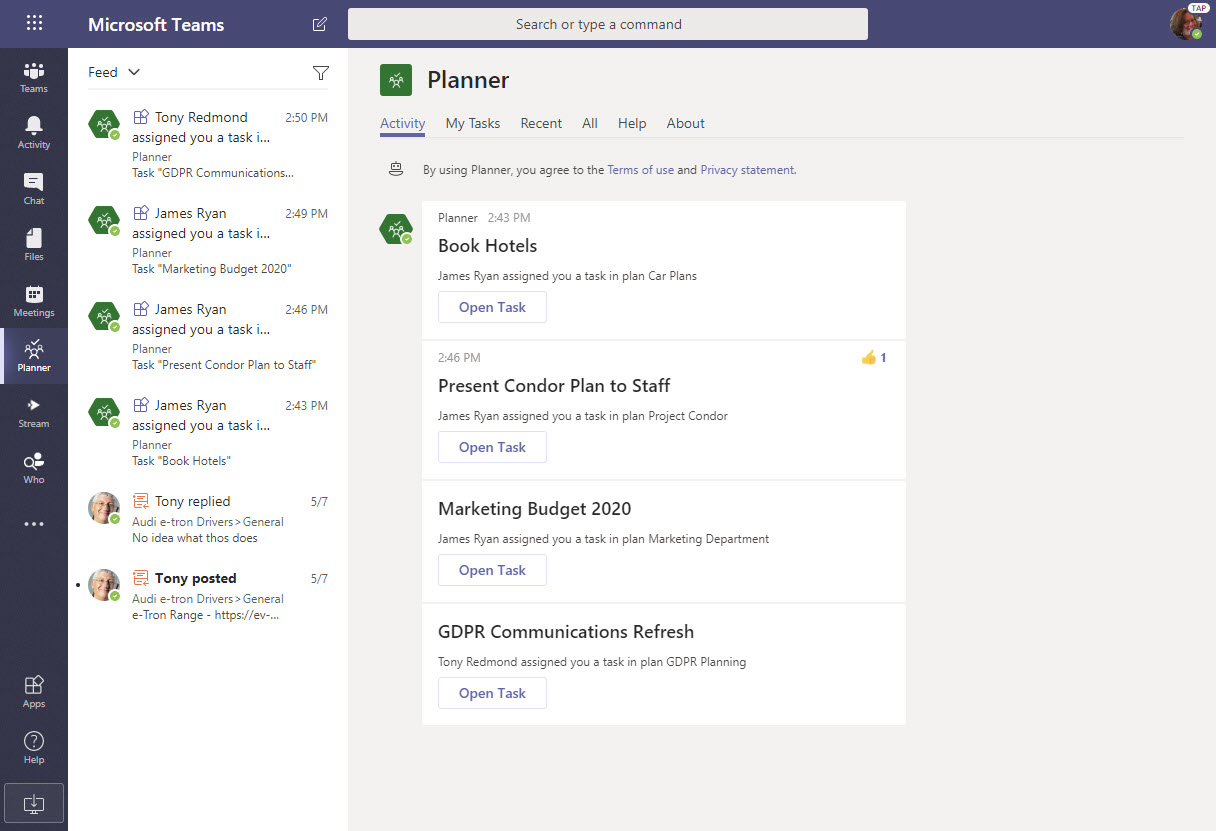
If you’ve integrated Planner into Teams by creating channel tabs for plans, users are now notified when they are assigned new tasks.The notifications turn up in the Teams activity feed. Why? Well, the Planner bot sends messages to people about new tasks, so its chats as treated like new messages in a personal chat.
The CISA report titled “Microsoft Office 365 Security Observations” makes five recommendations to improve security of an Office 365 tenant. The recommendations are valid, but competent administrators won’t take long to implement them. In fact, the worst thing is that consultants brought in to help organizations didn’t seem to have much expertise in securing Office 365.
The Groups section of the Azure Active Directory portal now includes a preview of a feature to configure the Office 365 Groups naming policy without going near PowerShell. Although those proficient with scripts and GUIDs will lament this sad reduction in standards, the normal administrator will welcome the chance to forget some obscure syntax.
The writing team has released update 14 for the Office 365 for IT Pros eBook. Fifteen out of twenty-four chapters are updated, so the new files should be downloaded and used to make sure that you have the latest content. This is the last major update for the 2019 edition as the writing team is now focused on creating the 2020 edition for publication in July.
Two Office 365 Message Center notifications bring news about an increase in the number of participants for a Teams group chat to 100 and improvements in shareable links for files. Moving the limit from 50 to 100 for a group chat makes these conversations more flexible. Adding permissions to the sharing links used by Teams gives users more control over how they share information with others.
The LinkedIn connector for Office 365 now uses a group to control the set of user accounts allowed to connect their accounts to LinkedIn. It’s a good change because it makes the connection easier to manage. Even so, you might still need to use PowerShell to manage the membership of the group, especially if you want to add multiple people to the group at one time.
On May 7, Microsoft eventually fixed a truncation bug that affected group events (creation, add member, etc.) ingested into the Office 365 audit log. The fix took far too long coming and the overall response is certainly not Microsoft’s finest hour. Audit events, after all, are pretty important in compliance scenarios and it’s not good when those events are incomplete.
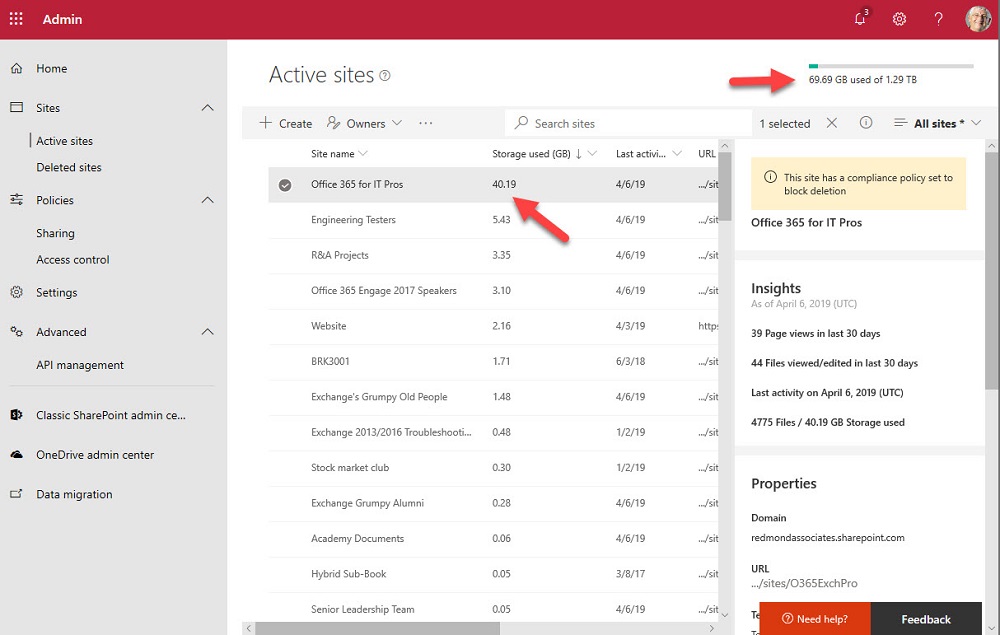
One of the great things about Teams is the way that it orchestrates Office 365 resources like SharePoint Online sites. The downside is that a tenant’s valuable SharePoint storage quota might be absorbed by a profusion of Teams. To offset the problem, you can apply lower limits to sites belonging to Teams and the best approach is to use PowerShell for the job.
From version 1.56 on, you can synchronize your My Tasks list from Planner to To-Do. The integration works well and it’s easy to manage Planner tasks in To-Do. Some of the more advanced actions aren’t available in To-Do, but a quick link to Planner solves the problem. Planner tasks are also accessible in the To-Do mobile app.
Microsoft commissioned Forester Consulting to write a total economic impact study of Teams. As you’d expect, the report says that Teams is a good deal. But like any consulting report, you need to question the findings and assumptions to figure out where the truth lies. In some cases, I simply disagree with the underlying logic for a conclusion. In others, I think the authors are mistaken. It’s up to you to make your own assessment.
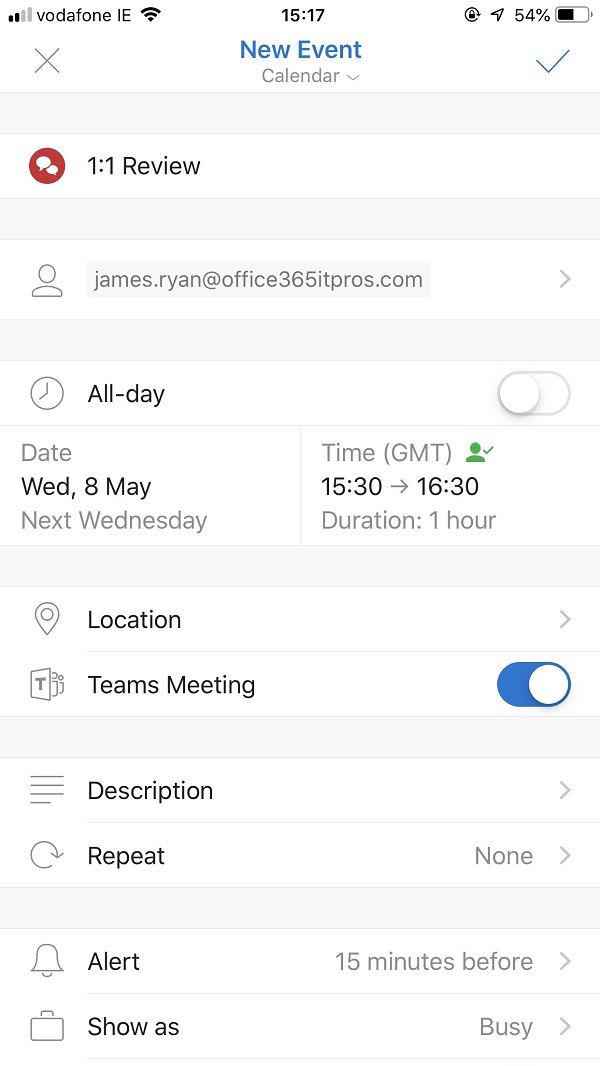
Outlook Mobile clients can now schedule Teams meetings, even if your tenant isn’t using the newer version of Outlook’s mobile connection architecture. The Office 365 tenant setting for Skype for Business Online co-existence mode has to be configured to use Teams, and once everything is in place Outlook is happy to schedule Teams meetings.
Over the next few months, Tony will speak at a number of small but intense technology conferences. The nice things about these conferences is that attendees and speakers mingle much more than they do at the uber-conferences. If you feel like coming along to The Experts Conference, ShiftHappens, the European Collaboration Summit, or Experts Live Norway, you can learn more about Office 365 and associated technologies without going through the wildness that Ignite can be at times.
The modern SharePoint Admin Center introduces the ability to rename the URLs for SharePoint site names. This responds to a longstanding customer request and makes it possible for site names to reflect what users see elsewhere in Office 365 groups or Teams. It’s a small but welcome change in the fit and finish category.