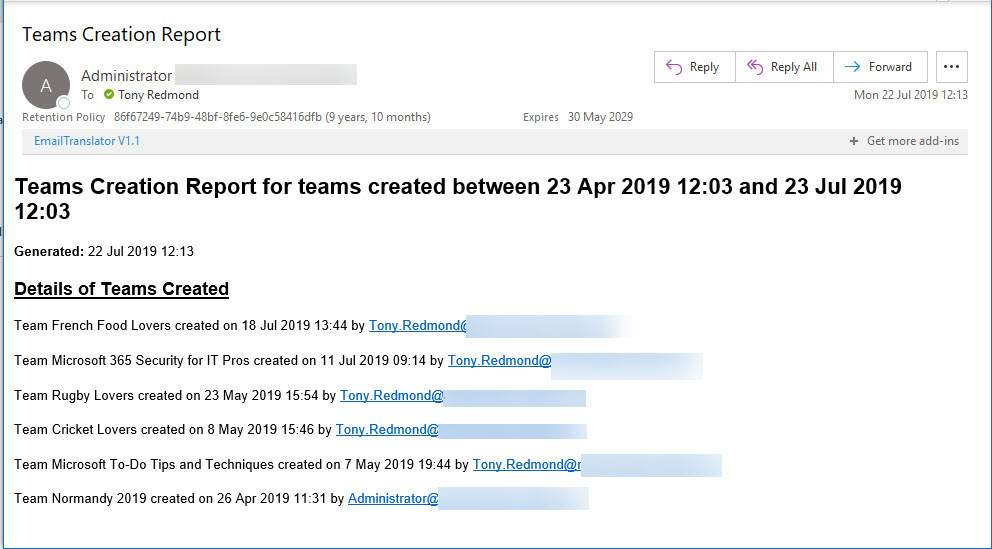
Office 365 Activity Alerts don’t seem to be working too well these days. At least, that’s what we found when we tried to create an alert for Teams creation events. Never mind, PowerShell will do the job as we can quickly whip up a PowerShell script to find audit records for team creations and put them into an email.
Teams has added the ability for moderation of channel conversations. If you moderate a channel, only team owners can post new conversations and you can restrict things even further by stopping members, bots, and connectors posting. It’s a feature that helps to control communication in channels intended to publish and share information.
The Teams Test Call feature calls up a bot to test your audio and camera settings in exactly the way that they’re heard and seen during a real meeting. It’s a very useful feature that emulates the Check Call Quality feature in Skype for Business Online. It won’t improve your looks, but Test Call will at least prove that you can be heard.
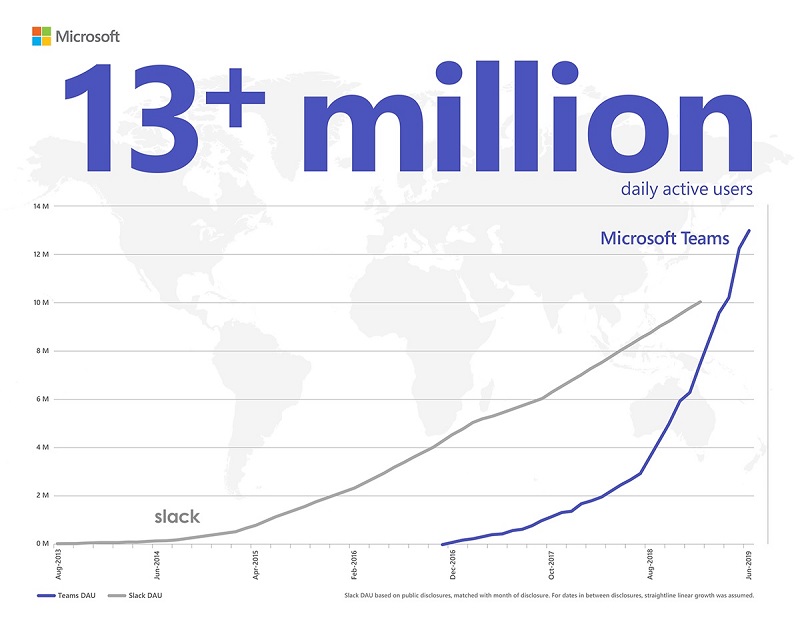
A July 11 Microsoft post brings the news that Teams has 13 million daily active users. That number surpasses the equivalent for Slack, so there’s much joy in the Teams camp. However, the number is lower than we expected based on the total number of organizations Microsoft reports to use Teams. It might just be the difference between active users and licensed users.
Teams now supports @-less mentions, meaning that the clients are intelligent enough to monitor user input for names of team members. If a name is found, Teams suggests making it a mention. The only thing you’ve got to remember is to capitalize the first letter of a name as otherwise Teams regards a name as just another word.
Teams does a good job of storing compliance records in Exchange Online mailboxes so that the data is available for Office 365 eDiscovery. But the number of records can impact the mailbox quotas of frontline workers, especially if they send graphics in personal and group chats. Here’s some PowerShell to help discover how much mailbox quota is being absorbed by compliance records.
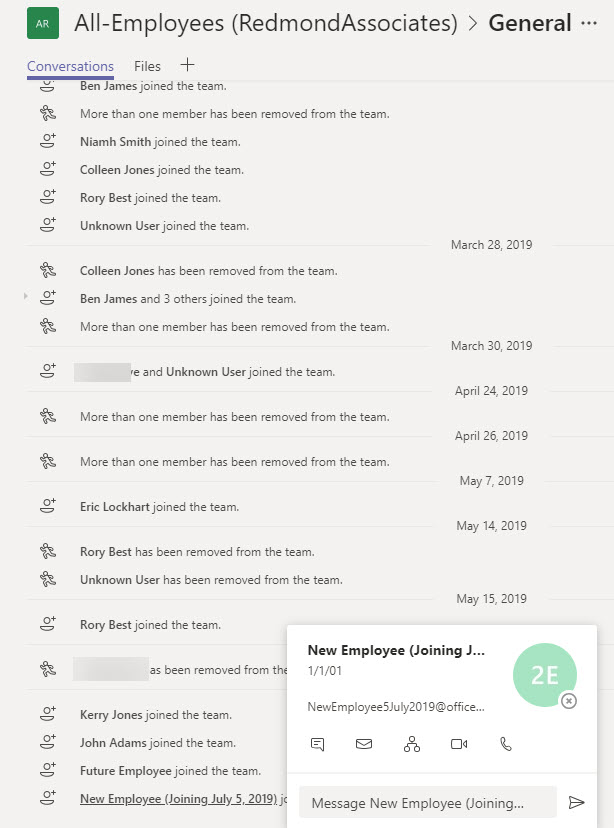
Do people read the notifications posted by Teams to the General channel of a team when someone joins or leaves the membership? Maybe they don’t take much notice, but these messages can tell you that someone has joined or left the company. If you think that Teams should have a setting to suppress “add member” messages for a team, consider supporting the User Voice suggestion on the topic.
A reader reports that the Teams Files channel tab is only able to display 300 items from a large SharePoint folder. Three hundred seemed like an arbitrary limit, but as it turns out, the new Files channel tab fixes the problem and all will be well once Office 365 completes the deployment to get the new Files Channel tab to all tenants.
Org-wide teams are great because they feature automatic membership management. But sometimes you don’t want new Office 365 accounts showing up in org-wide teams. The solution is to create the account with some dummy details to mask the identity of the real person and update the account after they join the company.
By the end of June, Office 365 tenants around the world will enjoy the chance to use the new announcement post type in Teams. I’m not altogether sure that the new post type will make our lives more productive, but it might brighten some of the boring announcements organizations are prone to make,
Microsoft has refreshed the Files channel tab to expose more functionality for Teams users when working with SharePoint Online document libraries.Office 365 commercial tenants should see the new UI in June 2019. The new Files channel tab is almost at feature parity with the functionality available through the SharePoint browser UI, but it still lacks the ability to expose and edit document properties.
A reader wants the benefits of dynamic Office 365 groups without having to pay for Azure AD premium licenses. It’s relatively straightforward to maintain the membership of a group with PowerShell. That is, if your directory is accurately populated and the right results are returned when you look for who the set of group members should be.
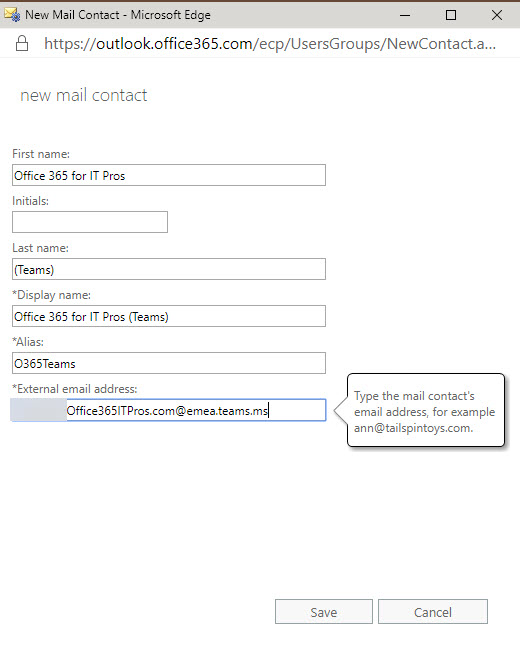
Teams allows users to send email to channels via special email addresses. Those addresses aren’t very user-friendly, but you can add them as mail contacts so that channel addresses show up in the Exchange GAL. It’s easy to do and makes it much easier for people to email Teams channels. That is, until someone removes the channel email address…
How best to add every team in your tenant to the Office 365 Groups Expiration Policy? Well, one way is to check all groups for Teams. Another is to use Get-Team to return the set of teams and process those. But then you should think about how to mark the teams that are in the policy in such a way that you don’t process them again. It’s easy to do this with one of the Exchange Online custom attributes.
Teams App Setup policies allow tenant administrators to modify the set of apps shown in the Teams navigation bar,. You can add your own apps and move apps around and then assign policies to select groups of users individually or using PowerShell. This is part of a set of features designed to make apps more manageable within enterprises. The next step will be Teams app permission policies (not yet available).
Office 365 supervision policies can now make use of artificial intelligence and machine learning to detect offensive language in email and Teams communications. The data model covers a wide range of problematic language, but only in English. You can go ahead and cheerfully continue to swear in French, German, and other languages with no danger of being detected by policy.
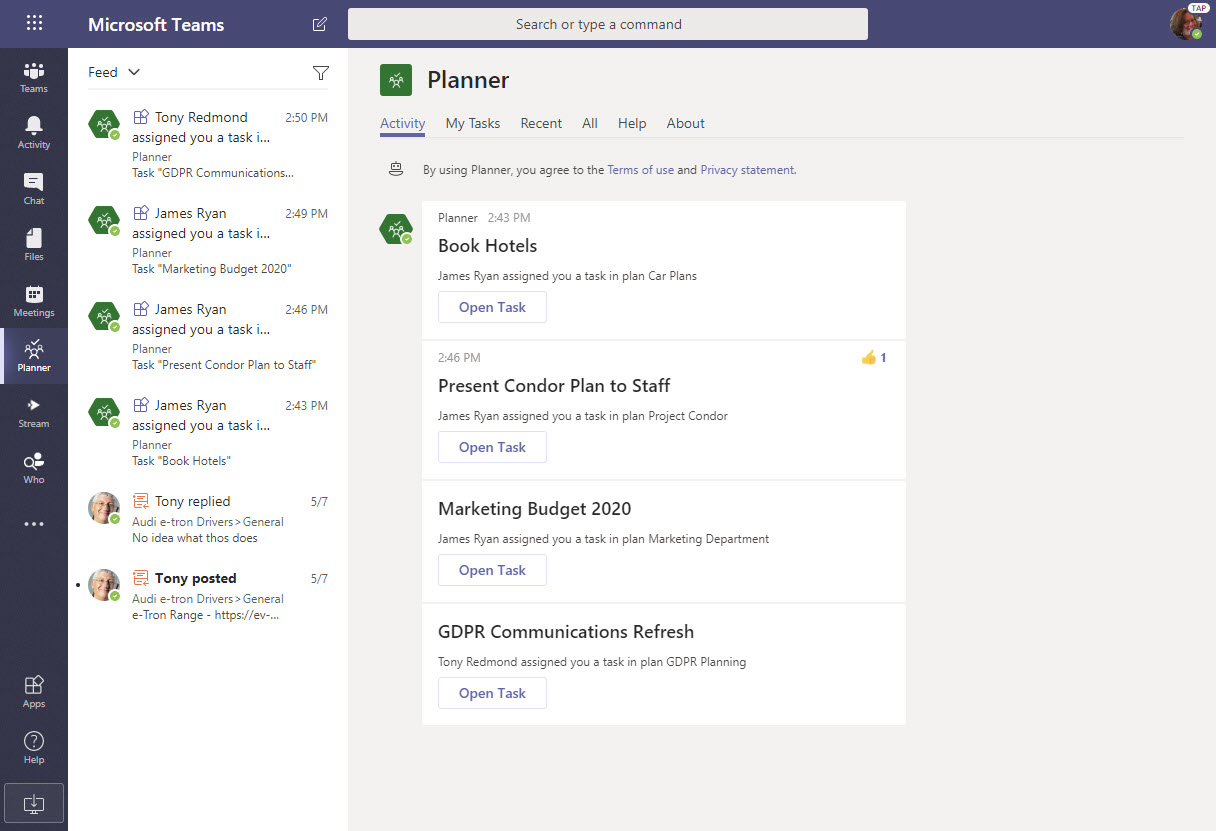
If you’ve integrated Planner into Teams by creating channel tabs for plans, users are now notified when they are assigned new tasks.The notifications turn up in the Teams activity feed. Why? Well, the Planner bot sends messages to people about new tasks, so its chats as treated like new messages in a personal chat.
The Groups section of the Azure Active Directory portal now includes a preview of a feature to configure the Office 365 Groups naming policy without going near PowerShell. Although those proficient with scripts and GUIDs will lament this sad reduction in standards, the normal administrator will welcome the chance to forget some obscure syntax.
Two Office 365 Message Center notifications bring news about an increase in the number of participants for a Teams group chat to 100 and improvements in shareable links for files. Moving the limit from 50 to 100 for a group chat makes these conversations more flexible. Adding permissions to the sharing links used by Teams gives users more control over how they share information with others.
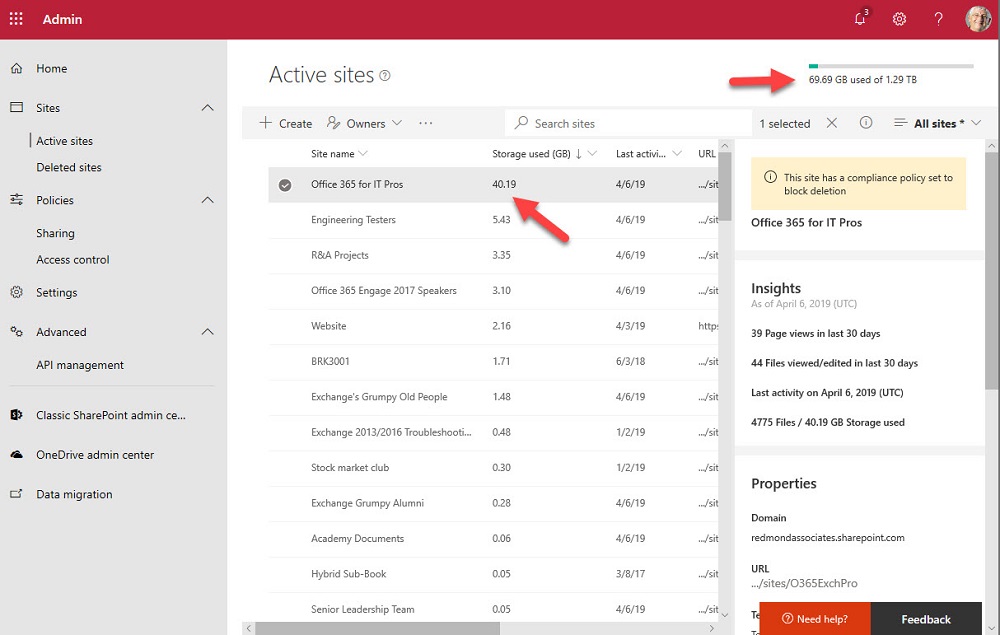
One of the great things about Teams is the way that it orchestrates Office 365 resources like SharePoint Online sites. The downside is that a tenant’s valuable SharePoint storage quota might be absorbed by a profusion of Teams. To offset the problem, you can apply lower limits to sites belonging to Teams and the best approach is to use PowerShell for the job.
Microsoft commissioned Forester Consulting to write a total economic impact study of Teams. As you’d expect, the report says that Teams is a good deal. But like any consulting report, you need to question the findings and assumptions to figure out where the truth lies. In some cases, I simply disagree with the underlying logic for a conclusion. In others, I think the authors are mistaken. It’s up to you to make your own assessment.
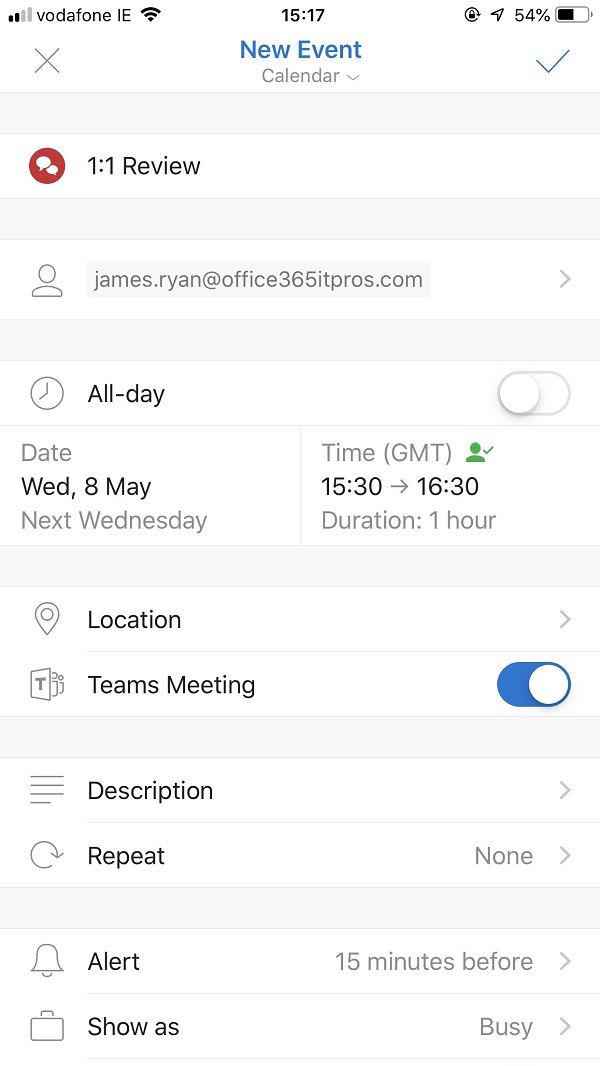
Outlook Mobile clients can now schedule Teams meetings, even if your tenant isn’t using the newer version of Outlook’s mobile connection architecture. The Office 365 tenant setting for Skype for Business Online co-existence mode has to be configured to use Teams, and once everything is in place Outlook is happy to schedule Teams meetings.
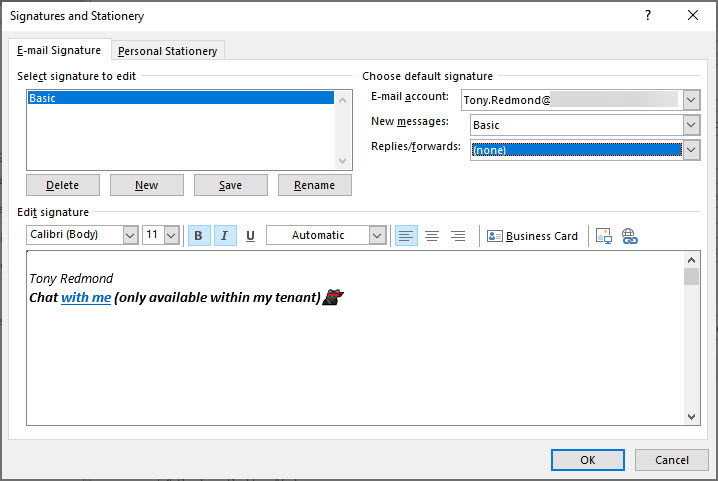
Teams deep links are probably not something you chat about a lot, but they can be used to start off a personal chat. In this post, we discuss how to insert a deep link in an Outlook or OWA signature so that recipients can contact you to follow up a topic started in email. It’s a quirky detail about Teams that might be interesting for you.
You can use Exchange Address Book Policies (ABPs) to limit the ability of Teams users to chat with each other. Everything works as expected until you look for some new teams to join only to find that Teams can’t suggest any teams to you. The problem seems to be with filtering the set of teams returned by the Microsoft Graph to take account of the scope applied to the user. At least, that’s what I think is going on.
The latest build of the Teams clients (desktop, browser, and mobile) include the ability to remove a participant from a group chat. This is a much-requested feature that’s taken surprisingly long to deliver, but now you can have fun adding and removing people to your heart’s desire. It’s nice to have a chat and it’s even better if you can control who you chat with.
Office 365 notification MC177587 tells us that Teams will soon start to move underused teams to the More section of the teams gallery, letting users concentrate on the set of teams that they really use. Background agents do the work of detecting teams that haven’t been accessed in 45 days or so and users get the chance to reverse the process. But it’s a good idea to let users know what’s coming, just in case they panic when they can’t find a moved team.
Office 365 notification MC177013 gives the news that team members can now nominate other people to join a private team. Teams routes the requests to team owners, who approve or deny access. It’s a small but useful update.
The Teams Admin Center now boasts the ability to delete teams and (if you don’t want to get rid of them altogether) archive teams. And unarchive teams back into use. All is good, even if Microsoft is making slow progress at building out Teams management functionality. Some of the slowness is due to dependencies, some because of other factors.
The tabs in a Teams channel can be associated with many different forms of data. When you delete a channel, you only remove the conversations for that channel. Any other data is left intact, including files in the folder in the SharePoint site used by the team. To fully clean up a deleted channel, you must therefore check what tabs exist and what data is accessed through those tabs.
Office 365 Message Center update MC176548 says that Teams has started to roll out “Praise” a way of sending another user a graphical reminder of how much you appreciate their work. Undoubtedly, praising people in Teams will make the world a happier place.
Every Office 365 group (and team) has a SharePoint site. But how to find the URLs of all the sites used by teams in a tenant. One PowerShell answer came from Syskit, but it’s an old technique and we can do better now by fetching a list of teams in the tenant and then retrieving the URL for each team-enabled group.
Teams supports federated chat with other users in Office 365 tenants using a feature called external access. It’s similar to the way that Skype for Business federated chat works, except that you can’t use emojis. Generally things work very well, which is nice when you want to reach out and communicate with someone externally.
At the Enterprise Connect conference, Microsoft announced that Teams is now used by 500,000 organizations. That’s a jump of 80,000 since the last data given in January. They also said that 150 organizations have more than 10,000 users and that Teams is used by 91 of the Fortune 100. All in all, some impressive numbers.
Microsoft announced that the era of favorites and following is over for Teams. The new way is to show or hide teams and configure notifications for channels. Apparently, people found the old terminology confusing. Hopefully the new world of Show/Hide and Channel notifications will be more reassuring.
New data about the number of Slack and Workplace usage gives the chance to compare how Microsoft is doing with Teams. And the answer is that things seem to be going well, largely because Teams is growing off the huge Office 365 base. With 155 million users (the last figure) and 3 million more added monthly, Teams has a lot more to go after in the Office 365 installed base.
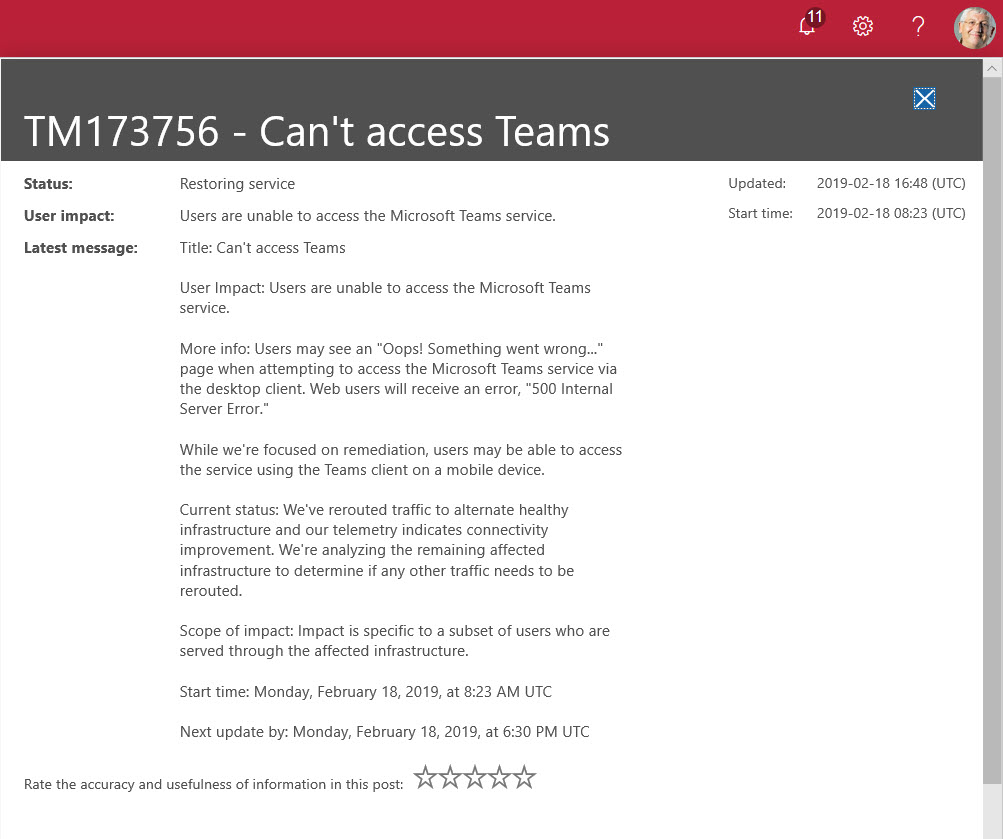
Microsoft Teams suffered its first major worldwide outage on 18 February 2019. Users reported a failure to connect because Teams couldn’t authenticate them. The Post-Incident report for TM173756 revealed an issue with the Azure Key Vault. What’s more interesting is that the issue affected users in multiple Office 365 datacenter regions, which is not good.
In one of those interesting (but possibly worthless) facts discovered about Office 365, we find that audit records are captured for Teams compliance records written into Exchange Online group mailboxes. The Search-UnifiedAuditLog cmdlet reveals details that we can interpret using some techniques explained in Chapter 21 of the Office 365 for IT Pros eBook.
Office 365 changes all the time, which is good because it keeps the Office 365 for IT Pros writing team busy and happy. Discussions this week included Microsoft’s response to a Dutch DPIA, the effect large Teams have on Yammer, how Exchange Online validated a fix to a security problem, and graphics to help understand the components of the Microsoft 365 E3 and E5 plans.
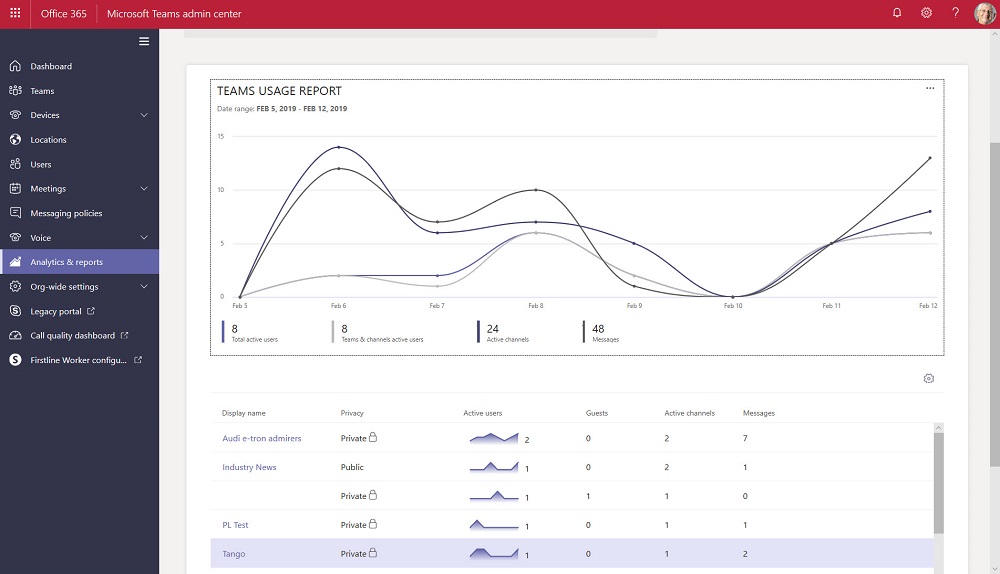
The Teams Admin Center has been renamed to remove any reference to Skype for Business Online. The console now includes a set of new Teams usage reports. The reports differ from what’s available in the Office 365 Admin Center and aren’t quite as powerful, but we can expect Microsoft to improve and refine these reports over time.
Teams users can now set their own status message to inform co-workers about what they’re up to for the next few hours, days, or on an ongoing basis. It’s a small but useful feature that seems to have crept into Teams without much publicity!