The Azure Active Directory Group Naming policy generates display names for new Office 365 Groups created by various applications. You can include a prefix or suffix in a group name, The approach taken by email favored prefixes because this gathered all distribution lists together in one place in the GAL. However, prefixes work better with applications like Teams.
The Microsoft Immersive Reader exists to make messages more readable for those who need a little help. It’s built into Office apps like Teams and OWA. Most people don’t know this or don’t need to use the reader, but those who do need support to access and understand text will find the Immersive Reader very helpful.
The prospect of allowing user-controlled purchases of Power Platform apps in an Office 365 tenant maddened many administrators. Microsoft promised to release a method to allow administrators control self-service purchases in a tenant. The MSCommerce PowerShell module is now available. Here’s how to use it to disable self-service purchases.
Some new and updated cmdlets in a new version of the Teams PowerShell module are available to support private channels. The cmdlets and parameters are pretty straightforward for anyone used to working with Teams through PowerShell. Remember to read up and understand all about private channels before trying to work with them through PowerShell.
OWA now supports the automatic labeling of outbound messages with Office 365 Sensitivity Labels. The new feature uses Office 365 sensitive data types to detect content in messages that should be protected, and once detected, the message is stamped with a label before it passes through the Exchange Online transport service.
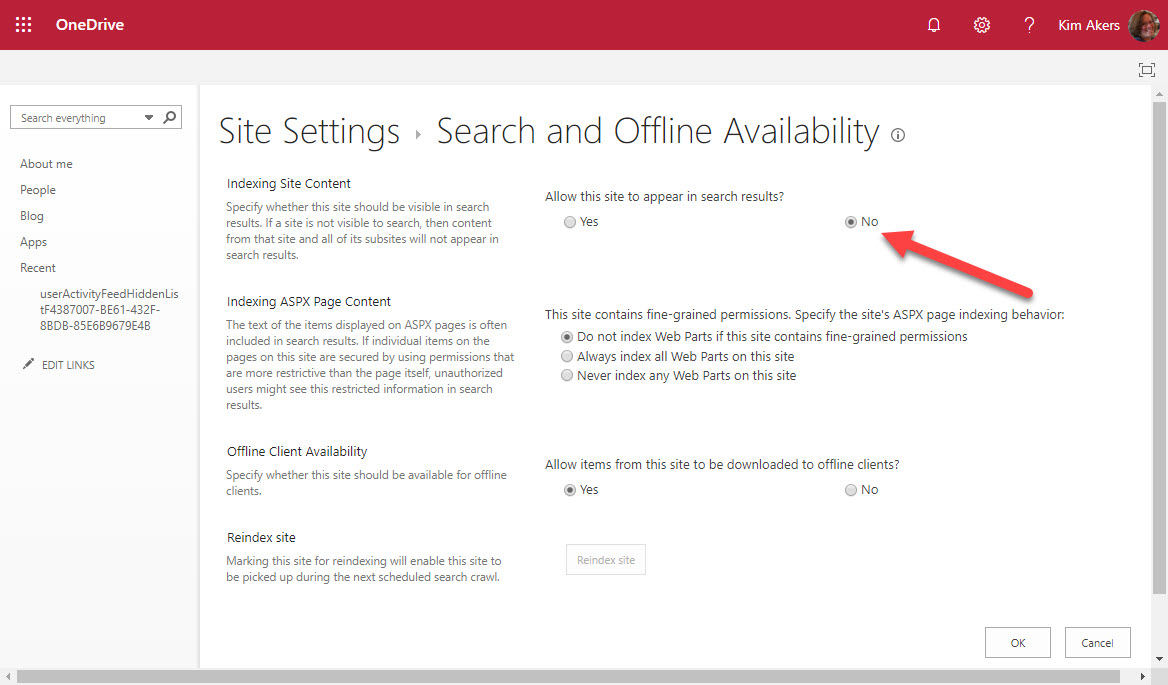
OneDrive for Business owners could exclude their sites from Office 365 searches but they can’t any longer after Microsoft acted to remove the capability from OneDrive site settings. All OneDrive for Business sites are now indexed and available to Office 365 searches.
ORCA is a project to help Office 365 tenant administrators validate their anti-spam and anti-malware settings against recommendations from Microsoft. ORCA is installed as a PowerShell module with just one cmdlet. After running Get-ORCAReport, you’ll have a report containing recommendations and observations about your configuration.
Microsoft is rolling out an upgraded rich federated experience for Teams to replace the previous plaintext 1:1 chat experience. When enabled, you’ll be able to send rich formatted text, emojis, and stickers to external Teams users in other Office 365 tenants and greatly increase the impact of your thoughts. The upgrade is rolling out now and should be complete worldwide by early December 2019.
Lots of announcements and other news flowed at the Microsoft Ignite 2019 Conference. Here’s a YouTube playlist for four short videos about interesting topics from the conference. We cover Office 365, Exchange Online, OneDrive for Business, and the famous “Office 365 substrate.”
Tired of receiving Teams notifications when you’re watching TV in the evenings? Turn on Quiet Hours to suppress notifications when you prefer not to be disturbed. And you can even turn off notifications for complete days too. All of this is only available for the Teams mobile client because it’s the only that people are most likely to be using when they should be thinking about their work-life balance.
In a session recorded at Microsoft Ignite 2019, Tony Redmond discusses the question of will Microsoft Teams take over from email. The session covers the strengths and weaknesses of both technologies and makes recommendations for how organizations can take full advantage of Teams and email.
Like any technology, Microsoft Teams has some lesser-known parts. At the Ignite 2019 conference, we had the chance to talk about topics from backups to DLP to background blur. You can listen to the recording of the session online and download a copy of the deck here.
Tony and Paul taped episode 17 of the Office 365 Exposed podcast at the Microsoft Ignite 2019 conference with guests Mark Kashman and Ross Smith IV of Microsoft. Topics discussed included SharePoint’s success at reaching 100 million monthly active users, Project Cortex, and Intune.
Nine new REST-based PowerShell cmdlets are available for Exchange Online. They offer the prospect of better performance and reliability. Here are the code samples we used to test the new cmdlets for a theater session delivered at the Microsoft Ignite 2019 conference. Anyone wanting to explore the new cmdlets can use these examples to get going.
At the Microsoft Ignite 2019 conference, Microsoft described how SharePoint Online will use Office 365 compliance features such as sensitivity labels and information barrier policies to better protect information stored in SharePoint sites. The Office Online apps also gain support for sensitivity labels. The new features will enter a mixture of public and private previews starting November 20.
At the Ignite 2019 conference in Orlando, Microsoft announced that Office 365 Groups will soon support sensitivity labels, but only to mark group containers with levels of sensitivity. The actual content of the containers, like the messages in Outlook Groups or Teams, will remain unaffected by the labels. For now.
In a surprise development, Microsoft reversed course for Exchange Online auto-expanding archives and imposed a 1TB limit. The promise of a bottomless archive that continually expanded to cope with user data is removed. Although it’s reasonable for Microsoft to restrict the consumption of resources, suddenly implementing a limit is not, especially when you don’t communicate with customers.
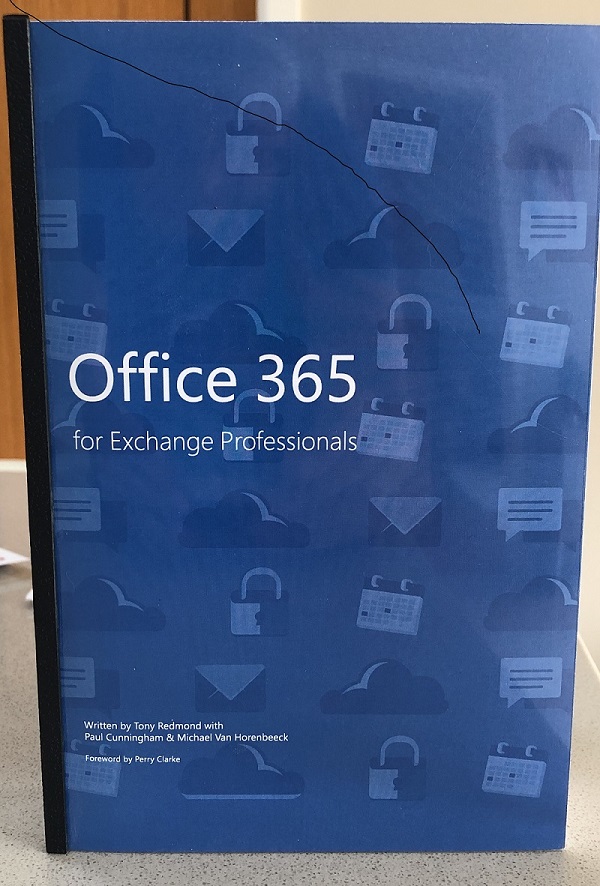
In May 2015 we launched the first edition of Office 365 for IT Pros at the new Microsoft Ignite conference. At that event, we had printed copies of the book. Since then we have learned our lesson and haven’t gone near hard copies, mostly because of the cost and complexity of coordinating content for a book that changes so often. If you’re considering writing a technical book about cloud services, our advice is to go along the ePublishing route.
The Office 365 for IT Pros writing team has published the November 2019 updates for the eBook. Subscribers can download the updated files from Gumroad.com (EPUB and PDF formats) or Amazon.com (Kindle). This update touches sixteen of the twenty-four chapters. We’d appreciate if our subscribers can download the new files as we hate to think of you using outdated material.
Teams supports federated guest access for Gmail accounts using the identity provider framework of Azure B2B Collaboration. Office 365 tenants must first decide if they want Gmail accounts as guests in all or some teams before going down the federation route. Why Teams and not other Office 365 apps? It’s all to do with the endpoint used by the client to connect. If it can handle federation, all good. If not, it’s standard Azure B2B Collaboration.
Modern browsers make it easy to pin websites to the Windows desktop and taskbar. Using OWA in this manner is great when network connections aren’t too reliable, like the flaky connections you often have on airline Wi-Fi networks. Other Office 365 apps work fine too when pinned from the browser, like the Admin Center, Planner, To Do, and Stream.
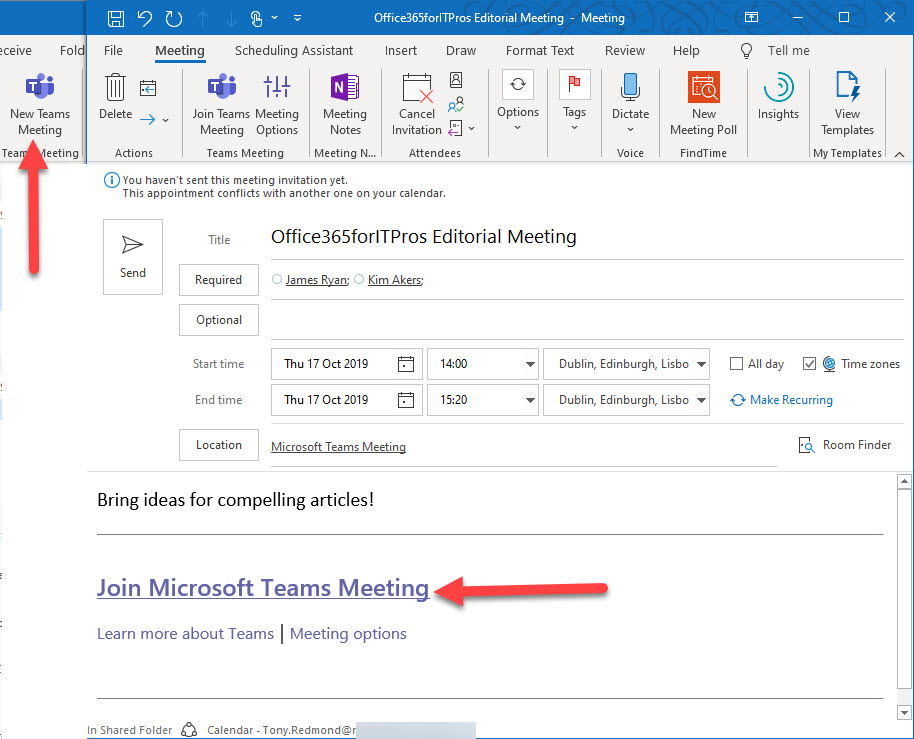
Outlook can schedule online Teams or Skype for Business Online meetings. But what marks an online meeting as different to a regular Outlook meeting? The magic lies in a set of MAPI properties populated by Outlook to help meeting participants connect to the right online meeting. A little poking behind the scenes with MFCMAPI reveals more.
Microsoft annoyed many Office 365 tenant administrators when they announced plans to allow self-service purchases for the Power Platform apps. A curious note in the FAQ might reveal how tenants can block this feature. If self-services purchases depend on accessing your tenant directory, maybe you can disable the service principal that holds the role enabling that access.
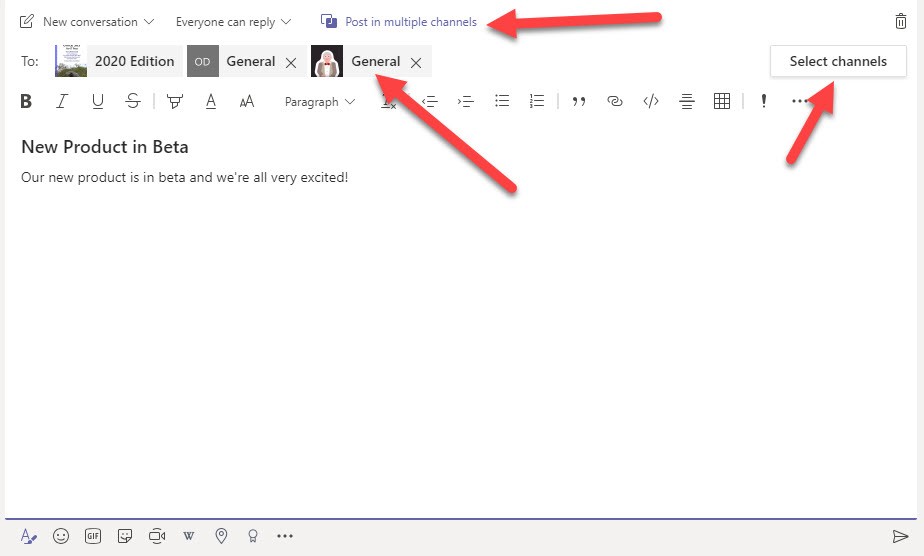
Microsoft Teams now supports the ability to post a topic to up to 50 channels at one time. It’s a feature that no doubt some will welcome with open arms, but it does come with a downside. For one thing, multi-channel posts might lead to a form of the email reply-all storm. Another potential issue is that there’s no good way to see the replies to all the messages posted in the target channels.
Paul Robichaux and Tony Redmond recorded episode 17 of their Office 365 Exposed podcast on October 23. It covers recent Office 365 news and an interview with Anna Chu of Microsoft. Anna is deeply involved in the organization of the Microsoft Ignite conference and we chatted about how sessions are selected and other topics.
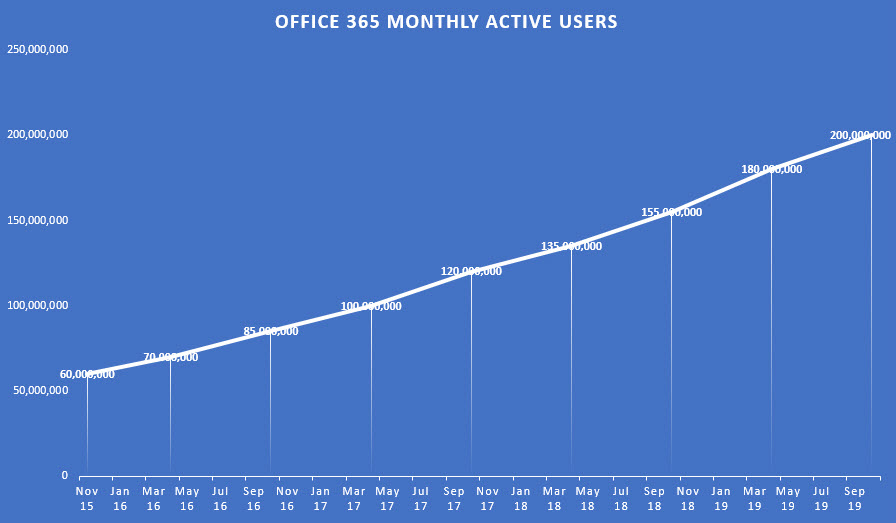
According to Microsoft’s FY20 Q1 results, Office 365 now has 200 million monthly active users. The interesting thing is that the growth has remained constant at about 3 million users per month since November 2015. Moving from 60 million users to 200 million over 4 years is impressive, but growth is probably going to become harder as the number of on-premises Microsoft customers decline.
Outlook for iOS and Android now support marking and encryption of email with Office 365 Sensitivity Labels. Sensitivity labels can now be applied through Office ProPlus, OWA, and Outlook mobile. All that really remains to achieve full coverage for sensitivity labels across Office 365 are the Office Online and SharePoint/OneDrive browser interfaces. In other news, Outlook Mobile also supports S/MIME.
OneDrive for Business now allows users to generate an external sharing report. The report is designed to help people understand what files are shared in their account. The report generates a CSV file that has lots of data, but you need to understand how to make sense of the data.
Azure Active Directory now features the public preview of the My Sign-Ins feature, which allows users to see where their sign-ins originate and what applications are used to sign-in. It’s a nice idea but Office 365 users are unlikely to find the page. We can help by creating a custom tile with a link to the My Sign-Ins page. The tile appears in the Office 365 apps menu and makes it easy for people to access their sign-in data.
The Office 365 for IT Pros author team is busy packing for the Microsoft Ignite 2019 conference in November. We’ll deliver sessions, tape podcasts, and staff booths, and come back with a ton of new information that we will incorporate into the December update for the Office 365 for IT Pros eBook.
Teams is all about open communication, but sometimes you just want to make a statement and not have a conversation. You can do this by restricting replies to a topic, in which case only the original author and channel moderators can reply. And if moderation isn’t used for a channel, team owners take that role.
Office 365 Informatiom Barriers allow tenants to erect communication firewalls between different groups. Teams supports Information Barriers, but currently has a problem adding new guest accounts to team memberships. An easy workaround exists, but debugging what’s going on is difficult because of the lack of clues.
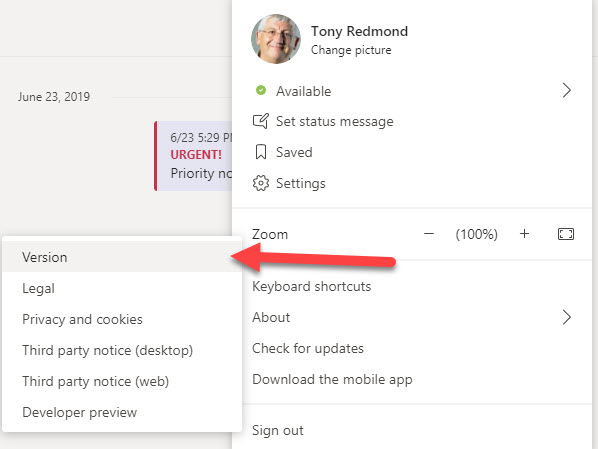
In an Office 365 notification to tenants, Microsoft says that the Modern Lifecycle Policy means that users must keep the Teams desktop up-to-date. The result is that users must make sure that their desktop client is no more than three months behind the latest software. If it is, they won’t be able to use the desktop client until it is updated.
Microsoft 365 applications create many Entra ID guest accounts. Here’s how to find old accounts and check their membership of Microsoft 365 groups. If you know the accounts that are old and stale and aren’t members of any Microsoft 365 group, you can consider removing them from your tenant.
The Office 365 Admin Center includes reports of licenses assigned to users. The same information can be extracted with PowerShell, which means that you can analyze license assignments anyway you wish. The script is quick and easy, mostly because its error handling is non-existent, but it’s enough to get going.
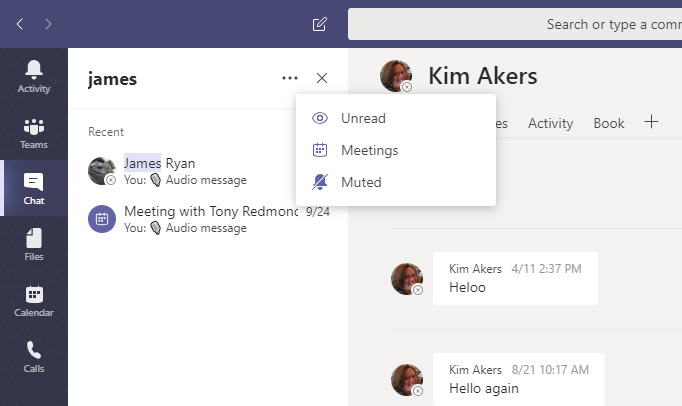
The Teams desktop and browser clients now offer the ability to filter personal chats and channels. Filtering is a useful feature, but it does draw the attention to the lack of precision in the Teams search function that really needs a revamp if Teams is to be taken seriously as a “hub for teamwork.”
It used to be more difficult to generate a report about the storage used by OneDrive for Business sites in an Office 365 tenant. Now it takes just a few lines of PowerShell. Here’s an example of a simple but powerful script to do the job.
The Teams desktop and browser clients now boasts the ability to report per-team and cross-team analytics. The information is interesting (at least the first time you look at it), but some doubts remain about its accuracy when the different methods of reporting are checked against each other. I’m sure it’s nothing more than timing, synchronization, or something else getting in the way.
The fight against spam and malware goes on unabated. ZAP, or zero-hour auto purge, is an Exchange Online Protection (EOP) feature that’s getting some extra features to deal better with spam and phish malware. New policy controls are available to control the feature.
Teams now supports live captions for meetings, but only for the English language. If you speak slowly and clearly into a high-quality microphone, you have a good chance that your words will be correctly interpreted. On the other hand, if you mumble or turn away from the microphone, be prepared for some interesting results. Overall, a nice enhancement that will be appreciated for those who need the captions.