Everyone’s got a question to ask, and if you have an Office 365 business subscription, you can use Forms to do the asking. It’s quick and easy to build a simple questionnaire and not much more trouble to build something more complex.
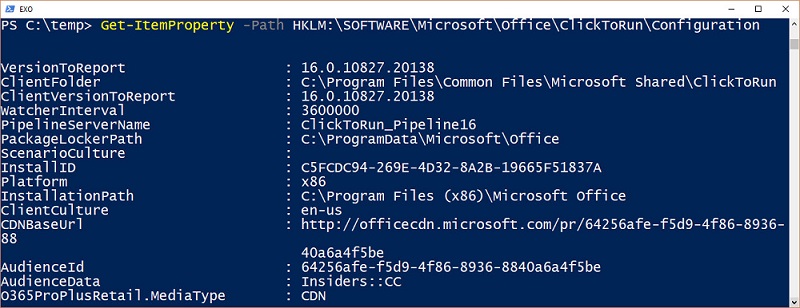
Microsoft would like Office 365 tenants to use the Click to Run (C2R) version of the Office desktop applications because C2R is automatically updated with new features. We like C2R, but we also like knowing what’s installed on user workstations. Here’s how to check the Click to Run configuration with PowerShell.
Org-Wide Teams are a nice feature, but calculating their membership can be puzzling, as in the case of some perfectly valid accounts that were not added to a team. As it turns out, the error lies in Azure Active Directory.
Microsoft has confirmed that they will not release a free hybrid license for Exchange 2019. That’s OK, because if you want to use Exchange 2019 as the HCW host, you simply assign the server one of your licenses. After all, the server won’t simply be running hybrid connectivity, will it?
Microsoft is releasing new training resources and materials as part of its continuous commitment to help in the adoption and usage of Microsoft Teams. In the “Instructor-led training for Microsoft Teams” web site, anyone using or interested in using Microsoft Teams will find a series of free, live, online training classes designed to get you …
Read More “New Training and Adoption Resources for Microsoft Teams”
Everyone knows how simple date-based retention works, but what happens when you want to tie retention to a specific event, like the signing of a contract or the completion of a project? That’s when you need event-based retention.
Teams supports the ability to create org-wide teams, but only if your tenant has fewer than 10,000 accounts. It’s a neat idea, if you can use it, but if your organization spans more than 10,000 accounts, there are other ways to foster company-wide communications.
Microsoft designed the Teams & Skype Admin Center to make it easy to manage settings for both platforms. In the case of the organization wide settings, the latest updates in the Teams & Skype Admin Center provide the following features: Manage External access, Guest access, Teams settings and Teams upgrade options for the organization. This …
Read More “Org-Wide settings in the Teams & Skype Admin Center”
Microsoft has a new OWA user interface in targeted release. So far it all looks good even if some features are still missing, Expect to see the new UI generally available in late 2018 or early 2019.
Slack is the most obvious competitor for Microsoft Teams. The question is how many users does each platform have? Here is our best guess.
Tony spoke at the recent Ignite conference about the knotty subject of writing about technology. Have a listen and see if you’re attracted to become a writer.
A quirky side of the New-Team cmdlet is that it creates some interesting values for the properties of the underlying Office 365 group that you might like to control better. As it turns out, the Alias parameter is what you need to set.
A simple question asked where Teams stores its Wiki content. A search found that the Wiki is stored in a SharePoint document library, while some further investigation discovered some interesting facts about the Teams wiki.
You can now connect Office 365 accounts to LinkedIn accounts (or block the connection at a tenant level). It’s a nice way to keep tabs on your LinkedIn contacts and find out what they’re doing with a simple click in an Office 365 people card.
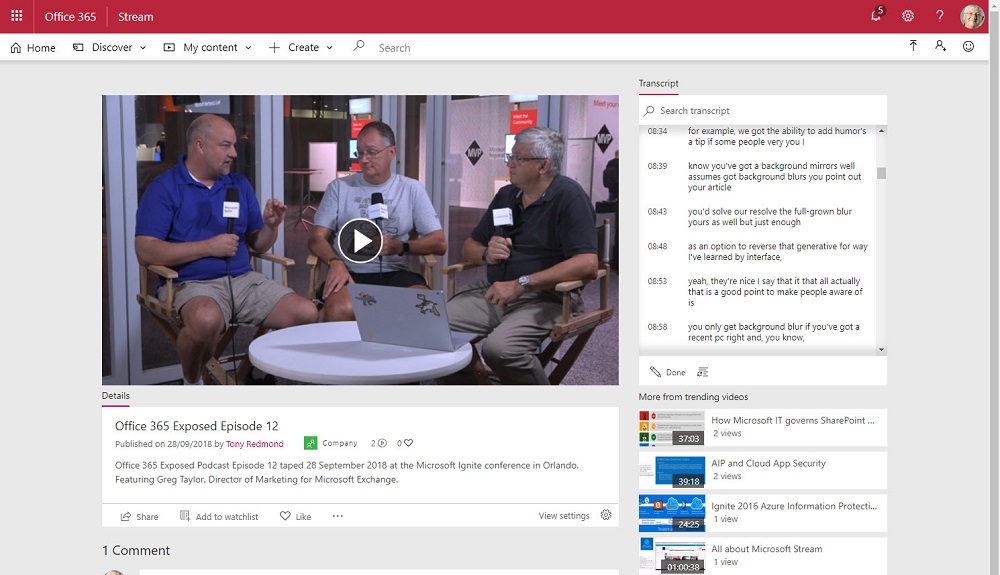
Paul Robichaux and Tony Redmond took the chance to tape an episode of Office 365 Exposed at the Ignite 2018 conference. After uploading the video to Stream, it was interesting to see what Stream’s intelligent voice recognition technology made of the soundtrack when it came to creating an automatic transcript.
The “Yammer Vision” session at last week’s Ignite conference was interesting. At least, I thought it was because it showed signs of a new willingness and direction to make Yammer a better citizen of the Office 365 ecosystem. Time will tell whether the grand plans succeed.
Details of how Microsoft IT manages its deployment of Office 365 Groups were discussed at the recent Ignite 2018 conference. It’s a good idea to write down the basic framework of your Office 365 Groups deployment, if only to understand how all the different policies and features fit together.
The new Microsoft 365 roadmap features the ability to download items (filtered or the entire roadmap) to a CSV file. You can then open the file with Excel or pour its contents into Power BI to analyze the roadmap to your heart’s content. That seems like a good thing.
Ignite 2018 is over and the countdown to the 2019 event has begun. Ignite 2019 is back in Orlando again, but in November, so we have about 13 months to go. In that time you’ll want to catch up on what happened at Ignite 2018, which is exactly what the Office 365 for IT Pros team has started to do. Our next update is due on October 19 and we have lots to do.
Exchange 2019 has a recommended minimum of 128 GB of memory. Just what does that recommendation mean?
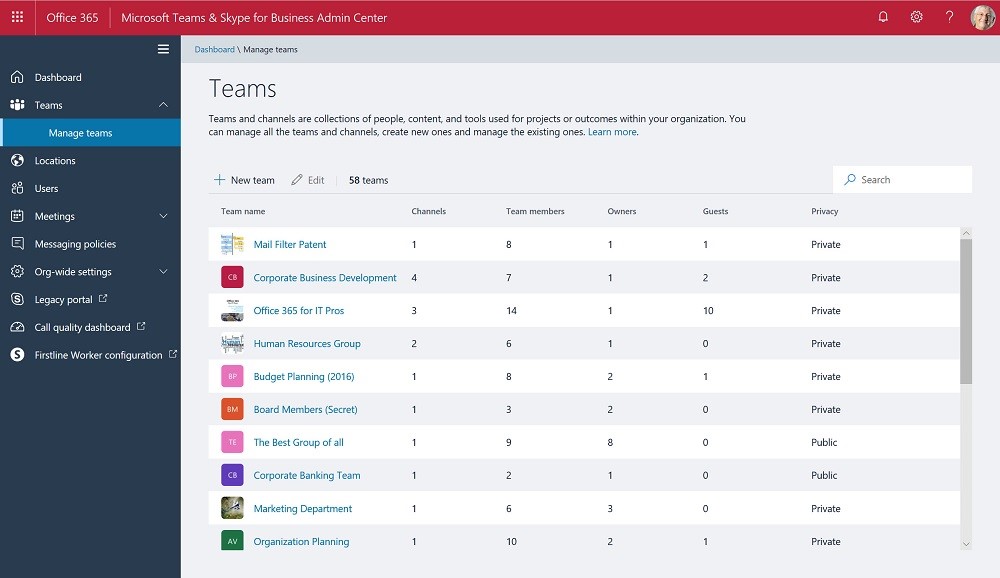
If you read yesterday’s article about the new team management functionality in the Teams and Skype for Business Online Admin Center, you might be interested to hear what Microsoft has to say on the topic. Head over to Ignite, in person or virtually, and you’ll find out.
In the same way Microsoft is introducing a new modern search experience in modern SharePoint Online (SPO) sites, the same strategy is being applied to search in Office 365. In this article we take a look at the modern search features you can find in Office 365. This article was published on Petri.com on September 27, 2018. …
Read More “New Search Experiences Coming to Office 365”
If you attended Tony’s session at the Ignite conference about how to use PowerShell to get real stuff done inside Office 365, you might like a list of where to get the code examples, So here it is.
As expected, Microsoft has announced the unified Microsoft 365 Roadmap that includes all the technologies that are part of Microsoft 365: Office 365, Enterprise Mobility + Security and Windows 10. The new roadmap comes also with a new web site and a new URL (Note: the Old Office 365 Roadmap Url is still live, but …
Read More “The unified Microsoft 365 Roadmap is here”
Would background blurring make a real difference to your video meetings? If it does, then try it out in Teams meetings, but only if you have a recent PC that supports AVX2.
The news has emerged that Microsoft won’t provision new Office 365 tenants with Skype for Business Online unless they have more than 500 users. Any smaller and the tenant gets no choice but Teams.
Exchange Online sends its mailbox audit records to the Office 365 audit log. You can search the log to discover who deleted messages from mailboxes, normally only an issue when delegates are involved.
Microsoft has documented how organizations using the free version of Teams can upgrade to the full enterprise version (and Office 365). It all seems pretty easy, which is good. Paying those Office 365 licenses mightn’t be as nice.
Microsoft has released four new administrative roles to help Office 365 tenants manage Teams. It’s a good thing and we were able to include the news in the September 20 update for Office 365 for IT Pros.
Subscribers to the Office 365 for IT Pros eBook can now download the September 20 update from Gumroad.com or Amazon, depending on in which format they bought the book.
A little known fact is that you can use graphic symbols and characters in Office 365 labels. It might bring a splash of color to your compliance and retention efforts, especially in a world where emojis are everywhere. After all, the symbols are just character codes that computers can process and Office 365 is designed to be multilingual and cope with different character sets (like the way Teams deals with Hebrew and Arabic).
Help Quadrotech understand the life of an Office 365 Admin and receive a $100 Amazon gift card.
The Microsoft Ignite 2018 conference takes place in Orlando next week. The Office 365 for IT Pros team will be there to keep an eye on the announcements Microsoft and other vendors make about new technology. We’ll have a blast, and then come back to update the book.
Search-Mailbox is a very useful cmdlet but running the cmdlet can be very dangerous as you might end up permanently removing some data that you’d prefer to keep. And in the cloud, there’s no backups…
Security groups are often used to protect access to resources, but they can’t be used to control membership for Microsoft 365 Groups or Teams. If you want to use AAD security groups to control membership for Groups and Teams, you need to come up with a way to synchronize. PowerShell is available to do the job, and as it turns out, it’s not too difficult.
Some will tell you that you can figure out what resources an Office 365 Group is connected to by checking the ProvisioningOption property with the Get-UnifiedGroup cmdlet. Well, you can’t. If you want to do something like check for team-enabled groups, you’ll need a different approach.
A new Exchange feature rolling out inside Office 365 allows meeting organizers to block people forwarding their meetings to all and sundry. The latest versions of OWA and Outlook 2016 click to run support the UI for the feature and blocks are built into Exchange Online and Exchange on-premises servers to stop blocked meetings sneaking through.
Content Searches Find Teams Compliance Items When someone leaves your company, you might need to preserve their Office 365 data. The steps needed to preserve user information stored in Email, OneDrive, and SharePoint are straightforward, but what about the messages the employee sent using Teams? As it turns out, an Office 365 content search or …
Read More “Preserving the Teams Data of Ex-Employees”
A demo to show how easy it is to use PowerShell to manage Office 365 Groups and Teams was progressing nicely at the UK Evolve conference when a problem happened with code that used to run perfectly. Sounds like a normal programming situation, but in this case, Microsoft had changed the format of Office 365 audit records for Azure Active Directory operations. That’s not so good. What’s worse is that some essential data is now missing from the audit records.
A Petri.com article explains how to publish news items generated in SharePoint Online sites to Teams channels. It’s the way to spread those important announcements as widely as possible.