At the Enterprise Connect conference, Microsoft announced that Teams is now used by 500,000 organizations. That’s a jump of 80,000 since the last data given in January. They also said that 150 organizations have more than 10,000 users and that Teams is used by 91 of the Fortune 100. All in all, some impressive numbers.
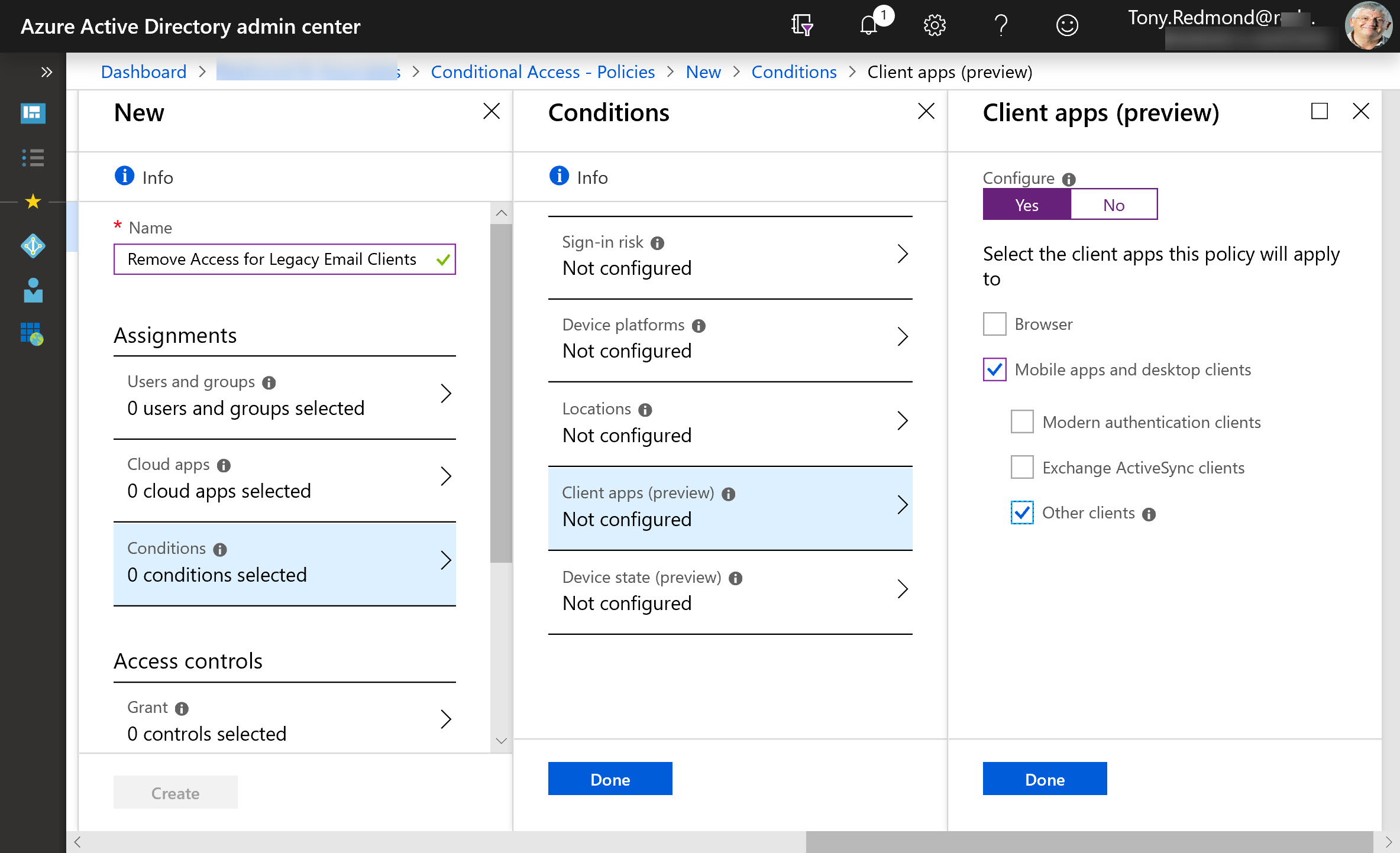
Exchange Online protocol authentication policies control what protocols a user can connect to mailboxes with, but it would be much better if we didn’t have to worry about some old and insecure protocols. Azure Active Directory gives Office 365 tenants the chance to clamp down on IMAP4 and POP3 connections and close off some of the holes that attackers try to exploit. Microsoft says that this can lead to a 67% reduction in account compromises, so that’s a good thing.
The March 2019 updates for the Office 365 for IT Pros eBook are now available for EPUB/PDF and Kindle versions. EPUB/PDF subscribers can download the updated files from Gumroad. Getting the updates for Kindle is slightly more difficult, but it’s possible and explained in our FAQ. Twelve of twenty-four chapters are updated in this release, so please take advantage of our work and download the updates now.
Microsoft To-Do now boasts the ability to process messages flagged by Outlook as tasks. It’s a great way to handle complex tasks that arrive in email, so Office 365 users might like to give To-Do a second look. The steps feature makes it very easy to build checklists of stuff that needs to be done to accomplish tasks.
A new feature makes it easier for Office 365 users to share documents in SharePoint Online and OneDrive for Business libraries with LinkedIn first-degree contacts. The LinkedIn folks are now included in the suggested people list. It’s much easier to pick someone from a list than to look for their email address (which might be out of date). Before you can share with LinkedIn, your Office 365 tenant and user account must be configured to support the connection.
Microsoft has announced that Planner now boasts the ability to copy a plan. Apparently, the idea is to save time by setting up plan templates that you can reuse. Office 365’s task management app might not get as much love as other apps, but this is a useful set forward. Only users who are allowed to create new Office 365 groups can copy plans.
The Office 365 Groups Naming Policy is now generally available. The policy has taken nearly two years of preview to not get very far, but at least it’s now an official part of the service. Microsoft considers the naming policy to be an Azure Active Directory Premium feature. Many customers might think differently, especially because the naming policy must be implemented through PowerShell and can easily be mimicked through PowerShell. And of course, Exchange Online’s distribution list naming policy is free.
Helping Exchange Protect Users from Bad Email Given the amount of spam floating around today, it comes as no surprise that many organizations deploy an Exchange transport rule to mark inbound external email with a suitable warning. This is a straightforward rule to configure and it can help stop users being fooled by bad messages …
Read More “Marking External Email with an Exchange Transport Rule”
Microsoft announced that the era of favorites and following is over for Teams. The new way is to show or hide teams and configure notifications for channels. Apparently, people found the old terminology confusing. Hopefully the new world of Show/Hide and Channel notifications will be more reassuring.
In a sign of how automation based on signals gathered by Office 365 will emerge to help administrators do a better job, the preview of the new Admin Center offered to create a DLP policy to protect some sensitive information that I had clearly overlooked. Well-intended as the portal was, its efforts to create the new policy failed. That’s not really important – it’s the glimpse into the future which is.
New data about the number of Slack and Workplace usage gives the chance to compare how Microsoft is doing with Teams. And the answer is that things seem to be going well, largely because Teams is growing off the huge Office 365 base. With 155 million users (the last figure) and 3 million more added monthly, Teams has a lot more to go after in the Office 365 installed base.
If you work with Office 365 through PowerShell, you probably have your own script to connect to the various services. If you don’t want to write your own script, you can download one from GitHub or the TechNet Gallery. This article covers two that you might like to try, including one with a GUI to choose which Office 365 services it should connect to.
PowerShell is hugely useful when the time comes to automate Office 365 processes. Other tools exist that can help, including Flow. Maybe it’s the right time to consider Flow, especially when it is highly capable of knitting together different Office 365 components to get work done.
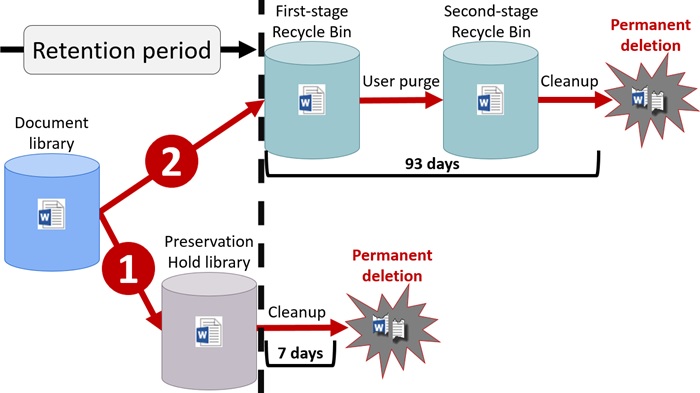
If you’re interested in deploying backups for SharePoint Online, you might be doing so to prevent data loss through accidental user deletion. However, Office 365 retention labels and policies can help prevent accidental deletion too. And the best thing is that retention policies and labels are part of Office 365 E3, so you don’t have to pay more to get protection.
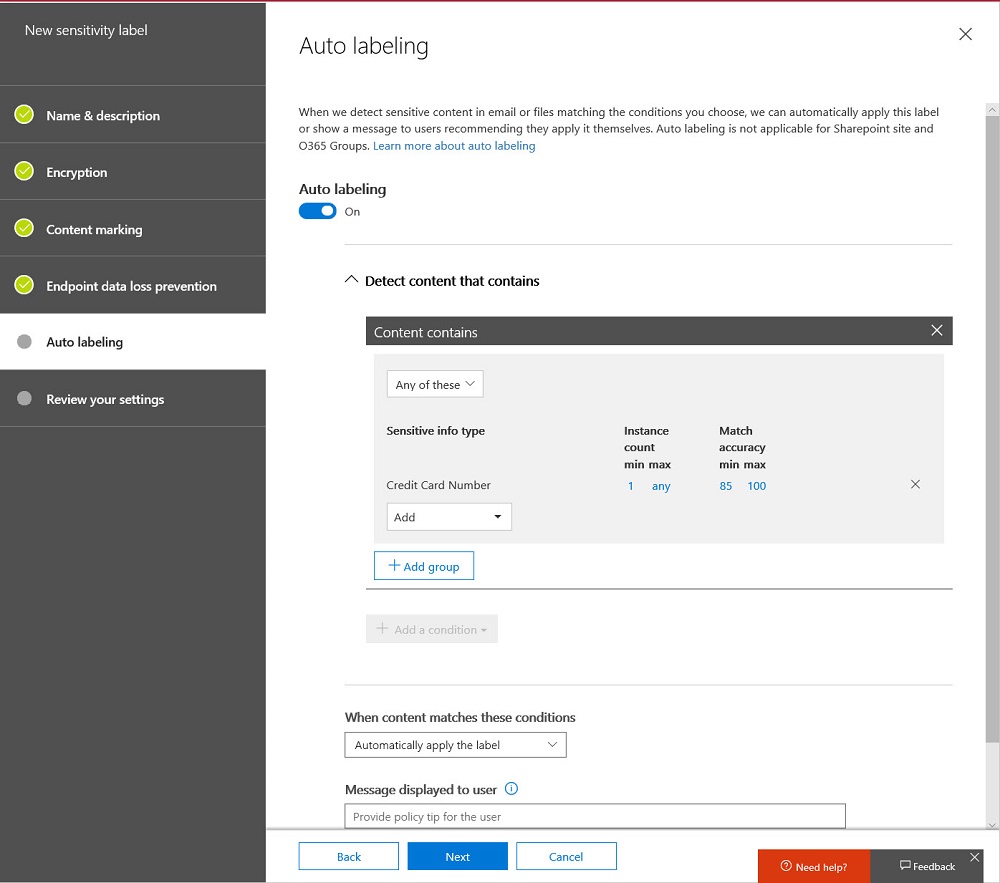
Microsoft released an update for the unified labeling version of the Azure Information Protection client needed for Office 365 sensitivity labels, which now boast auto-label support. Solid progress is being made to move sensitivity labels to the point where they are considered to be generally available, probably later this year. In the meantime, pay attention to the premium features like auto-label which require more expensive licenses.
Microsoft announced that the Office 365 E3 and E5 plans will receive new Information Protection licenses. They’re preparing for the introduction of sensitivity labels and the increased use of encryption to protect access to content in Office 365 apps like SharePoint Online, Exchange Online, OneDrive for Business, and Teams. You don’t have to do anything to prepare for the new licenses, but it’s nice to know what they are and how the licenses are used.
SharePoint Online supports the ability to create and publish a news digest from news items published on a site (or sites associated with a hub site). It’s a great way to spread information within an Office 365 tenant.
Microsoft will deliver a set of five seminars about Outlook Mobile starting on March 14. It’s always good to gain some knowledge about an important technology. Outlook Mobile is important to Office 365 because it is the most functional email client available. If you don’t believe me, attend some of the seminars and make your own mind up.
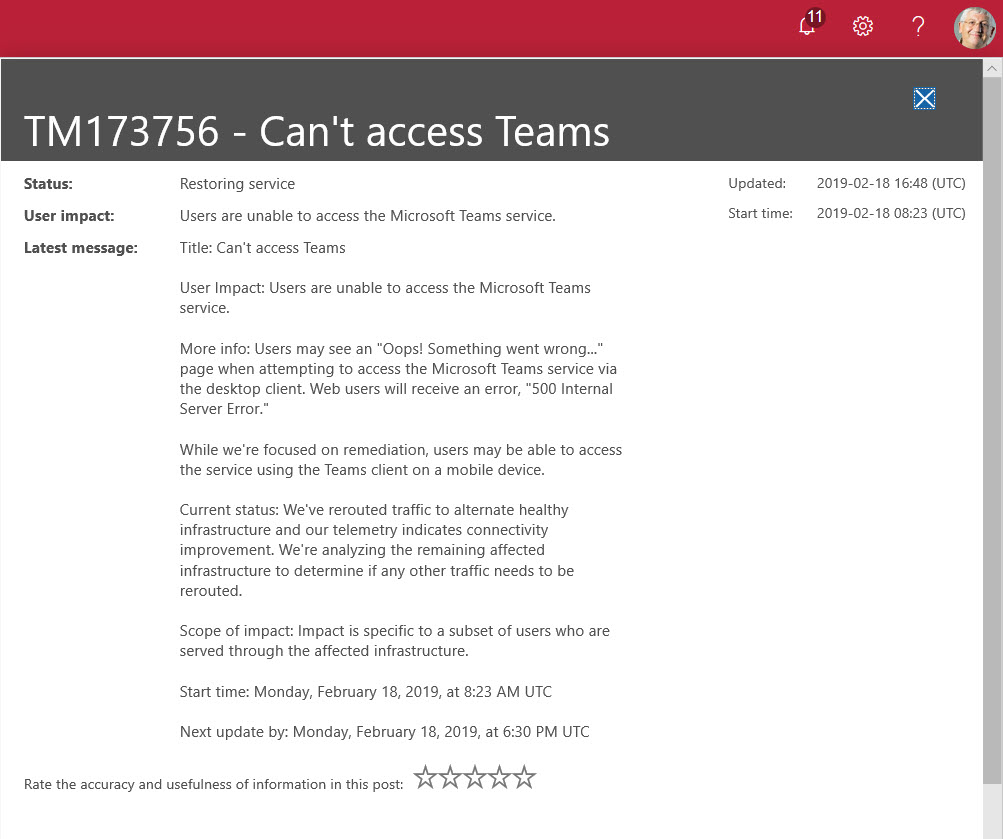
Microsoft Teams suffered its first major worldwide outage on 18 February 2019. Users reported a failure to connect because Teams couldn’t authenticate them. The Post-Incident report for TM173756 revealed an issue with the Azure Key Vault. What’s more interesting is that the issue affected users in multiple Office 365 datacenter regions, which is not good.
Phishing attacks through email happen all the time. A new relatively crude one arrived today. It’s easy for the trained eye to detect phishing, but do your Office 365 admins know how to use the tools available in Exchange Online Protection to suppress malware, and do your users know the signs of bad email? In this case, it’s an invitation to click to get to a PDF document to bring you to digitaloceanspaces.com. Some interesting things might happen afterwards, but I really don’t want to find out what occurs when I click the link.
In one of those interesting (but possibly worthless) facts discovered about Office 365, we find that audit records are captured for Teams compliance records written into Exchange Online group mailboxes. The Search-UnifiedAuditLog cmdlet reveals details that we can interpret using some techniques explained in Chapter 21 of the Office 365 for IT Pros eBook.
Update #11 for the Office 365 for IT Pros eBook is now available. Subscribers can download updated files from Gumroad or Amazon Kindle (depending on which version you bought) and benefit from the 16 updated chapters. ePublishing is the only way to keep up with the volume of changes in Office 365, and Office 365 for IT Pros is the only book that keeps up. But you know that anyway because you’re reading this site!
A recent Petri.com article set out the case that the technical lead for Office 365 deployments is best found in the ranks of people experienced with Exchange.The uphot was a flurry of tweets where people who worked with SharePoint and Skype explained their (strong) feelings on the matter. The upshot was an online debate to explore the attributes of people who lead successful Office 365 deployments. You can listen to a recording online.
Office 365 changes all the time, which is good because it keeps the Office 365 for IT Pros writing team busy and happy. Discussions this week included Microsoft’s response to a Dutch DPIA, the effect large Teams have on Yammer, how Exchange Online validated a fix to a security problem, and graphics to help understand the components of the Microsoft 365 E3 and E5 plans.
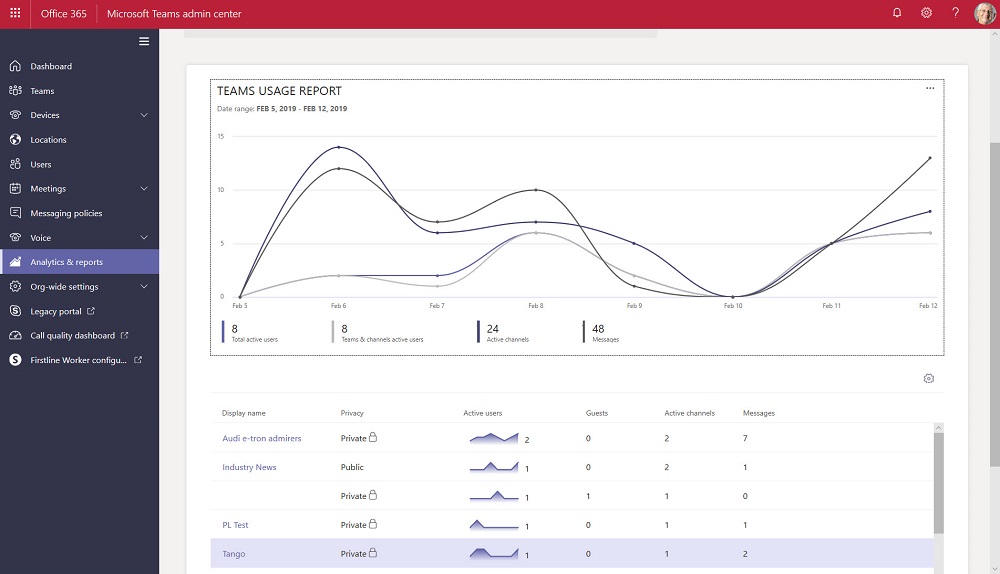
The Teams Admin Center has been renamed to remove any reference to Skype for Business Online. The console now includes a set of new Teams usage reports. The reports differ from what’s available in the Office 365 Admin Center and aren’t quite as powerful, but we can expect Microsoft to improve and refine these reports over time.
The January 24-25 Azure Active Directory outage demonstrated once again how important AAD is to Office 365. Microsoft’s Post Incident Report tells us what happened to deprive 1% of the users in Europe of service. That doesn’t sound a lot, but you’d be mad if you were affected.
The Search-Mailbox cmdlet is a very powerful weapon for Exchange administrators. It has some quirks, but the Invoke-Command cmdlet helps us get around one, which is how to use a different search query for each mailbox processed in a set of mailboxes.
Teams users can now set their own status message to inform co-workers about what they’re up to for the next few hours, days, or on an ongoing basis. It’s a small but useful feature that seems to have crept into Teams without much publicity!
After a brief hiatus, the recording for episode 13 of the Office 365 Exposed podcast is now available. We think it includes some interesting topics and the arguments aren’t too heated. See what you think and let us know in the comments.
Microsoft revealed that Teams now supports a membership limit of 25,000 members per team (March 2021). The new maximum will help large organizations like Accenture (the largest user of Teams). Even with the increased limit, Teams might not be the best choice for organization-wide communications for the largest companies. Yammer is still the Microsoft collaboration scalability champ.
Some backup vendors think that corruption can lead to data loss within Office 365. The possibility exists, but the page patching mechanism for databases incorporated into Exchange Online DAGs makes corruption a lot less likely, especially when mailboxes are protected by four database copies and Exchange applies many other techniques to ensure the consistency of the databases.
The new version of OWA (sometimes called Outlook on the Web, or Outlook Web Access) is now generally available to all Office 365 tenants. Although the new OWA has some nice features, you might want to turn off the user choice (toggle) to move the new UI until you’ve had time to prepare the help desk, documentation, and that sort of thing.
Security alerts from Office 365 Cloud App Security now flow into the Office 365 Audit Log, which means that you can run the Search-UnifiedAuditLog to find the alerts. Unhappily, more work than should be needed is necessary to extract the interesting information from the alert records.
Microsoft has released details of an Exchange Online transport rule to encrypt outbound email containing sensitive data types like credit card numbers. The rule works (after fixing the PowerShell), but needs to be reviewed and possibly adjusted to meet the needs of Office 365 tenants.
A new report commissioned by Microsoft explains how Exchange Online and the Security and Compliance Center meet the electronic records requirements of regulatory bodies like the SEC and FINRA. Within the report, there’s some news about changes to the way that Office 365 handles Teams compliance records stored in Exchange Online. And after all that, we consider how some backup vendors treat Teams compliance records as equivalent to the data stored in the Teams Azure services.
According to Microsoft’s FY19 Q2 results released on January 30, Teams is now used by 420,000 organizations. That’s a strong growth rate over the 329,000 number given at Ignite 2018. And with Office 365 still growing, there’s plenty of room for Teams to expand.
The internet makes it easy to find material to read about technical topics. Unfortunately, a lot of content is rubbish. In this post, we compare two recent technical articles and explain why we think one marketing post is good and the other isn’t up to scratch.
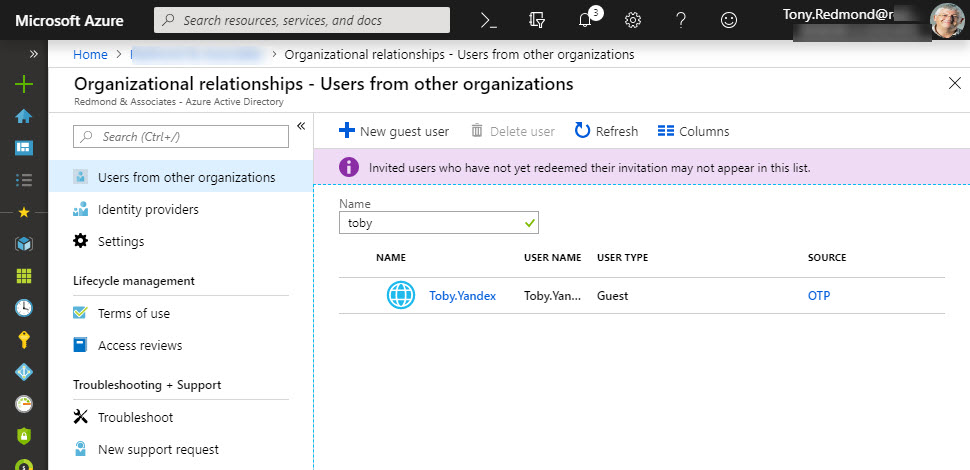
Microsoft has launched email one-time passcodes (OTP) into preview for Azure Active Directory guest accounts. It’s all to do with better collaboration. OTP doesn’t support Teams, Planner, or Office 365 Groups yet, but it can be used to share documents from SharePoint Online or OneDrive for Business.
A recent article prompted a check to see whether a PowerShell recommendation made sense and delivered better performance when executing a command to extract the membership of Office 365 Groups performance. As it turns out, the recommendation is valid, but whether you notice any difference is arguable.
Delve has options to export user information that seem to have been added to help Office 365 tenants comply with Article 15 of GDPR. Unhappily, the export is rudimentary and the JSON information will be impenetrable to normal human beings.