Microsoft revealed that Teams now supports a membership limit of 25,000 members per team (March 2021). The new maximum will help large organizations like Accenture (the largest user of Teams). Even with the increased limit, Teams might not be the best choice for organization-wide communications for the largest companies. Yammer is still the Microsoft collaboration scalability champ.
A new report commissioned by Microsoft explains how Exchange Online and the Security and Compliance Center meet the electronic records requirements of regulatory bodies like the SEC and FINRA. Within the report, there’s some news about changes to the way that Office 365 handles Teams compliance records stored in Exchange Online. And after all that, we consider how some backup vendors treat Teams compliance records as equivalent to the data stored in the Teams Azure services.
According to Microsoft’s FY19 Q2 results released on January 30, Teams is now used by 420,000 organizations. That’s a strong growth rate over the 329,000 number given at Ignite 2018. And with Office 365 still growing, there’s plenty of room for Teams to expand.
The new version of OWA is maturing and new features are turning up on a weekly basis. You can now schedule a Teams meeting from OWA and the prospect of joyful animations hang in the air. But only for Office 365 users as there’s no sign that the new OWA will come to Exchange on-premises servers.
The Shifts app is now available to Office 365 tenants worldwide. Hosted as a Teams app, the idea is that managers can build out and publish schedules for hourly-paid frontline workers, who can then view their hours and request changes.
It’s easy to create a webhook connector to post information to a team channel or an Microsoft 365 group. What might not be quite so easy is formatting the JSON payload. Here’s how to use a template card to simplify the process.
Microsoft’s CMO says that the largest customer deployment of Teams (Accenture) has reached 170,000 users. Numbers like this underline the success of Office 365’s fastest growing application.
Encrypted email is becoming more common within Office 365. Things usually flow smoothly when sending protected messages to email recipients, but other Office 365 recipient types like Teams and Yammer might not be able to handle protected email.
You can now buy a Meeting Room license to connect Teams to a device in the room. The license allows the device to participate in Teams meetings.
A survey found that Teams is now the second most popular chat application in large businesses and has put Slack into third position. But anyone who has tracked the numbers isn’t surprised because Teams has been growing strongly for some time.
Now that we know all about the different email addresses used by Microsoft 365 Groups and Teams, the question arises of how to include a team channel as a member of a distribution group. As it turns out, there’s a simple way and a more complicated way.
Some recent questions in the Microsoft Technical Community show confusion about the email addresses used by Office 365 Groups and Teams. Here’s our attempt to clarify.
Teams has released version 0.9.6 of its PowerShell module. You should upgrade to the new module because it fixes some bugs and allows administrators to manage any team, even when they’re not a team owner.
Exchange Online distribution lists can be used to populate the membership of Office 365 Groups or Teams by applying a little PowerShell magic. Here’s how.
Teams offers a number of ways to create new teams, which is good. However, if you create a new team with PowerShell, make sure that you add the team owners to the members list as otherwise they won’t be able to access Planner.
The latest version of the Teams desktop and browser clients support the creation of dynamic teams based on dynamic Office 365 Groups. The functionality is welcome, as long as you can pay for it as every member who comes within the scope of a query used for a dynamic team needs an Azure AD P1 license.
Office 365 doesn’t include a way to export a list of Teams in a form that can be imported by Power BI, but PowerShell makes it an easy task to accomplish. Here’s a script to help solve the problem.
Team owners can set the picture for their teams, but can tenant administrators do the same thing? As it turns out, no. But there’s a reason why.
Microsoft has made the intelligent features of Stream available to all Office 365 commercial customers, meaning that you can now luxuriate in closed captions, automatic transcripts and deep search, and face recognition.
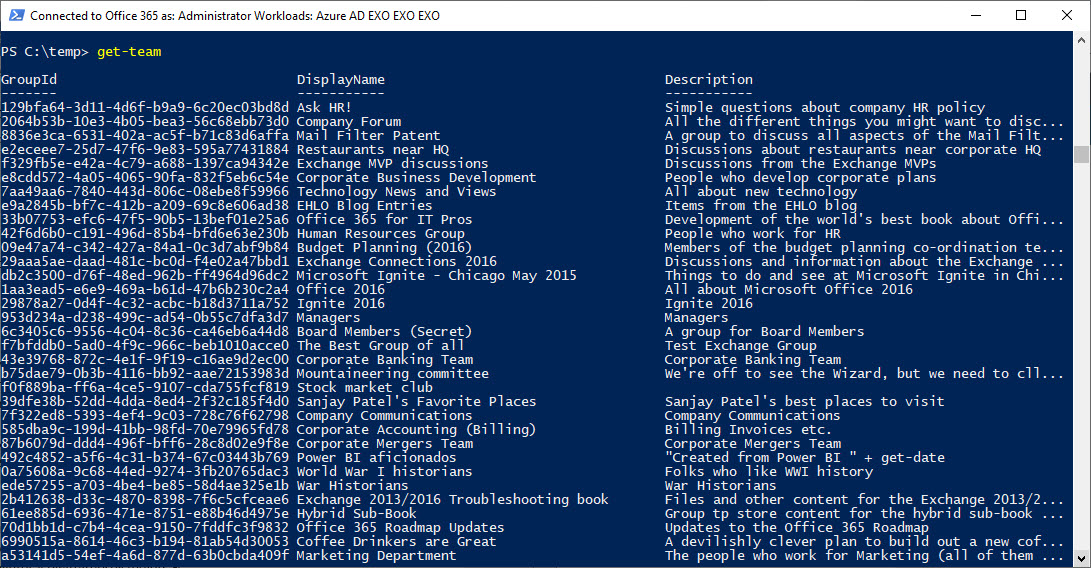
The new version of the Teams PowerShell module (0.9.5) supports a Get-Team that’s actually useful because it can return a full list of teams in the tenant. But there’s still some work to do…
By default, the Groups policy for an Office 365 tenant allows group owners to add guest users to group membership. You can block this access if necessary, but it’s probably not what you want to do as blocking brings guest access to a complete halt across the tenant.
Backup vendors say you should definitely use their products to protect your valuable Microsoft 365 data. Backup products can do a good job, but the nature of Microsoft 365 creates many challenges at a technical level. A lack of APIs is the most fundamental issue, but the connected nature of Microsoft 365 apps is another.
Microsoft will retire the Windows S client for Teams on November 29, 2018. The decision to double-down on the Electron-based client is probably due to the fact that not many people use Windows S.
Do you need to remove some offensive or otherwise doubtful material from Teams? If the original author won’t do the right thing, the team owner or an Office 365 administrator might have to step in to do the right thing.
When you impose a block on certain domains, you’d like to think that applications like Teams will respect that block. As it turns out, if you have some lingering guests in your Azure Active Directory, the B2B collaboration policy might not be as effective as you’d hope.
Tony spoke about “Can Teams Replace Email” at the Modern Workplace Conference in Paris on October 17. Here’s a sketch note about what he said and a copy of the slides.
Microsoft has released a nifty Network Testing Companion to help Office 365 admins validate that their network can support the deployment of Teams and Skype for Business Online.
The Teams T-Bot is no more and has been replaced by a snazzy new help “experience.” No doubt this is good news for those who consult help on a regular basis, but it won’t help Office 365 tenant admins much.
How many guest users does your Office 365 tenant have? And how many of those accounts are actually used? Given that many Office 365 applications now generate guest user accounts to facilitate external access to content, managing these accounts is a growing concern.
The prospect of having to pay for many Azure AD Premium P1 licenses just because you use an org-wide team is horrible to contemplate. But don’t worry. You don’t have to because the Teams developers look after membership updates for you.
Org-Wide Teams are a nice feature, but calculating their membership can be puzzling, as in the case of some perfectly valid accounts that were not added to a team. As it turns out, the error lies in Azure Active Directory.
Microsoft is releasing new training resources and materials as part of its continuous commitment to help in the adoption and usage of Microsoft Teams. In the “Instructor-led training for Microsoft Teams” web site, anyone using or interested in using Microsoft Teams will find a series of free, live, online training classes designed to get you …
Read More “New Training and Adoption Resources for Microsoft Teams”
Teams supports the ability to create org-wide teams, but only if your tenant has fewer than 10,000 accounts. It’s a neat idea, if you can use it, but if your organization spans more than 10,000 accounts, there are other ways to foster company-wide communications.
Microsoft designed the Teams & Skype Admin Center to make it easy to manage settings for both platforms. In the case of the organization wide settings, the latest updates in the Teams & Skype Admin Center provide the following features: Manage External access, Guest access, Teams settings and Teams upgrade options for the organization. This …
Read More “Org-Wide settings in the Teams & Skype Admin Center”
Slack is the most obvious competitor for Microsoft Teams. The question is how many users does each platform have? Here is our best guess.
A quirky side of the New-Team cmdlet is that it creates some interesting values for the properties of the underlying Office 365 group that you might like to control better. As it turns out, the Alias parameter is what you need to set.
A simple question asked where Teams stores its Wiki content. A search found that the Wiki is stored in a SharePoint document library, while some further investigation discovered some interesting facts about the Teams wiki.
Details of how Microsoft IT manages its deployment of Office 365 Groups were discussed at the recent Ignite 2018 conference. It’s a good idea to write down the basic framework of your Office 365 Groups deployment, if only to understand how all the different policies and features fit together.
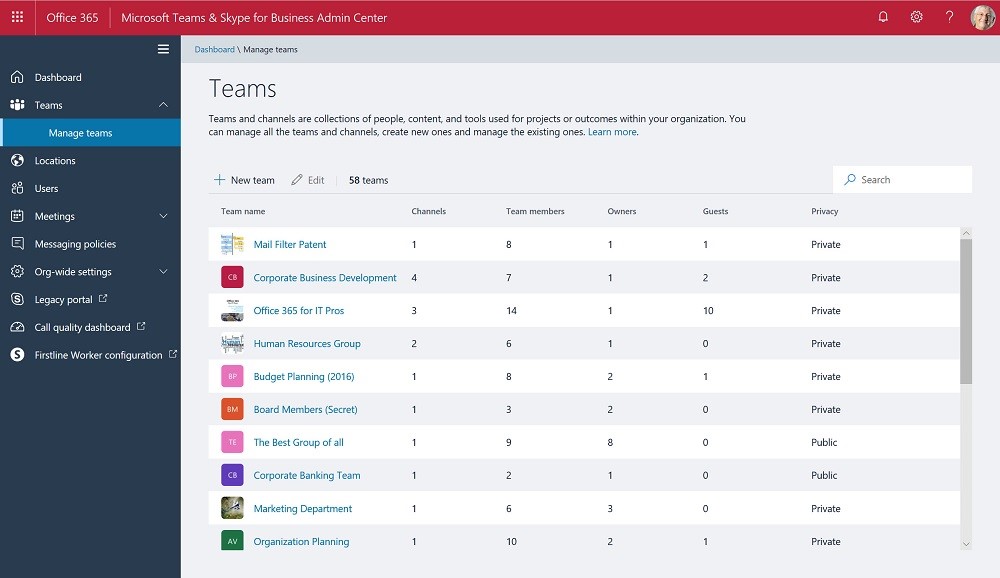
If you read yesterday’s article about the new team management functionality in the Teams and Skype for Business Online Admin Center, you might be interested to hear what Microsoft has to say on the topic. Head over to Ignite, in person or virtually, and you’ll find out.
Would background blurring make a real difference to your video meetings? If it does, then try it out in Teams meetings, but only if you have a recent PC that supports AVX2.